

Baseus Gimbal Stabilizer – Kenya
KSh14,999.00
Baseus Gimbal Stabilizer in Kenya
Baseus Gimbal Stabilizer Price in Kenya is Ksh 14,999.
(1) Install phone
1.Please install a phone and adjust the balance when the gimbal powers off.
2.Push and hold open the phone clamp, slide the phone in as close as possible against the tilt axis motor, and clamp on.( see the above Figure)
3.Rotate the tilt axis to the right
4.Adjust the phone balance by sliding the horizontal arm of the roll axis; (If the phone is tilted to the right, shorten the arm; if the phone is tilted to the left, lengthen the arm. If it is still tilted to the left, attach the counterweight to adjust the balance)
(2) Power on/off
1.Power on: Long press the power button for 3 seconds to power on the gimbal after balancing the phone;
Notes: If the gimbal automatically detects that the phone is not well-balanced after powering on, it will enter the automatic calibration state. Click Calibrate and wait for 15 seconds. The gimbal will automatically calibrate and enter sleep mode during this period. Restart it after 15 seconds.
(3) Connect APP
Power on the gimbal turn on the phone Wireless open the Baseus Control APP search the gimbal Wireless and connect the gimbal.
Baseus 3-Axis Handheld Gimbal Stabilizer
Capture the Most Beautiful Moments
The Baseus Gimbal Stabilizer Price in Nairobi,Kenya is Ksh 15,000.
Features:
1.Three-axis stabilization / 2.Automatic motion tracking / 3.Manual zoom / 4.panoramic shooting / 5.Auto-calibration / 6.Multi-angle shooting
Take Out the Shake and Record Anywhere
Be the director of your life/Segment subrecording/Online streaming/Outdoor activities/Extreme sports/Dance filming /Wedding fiming
Three-Axis Stabilization Anti-Shake for a More Beautiful Shot
Enhanced stability gimbal for a smooth recording and live streaming experience.
Automatic Motion Tracking Be a Star Wherever You Go
Uses intelligent image recognition technology to follow target faces or objects./Face tracking /Object tracking
Auto-Calibration Can Record Portrait and Landscape
Automatically detects based on balance benchmarks and supports multi-angle shooting.
Portrait Landscape Side Shot Hanging
320°Panoramic Now You Can Finally Fit Everyone in the Picture
Supports 180°/320°panoramic tracking take in all the views.
Dolly Zoom Make Home Movies Like the Hollywood Pros
Slide the button to zoom in on close-ups for an amazing telescopic feel. Create the Vertigo Effect zoom effects with the app.
One-Click Transition Effects
PhoneGo mode makes quick transitions to capture every little movement.
Timelapse Photography Discover the Dynamic World
Use the smart app to toggle time-lapse settings including exposure/recording time, light, and shadow with your phone.
Static timelapse Sports timelapse Tracking timelapse
12 Hour Battery Life Record Worry Free
2200mAh battery capacity.
Smart Controls Through Mobile App
Enjoy shooting moments by using multiple intelligent functions expanded through the APP.
Baseus Control APP supports iOS 10.0 or above and Android 6.0 or above.
Concise Controls Designed from Entry Level to Prosumer
Includes free micro USB charging cable
Package List
1.Cable*1 /2.Stabilizer*1/3.Counter weight*1
Related products
-
 Read more
DJI RS 4 Pro Gimbal Stabilizer in Kenya
DJI RS 4 Pro Gimbal Stabilizer Price in Kenya is Ksh 112,000. Enhanced operation efficiency, native vertical shooting, and an expanded accessory ecosystem make the DJI RS 4 Pro**a powerful tool for the mirrorless camera shooter. The gimbal only weighs around 2.74 lb and sports a load capacity of 10 lb capable of supporting your compact camera build. Teflon-coated axes reduce friction for a smoother balancing and operating experience. Other intuitive features include a fine-tuning knob, auto-locking OLED screen, and RSA communication port for use with expanded accessories. Buy DJI RS 4 Pro Gimbal Stabilizer at the best price in Kenya from Adishnetservices.
Second-Generation Quick Release Plate Design
With the familiar dual-layered quick release plates of its predecessor, the RS 4 makes mounting and balancing your camera a breeze. The horizontal plate is newly designed for faster transitions to native vertical shooting. A fine-tuning knob adjusts the tilt axis to move your camera forward or backward. The upper plate has added placement guides for secure camera mounting.
DJI RS 4 Pro Gimbal Stabilizer specs and Price in Kenya
Grip Design
Single Handgrip (Slanted)Load Capacity
9.9**lb / 4.5**kgNumber of Axes
3: Pitch (Tilt), Roll, Yaw (Pan)Price in Kenya
Ksh 122000Wireless Protocol
Bluetooth 5.0Mobile App Compatible
Yes: Android & iOS
App Name: Ronin AppMounting
1 x 1/4**-20 Female
2 x NATO RailWeight
2.73**lb / 1.24**kg
Compatibility
For a full list of compatible cameras, please see the most current compatibility information on the DJI website.
Second-Generation Automated Axis Locks
When the gimbal is powered off, you can press and hold the power button, and the three axes unlock while the gimbal expands automatically, allowing you to start working in just two seconds. Press the power button once, and the axes automatically lock and enter sleep mode, making a move or storage significantly more efficient. The second iteration of this design has created smaller gaps when locked to further reduce gimbal shake.
RSA Communication Port
The RSA communication port allows you to integrate Ronin series accessories into your gimbal configuration. Add Ronin-specific or third-party accessories with control capabilities to switch between different shooting configurations. The DJI RS SDK protocol will allow third-party manufacturers and other developers to create future customized functions for the RS 4.
Wireless Shutter Control
By implementing Dual-Mode Bluetooth, the RS 4 Pro supports wireless shutter control, saving time and effort with every use. After the initial Bluetooth pairing, you can control video and photo shooting by simply pressing the record button on the stabilizer. Previously paired cameras can automatically reconnect after the first use, eliminating the need for a camera control cable.
Updated ActiveTrack Pro
Tracking on the Ronin series has never been more accurate or responsive. The next-generation ActiveTrack Pro can directly read images from the camera built into the Focus Pro LiDAR Autofocus, with no need for the Ronin Image Transmitter. When using ActiveTrack Pro, you can directly monitor or frame the subject on the RS 4 Pro**s OLED touchscreen. The new optional LiDAR unit can project 76,800 ranging points within a 20-meter area.
Integrated Controls
By simply sliding the new gimbal mode switch, you can alternate between Pan follow, Pan and Tilt follow, and FPV modes. The FPV mode selection is also customizable to 3D Roll 360, Portrait, or Custom, allowing you to adjust your equipment and get started as fast as possible. Other intelligent features include motion-lapse, track, and panorama.
The trigger button can be customized to FPV mode, which causes the three axes to follow the direction of the grip**s movement when held down.
Car Mount Mode
The new car mount mode optimizes stabilization specifically to accommodate vehicle vibrations and wind resistance for steady capture.
Fourth-Gen RS Stabilization Algorithm
Empowered by a next-generation stabilization algorithm, the RS 4 Pro provides enhanced stability over the RS 3, effortlessly managing vertical shooting, fast-paced movements, and low-angle shots. The motor torque on all three axes has been increased by 20% for greater power.
Auto-Locking OLED Screen
The RS 4 Pro is equipped with a fixed OLED touchscreen with a new auto-lock feature. Once locked, the screen will display the current gimbal and joystick moves at a low brightness to prevent accidental switching and conserve battery.
Integrated Monitoring and Control
Remotely adjust camera exposure directly in the Ronin app, or control the gimbal with the virtual joystick to get an integrated monitoring and control experience. With the Ronin Image Transmitter, a smartphone can be used as a motion controller to remotely control the RS 4 Pro gimbal for more flexible and dynamic camera movements.
Enhanced Battery and Fast Charging
The RS 4 Pro battery grip features a cartridge design, making it easier to swap batteries and smaller for storage. It can even be charged separately from the gimbal. The new battery grip provides an extended runtime of up to 13 hours, enough for continuous shooting all day. It supports 18W PD fast charging with a charge time of just 1.5 hours. It can even be used while charging to keep RS 4 Pro powered almost indefinitely. -
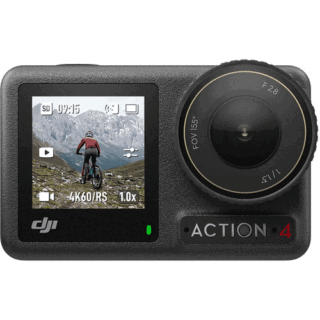
DJI Osmo Action 4 Camera Standard Combo – Kenya
KSh44,000.00Add to cartDJI Osmo Action 4 Camera Standard Combo in Kenya
DJI Osmo Action 4 Camera Standard Combo Price in Kenya is Ksh 44,000.Capture steady, high-definition footage in virtually any scenario with the Osmo Action 4 Camera Standard Combo**from**DJI. The Osmo Action 4 features many of the same features as its predecessor, like dual screens, RockSteady and HorizonSteady stabilization systems, and a waterproof camera body. A slightly bigger sensor with a higher MP count, a new 10-bit D-Log M color mode, and an upgraded microSD slot capable of supporting larger card sizes make up the Action 4**s improved design..Buy DJI Osmo Action 4 Camera Standard Combo at best price in Kenya at Adishnetservices.
High-Definition Video with Wide Dynamic Range
The camera features a 1/1.3** sensor to record up to UHD 4K120 video and capture experiences in dynamic, smooth detail. A super-wide 155** FOV ensures all the action is in frame. 10-bit D-Log M color mode provides you with over one billion colors and a wider dynamic range for vivid footage.
Color Temperature Calibration
The Action 4**s color temperature sensor intelligently adjusts white balance and auto-exposure for highly accurate colors, even in complex lighting environments like when scuba or free diving deep below the surface. Sync with the DJI Mimo app for improved detail rendering underwater.
RockSteady 3.0
An intelligent stabilization algorithm eliminates camera shake in all directions to ensure your high-adrenaline mountain biking or skiing shots maintain smooth movements. It supports use while recording at up to 4K120, providing a stable and immersive first-person perspective.
HorizonSteady and HorizonBalancing
This smart stabilization feature helps to eliminate camera shake in all directions, and even horizontally corrects tilt at any angle in 2.7K60 video. That means footage can remain horizontally level, even through heavy bumps and 360** rotations. In addition, you can activate HorizonBalancing, which corrects the tilt horizontally within **45** and supports recording stable 4K60 videos.
Efficient Shooting Configurations
The magnetic quick release design of the Action 4 allows you to easily switch things up when needed. Detach and switch between different mounts and accessories. The horizontal-vertical protective frame lets you natively shoot vertical video for social media platforms.
Custom Modes and Quick-Switch Button
Use features like SnapShot to ensure you never miss a moment. Save frequently used settings to the five built-in shortcuts to switch modes on the fly using the quick-switch button or voice prompts.
Voice Prompt and Voice Control
Intuitive control, even if you can**t see the screens. Short press the Quick Switch button, and the camera will voice broadcast the current shooting mode. Even if the camera is installed on a helmet or other hard-to-see location, you can accurately select the required mode and be confident you**ll never miss the moment you want to record. You can even add up to five sets of custom parameters to the shooting mode list. Remotely control your camera with just your voice. Ideal for scenarios where your hands are busy, the Action 4 recognizes voice commands with a high recognition rate, letting you stay locked into the moment.
Dual Touchscreens
The 1.4** front screen is convenient for vlogging and framing selfies and supports commonly used touch control functions. No more turning the camera around for parameter adjustments, mode switching, or video playback. When the camera is switched between horizontal and vertical orientations, the user interface adapts accordingly. The touchscreens are also sensitive enough to be operated easily with wet hands.
AI Selfie Stick Removal
Use the upgraded InvisiStick function with the DJI Mimo app to fully eliminate the selfie stick from your shots to maintain your camera**s POV without interference from your mounting equipment.
Wi-Fi Live Streaming
Live stream directly from your Action 4 using the built-in dual-band Wi-Fi or your phone**s hotspot. Choose your preferred platform and resolution to connect anywhere and record your footage.
Onboard Audio Interface
Three built-in omnidirectional microphones record accurate and clear sound. A hidden microphone at the bottom of the Action 4 suppresses wind noise for windy or fast-moving scenarios. Connect the separately available DJI Mic for a portable, easy-to-mount audio solution with a transmission distance of 820**. The camera can connect to other external microphones using an optional USB-C to 3.5mm cable.
Waterproof
The camera body can be fully submerged up to 59**, enhancing your underwater adventures without the need for additional accessories.
Long Battery Life with Fast Charge
Continuously record for 2.6 hours with the 1770mAh high-capacity battery capable of operating in temperatures as low as -4**F. Fast charging technology allows you to power up the battery 80% in just 18 minutes.
Timecode Sync
Built-in timecode in the Action 4 allows you to easily synchronize footage in multi-camera shooting scenarios.
LightCut Video Editor
The LightCut video editor app is thoroughly optimized for use with the Action 4. It can automatically select clips and intelligently match them with exclusive templates to generate ready-to-share video edits. It supports a direct connection with the Action 4 for quick, convenient footage previews. After shooting, simply let the AI select your highlight moments and generate 4K HD videos. Choose from a number of fun templates designed for fast-paced footage. Whether biking, snowboarding, or diving, epic little edits are right at your fingertips. -
 Read more
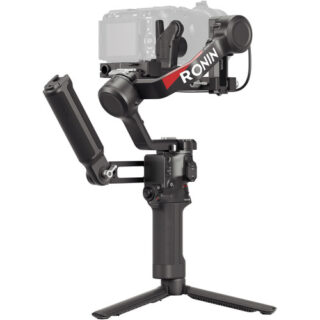
DJI RS 4 Gimbal Stabilizer Combo in Kenya
DJI RS 4 Gimbal Stabilizer Combo Price in Kenya is Ksh 84,500. Enhanced operation efficiency, native vertical shooting, and an expanded accessory ecosystem make the DJI RS 4 Gimbal Stabilizer Combo**a powerful tool for the mirrorless camera shooter. The gimbal only weighs around 2.4 lb and sports a load capacity of 6.6 lb capable of supporting your compact camera build. The combo includes a Focus Pro Motor with a rod mount kit, a focus gear strip, a briefcase handle, and a carrying case. Teflon-coated axes reduce friction for a smoother balancing and operating experience. Other intuitive features include a fine-tuning knob, auto-locking OLED screen, and RSA communication port for use with expanded accessories.Buy DJI RS 4 Gimbal Stabilizer Combo at the best price in Kenya from Adishnetservices.
DJI RS 4 Gimbal Stabilizer Combo Price in Kenya
Grip Design
Single Handgrip (Slanted)Price in Kenya
Ksh **84,500Number of Axes
3: Pitch (Tilt), Roll, Yaw (Pan)Wireless Frequency
2.4 GHzWireless Protocol
Bluetooth 5.0Mobile App Compatible
Yes: Android & iOS
App Name: Ronin AppMounting
1 x 1/4**-20 Female
2 x NATO RailWeight
2.36**lb / 1.07**kg
Second-Generation Quick Release Plate Design
With the familiar dual-layered quick release plates of its predecessor, the RS 4 makes mounting and balancing your camera a breeze. The horizontal plate is newly designed for faster transitions to native vertical shooting. A fine-tuning knob adjusts the tilt axis to move your camera forward or backward. The upper plate has added placement guides for secure camera mounting.
Compatibility
For a full list of compatible cameras, please see the most current compatibility information on the DJI website.
Second-Generation Automated Axis Locks
When the gimbal is powered off, you can press and hold the power button, and the three axes unlock while the gimbal expands automatically, allowing you to start working in just two seconds. Press the power button once, and the axes automatically lock and enter sleep mode, making a move or storage significantly more efficient. The second iteration of this design has created smaller gaps when locked to further reduce gimbal shake.
RSA Communication Port
The RSA communication port allows you to integrate Ronin series accessories into your gimbal configuration. Add Ronin-specific or third-party accessories with control capabilities to switch between different shooting configurations. The DJI RS SDK protocol will allow third-party manufacturers and other developers to create future customized functions for the RS 4.
Wireless Shutter Control
By implementing Dual-Mode Bluetooth, the RS 4 supports wireless shutter control, saving time and effort with every use. After the initial Bluetooth pairing, you can control video and photo shooting by simply pressing the record button on the stabilizer. Previously paired cameras can automatically reconnect after the first use, eliminating the need for a camera control cable.
New DJI Focus Pro Motor
Pair the RS 4 with the included Focus Pro Motor using the designated USB-C port. The motor features a 30% increased speed and allows you to focus your lens via dial and zoom via joystick.
Integrated Controls
By simply sliding the new gimbal mode switch, you can alternate between Pan follow, Pan and Tilt follow, and FPV modes. The FPV mode selection is also customizable to 3D Roll 360, Portrait, or Custom, allowing you to adjust your equipment and get started as fast as possible. Other intelligent features include motion-lapse, track, and panorama.
The trigger button can be customized to FPV mode, which causes the three axes to follow the direction of the grip**s movement when held down.
Fourth-Gen RS Stabilization Algorithm
Empowered by a next-generation stabilization algorithm, the RS 4 provided enhanced stability over the RS 3, effortlessly managing vertical shooting, fast-paced movements, and low-angle shots.
Auto-Locking OLED Screen
The RS 4 is equipped with a fixed OLED touchscreen with a new auto-lock feature. Once locked, the screen will display the current gimbal and joystick moves at a low brightness to prevent accidental switching and conserve battery.
Integrated Monitoring and Control
Remotely adjust camera exposure directly in the Ronin app, or control the gimbal with the virtual joystick to get an integrated monitoring and control experience. With the Ronin Image Transmitter, a smartphone can be used as a motion controller to remotely control the RS 4 gimbal for more flexible and dynamic camera movements.
Enhanced Battery and Fast Charging
The RS 4 battery grip features a cartridge design, making it easier to swap batteries and smaller for storage. It can even be charged separately from the gimbal. The new battery grip provides an extended runtime of up to 12 hours, enough for continuous shooting all day. It supports 18W PD fast charging with a charge time of just 2.5 hours. It can even be used while charging to keep RS 4 powered almost indefinitely. -

DJI RS 4 Mini Handheld Gimbal Stabilizer – Kenya
KSh46,000.00Add to cart**DJI RS 4 Mini Handheld Gimbal Stabilizer in Kenya
**DJI RS 4 Mini Handheld Gimbal Stabilizer price in Kenya is KShs 46,000.Custom-designed for mirrorless cameras, the DJI RS 4 Mini Handheld Gimbal Stabilizer**is a lightweight single-handed gimbal stabilizer that supports a payload of up to 4.4 lb. This single-grip gimbal uses the DJI RS stabilization algorithm for enhanced performance. Weighing just 2 lb, it can capture smooth video for up to 13 hours thanks to the built-in 3100mAh battery and is supported by the detachable extended grip/tripod..Buy DJI RS 4 Mini Handheld Gimbal Stabilizer at Adishnetservices Kenya.
For Mirrorless Cameras or Smartphones
While the gimbal supports mirrorless camera rigs up to 4.4 lb, you can convert the RS 4 Mini into a smartphone gimbal with the optional Phone Holder. The phone holder offers more features and range of movement than a standard smartphone holder. The holder can also be used to monitor your camera image via the Ronin smartphone app.
Quick Auto Axis Locks
The RS 4 Mini adds auto axis locks previously found on DJI**s flagship gimbals, which allow the three axis locks to automatically unlock upon power-on and lock upon power-off or sleep. This speeds up the filming, transitioning, and storage processes. The storage structure has also been upgraded, with the axis arms folding flatter to save space. Combined with automated axis locks, the gimbal can be stored quickly with the press of a button, making it easy to fit into a bag for convenient carrying.
Fast Vertical Switch
The gimbal offers the fastest switch between horizontal and vertical shooting in the RS series. To switch to vertical shooting, simply loosen and press the single-side knob, remove the gimbal**s horizontal plate, rotate it 90**, and then tighten it back in place. This can all be done in approximately 10 seconds, quickly switching to vertical videos, well-suited for mobile phone capture for social media sites.
Easy Balancing
The RS 4 Mini has been meticulously upgraded by adding Teflon interlayers previously used on DJI**s flagship gimbals, reducing friction for smoother balancing. The new fine-tuning knob on the tilt axis can move the camera forward or backward, achieving precise, millimeter-level balancing.The upper quick-release plate adds three positioning slots, allowing you to choose different installation positions based on your camera, offering more balancing space. When you need to remove the camera from the gimbal and reattach it, it also aids in memory for quick repositioning without affecting the balancing.
Mount a Camera or Smartphone
The lightweight RS 4 Mini offers a payload capacity of 4.4 lb, effortlessly handling combinations like the Sony a7 series mirrorless camera with a 24-70 mm F2.8 GM II lens, as well as vLog cameras like the Sony ZV series. When paired with DJI Mic series microphones, fill lights, and other accessories, it still allows for smooth camera movements. You can also quickly switch to a smartphone stabilizer using the new Phone Holder.
Wireless Recording and Zoom
After Bluetooth pairing, you can control the start/stop of recording of your camera or phone directly via the gimbal**s record button, without the hassle of a cable release. The new zoom control function allows you to control Power Zoom for PZ lenses and Clear Image Zoom simply by pushing the joystick, making one-handed operation a breeze. A camera only needs to be paired once, after which it can reconnect seamlessly and automatically.
Upgraded UI
The OLED touchscreen now displays icons more clearly and runs more smoothly. New gimbal status prompts have been added, and when customizing parameters, you can fine-tune values directly using the front dial. When using the touchscreen auto-lock feature, the screen will display the current gimbal and joystick modes at a low brightness to prevent accidental touches and help conserve battery power.
Intelligent Tracking and Composition
The RS Intelligent Tracking Module is a new universal accessory for RS 4 series gimbals. It assists novice videographers in intelligent follow-filming and composition, keeping the human subject in a consistent position within the frame. This is particularly useful for orbit shots, backward tracking shots, and for tracking yourself from a fixed camera position when filming alone. The module supports tracking up to 32.8**, and functions reliably even in complex scenes, such as multi-person environments. Even if the subject temporarily leaves the frame, the gimbal can find and follow the subject again.The module installs via the magnetic quick release design onto the tilt axis, ensuring it is securely mounted.
Shooting Modes
The RS 4 Mini can switch between a variety of shooting modes:Horizontal mode and a vertical view for social media without the need for additional accessories.
Upright mode: Standard mode for walking or running shots.
Underslung mode: The gimbal flips so your camera hangs for low-angle and tracking shots.
Flashlight mode: The camera can be held forward like a flashlight to shoot in confined spaces.
Briefcase mode: This makes it easier for low-angle shots using the adjustable briefcase handle.Quick Release Plates
The dual-layer quick release plates make it easy to mount a camera onto the RS 4 Mini and eliminate the need to rebalance the gimbal after swapping out a new battery or memory card.
Built-In Battery
The RS 4 Mini battery grip contains a built-in 3100mAh battery that provides a runtime of up to 13 hours (fixed mode), generous enough for shooting all day.
It charges in less than two hours using the included USB-C cable.Intelligent Functions
Create impressive effects using intelligent motion functions, including Panorama, Time-Lapse, and Tracking.
Briefcase Handle Accessory
The new briefcase handle was designed specifically for the RS 4 Mini, reducing the size by about 20% and the weight by about 12%, making low-angle handheld filming more effortless.
-
 Read more
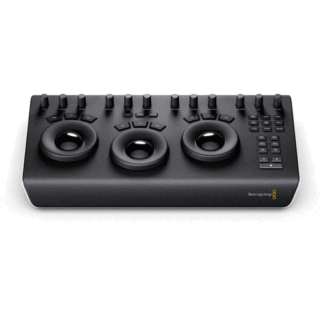
Blackmagic Design DaVinci Resolve Micro Panel with Resolve Studio Software in Kenya
Blackmagic Design DaVinci Resolve Micro Panel with Resolve Studio Software Price in Kenya is Ksh .Buy Blackmagic Design DaVinci Resolve Micro Panel with Resolve Studio Software price in Kenya from Adishnetservices.
DaVinci Resolve Micro Panel**from**Blackmagic Design**is a portable control surface that provides more control and a faster workflow to DaVinci Resolve Studio software than working with a keyboard and mouse alone. Suitable for editors and colorists that need a portable control surface, it features three high-resolution, weighted trackballs and 12 control knobs for accessing essential primary color-correction tools in the included Resolve software. Eighteen dedicated keys on the right side also give you access to the most commonly used grading features and playback controls.
The Micro Panel uses a USB 3.0 Type-C interface that allows you to connect to a computer or laptop and power the panel, alleviating the need for a separate power supply. It also interfaces with macOS, Windows, or select Linux systems. For the panel to work with Resolve, your computer must be running DaVinci Resolve 14.3 or DaVinci Resolve Studio 14.3 or later. An included USB 3.0 Type-A to USB Type-C cable provides backward compatibility for systems that have USB 3.0 Type-A ports.
**
Y lift Control: Adjust the contrast of the image in the darker areas, specifically in the Y (luminance) channel only. This adjustment allows changing the black point without changing saturation.
Y Gamma Control: Adjust the contrast of the image in the mid-tone areas, specifically in the Y (luminance) channel only. This control helps add depth and extra vibrancy to shots.
Contrast
Contrast Control: Increase contrast to make the blacks darker and the whites brighter, or decrease contrast to do the opposite.
Pivot: Change the center of tonality about which dark and bright parts of the image are stretched or narrowed during a contrast adjustment.
Mid-Tone Detail: Affect the contrast of regions of the image with high edge detail to increase or decrease the perception of image sharpness and definition. Often used for softening facial features, making it popular for beauty shots.
Detail
Color Boost Control: Raise the saturation in regions of the image with low saturation while leaving properly saturated areas alone. Also known as a vibrance operation, this is useful for adding color without oversaturating the image.
Shadow Control: Selectively lighten or darken shadow detail without affecting your image**s mid-tones.
Highlight Control: Enable retrieving blown-out highlight detail in high dynamic range media by lowering this parameter. This allows you to achieve a smooth blend between the retrieved highlights and unadjusted mid-tones for a natural-looking image.
Saturation
Increases or decreases overall image saturation. You can turn your color image into a grayscale image with this control.
Hue Control: Rotate all hues of the image around 360** of the color wheel. The default setting is 50, which retains the original distribution of hues.
Luminance Mix Control: Control the balance between the YRGB adjustments and Y-only adjustments made using the Y channel lift, gamma, and gain controls.
System Requirements for DaVinci Resolve
System requirements as of DaVinci Resolve 18:
Minimum System Requirements for Mac OS
macOS 11 Big Sur
8GB of system memory; 16GB when using Fusion
Blackmagic Design Desktop Video version 12.0 or later
Integrated GPU or discrete GPU with at least 2GB of VRAM
GPU that supports Metal or OpenCL 1.2
Minimum System Requirements for Windows
Windows 10 Creators Update
16GB of system memory; 32GB when using Fusion
Blackmagic Design Desktop Video 10.4.1 or later
Integrated GPU or discrete GPU with at least 2GB of VRAM
GPU that supports OpenCL 1.2 or CUDA 11
NVIDIA/AMD/Intel GPU Driver version**as required by your GPU
Minimum System Requirements for Linux
CentOS 7.3
32GB of system memory
Blackmagic Design Desktop Video 10.4.1 or later
Discrete GPU with at least 2GB of VRAM
GPU that supports OpenCL 1.2 or CUDA 11
NVIDIA/AMD Driver version**as required by your GPU
Blackmagic Design DaVinci Resolve Micro Specs in Kenya
Controls
30x Pre-Labeled Key
12x Dial
3x TrackballDisplay
NoOS Compatibility
Windows 10 or Later
macOS 10.15 or Later
CentOS 7.3 or LaterUSB I/O
1x USB-C Female Input
Power
Power Source
USBPower Consumption
2 W (Maximum)