
Green Lion Type-C Wireless Mic with Remote – Kenya
KSh8,000.00
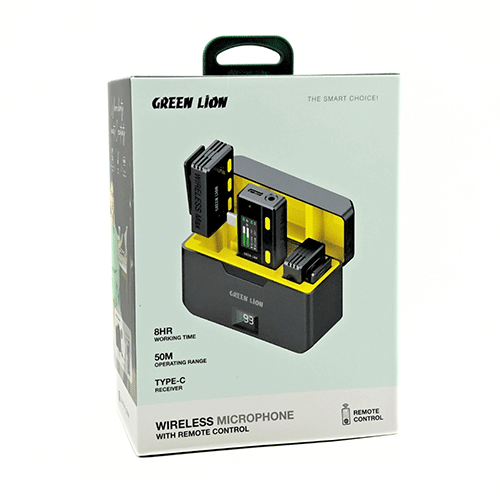
Green Lion Type-C Wireless Microphone with Remote Control in Kenya
Green Lion Type-C Wireless Microphone with Remote Control Price in Kenya is Kshs.8,000.Green Lion 3-in-1 360 Microphone is your wireless audio sidekick, ready to capture crystal-clear sound for up to 21 hours! Say goodbye to background noise and hello to clear recordings thanks to its smart noise-canceling tech. Buy Green Lion Type-C Wireless Microphone with Remote Control at best price in Kenya at Adishnetservices.
It easily connects to any device with automatic pairing, and its 360** sound pickup ensures you never miss a beat.Plus, it**s portable and versatile, with both USB-C and Lightning connectors + Aux for easy connection. Experience high-quality audio with its impressive specs and long-lasting battery life. This microphone is the ultimate game-changer for all your audio needs!
How to use Green Lion Type C Wireless Microphone with Remote
1. Product Overview
Components:
Wireless Microphone
Type-C Receiver
Remote Control
Charging Cable
User Manual
2. Charging the Microphone and Receiver
Initial Charge: Fully charge both the microphone and the receiver before first use.
Charging Process:
Connect the charging cable to the microphone and the receiver.
Plug the other end into a USB power source.
The LED indicators will show charging status (usually red while charging and green when fully charged).
3. Power On/Off
Microphone:
Press and hold the power button for 2-3 seconds until the LED indicator lights up.
To turn off, press and hold the power button again until the LED indicator turns off.
Receiver:
Plug the receiver into the Type-C port of your device; it should power on automatically.
4. Pairing the Microphone and Receiver
Automatic Pairing:
When both the microphone and receiver are powered on, they should automatically pair.
The LED indicator will turn solid (usually blue) when paired successfully.
Manual Pairing:
If they do not pair automatically, press and hold the pairing button on the microphone and the receiver until the LED indicators flash.
Release the buttons and wait for the indicators to turn solid, indicating a successful pairing.
5. Using the Remote Control
Power On/Off:
Some remote controls may have a power button. Ensure it is turned on.
Functions:
Volume Control: Use the + and ** buttons to adjust the volume.
Mute/Unmute: Press the mute button to mute/unmute the microphone.
Additional Functions: Depending on the model, there may be other buttons for echo control or changing channels.
Pairing Remote:
If the remote needs pairing, refer to the specific pairing instructions in the user manual. This typically involves pressing a pairing button on the remote and the microphone simultaneously.
6. Connecting to a Device
Type-C Port: Plug the receiver into the Type-C port of your smartphone, tablet, or computer.
Device Recognition:
Ensure your device recognizes the microphone as an audio input.
You might need to select the microphone in the audio settings of your device.
7. Operating the Microphone
Volume Control: Adjust the volume using the remote control or buttons on the microphone, if available.
Mute/Unmute: Use the mute button on the remote control or the microphone.
Indicator Lights: Understand the meaning of different LED indicators (e.g., power status, battery level, pairing status).
**
Related products
-
 Add to cart
Baseus PrimeTrip VA1 2-in-1 Car Tire Inflator in Kenya
Baseus PrimeTrip VA1 2-in-1 Car Tire Inflator Price in Kenya is**KShs 9000.The**Baseus Primetrip Series Super Energy 4-in-1 Car Jump Starter**is a multifunctional device designed for**roadside emergencies. This compact tool combines a powerful**car battery jump starter, a**150 PSI tire inflator,**LED lights, and a**power bank. With a**1200A peak power, it can quickly jump-start 12V batteries in cars, SUVs, trucks, and motorcycles, ensuring you**re never stranded. Whether you**re inflating tires, charging your devices, or needing a flashlight, this jump starter has you covered for all your emergency needs.Buy Baseus Primetrip Series Super Energy 4-in-1 Car Jump Starter at Adishnetservices Kenya
Safety and Performance for Every Situation
The**Baseus Primetrip Jump Starter**is built with 12 advanced safety protections, including**overcharge,**reverse polarity, and**overcurrent**safeguards, ensuring reliable and secure operation. Its**real-time LED display**monitors tire pressure, battery voltage, and remaining power, providing peace of mind during emergencies. Designed with a**cold-resistant lithium battery, this**car battery booster**is reliable even in extreme temperatures (-18**C to 40**C), making it ideal for use in all weather conditions. With its**compact design, this**car power bank jump starter**fits perfectly in your glovebox or trunk.Portable Power for the Road
The**Baseus Primetrip 4-in-1 Jump Starter**is not only powerful but also portable. Whether you**re using it as a**battery jumper,**car starter, or**car battery jump box, this device ensures you**re always prepared for unexpected power outages or low battery situations. With integrated storage for accessories and a lightweight design, it**s an essential tool for any road trip. This**car power bank**is perfect for those in need of a reliable, all-in-one solution to handle emergencies and keep your devices powered up. -
Green Lion Ultra 3-in-1 Vacuum Cleaner – Kenya
KSh11,000.00Add to cartGreen Lion Ultra 3-in-1 Vacuum Cleaner in Kenya
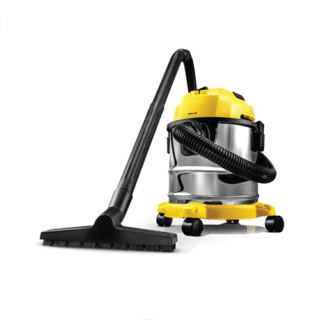
Green Lion Ultra 3-in-1 Vacuum Cleaner price in Kenya is KShs 11,000.The Green Lion Ultra 3-in-1 Vacuum Cleaner**is strong and flexible. It easily handles wet and dry messes. With a**1000W**engine, it delivers over**15 kPa of suction power. This ensures deep and efficient cleaning on many surfaces. The**12L**dustbin is great for home, work, or workshops. It allows for longer cleaning without constant emptying. Plus, the**swivel caster wheels**make it easy to move in any direction. The**3-meter**power cord has a longer reach. This means you won**t need to plug and unplug it as often. This vacuum has a**blower feature**that reaches tough spots. Its**nozzles**are designed for effective cleaning on different surfaces and types of debris. With an**IPX4 waterproof**rating, it**s durable and reliable for various cleaning tasks. The cloth dust bag is easy to clean and ensures good dust capture. The Green Lion Ultra 3-in-1 Vacuum Cleaner offers hassle-free, effective cleaning. It**s perfect for spills and fine dust.Buy Green Lion Ultra 3-in-1 Vacuum Cleaner at Adishnetservices Kenya.
-
Amazfit Helio Ring Smart Ring – Kenya
KSh20,000.00Add to cartAmazfit Helio Ring Smart Ring in Kenya
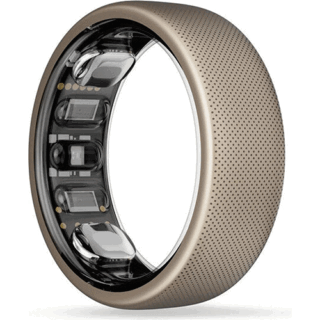
Amazfit Helio Ring Smart Ring price in Kenya is KShs 20,000..Amazfit Helio Ring is developed for athletes and focuses on providing them with the recovery support needed to improve their performance. Amazfit says the Helio Ring can **monitor comprehensive data related to the user**s mental and physical condition with accuracy only possible from a wearable worn on the finger.** The data collected by the Amazfit Helio Ring is made **actionable** with the Zepp app, which turns it into an intuitive Readiness score to help athletes determine whether they should focus on activity or recovery. The Amazfit Helio Ring can be worn as a standalone device or as a complimentary device together with an Amazfit smartwatch. If it**s the latter, the data from the ring and the smartwatch will be fused for a deeper analysis in the Zepp app. The Amazfit Helio Ring is made of skin-friendly titanium alloy and has 10ATM water resistance. The smart ring will come in two sizes ** 10 and 12, weighing 3.8g and 4g, respectively. Amazfit hasn**t revealed the Helio Ring**s battery size but said current testing suggests it can last up to five days on a single charge.**Buy Amazfit Helio Ring Smart Ring at Adishnetservices Kenya.
Empowering Your Ascent to Excellence
When competing at the top level, every percentage point, every fraction of a second, might mean the difference between winning and finishing second. The Amazfit**Helio**Ring, designed for top athletes, acknowledges that optimal recuperation is essential for peak performance. This smart ring is the pinnacle in sports recovery analysis and assistance, covering everything from your training load to your sleep quality and the mental aspect of your game.
Become An Unstoppable
Wear your Amazfit Helio Ring to sleep after a day of vigorous exercise. In the morning, you**ll receive a Readiness score and insight1 based on your mental and physical health.
Recover Smarter, Achieve More
Customized sleep sounds that intelligently alter based on your body**s responses. Detailed weekly and monthly sleep reports, including sleep health evaluations and valuable insights. Meditation and relaxing sounds might help you stay mentally sharp. Access to the Zepp Wellness Coach, which monitors your sleep and responds to your wellness queries through an AI chatbot.
Perform Like a Champion
More than simply a sleep tracker, the Amazfit**Helio**Ring is an elite athlete training gear that serves as your personal exercise companion and sports scientist. When you**re ready to go, launch the Zepp App**s Running, Walking, Cycling, or Treadmill training mode, and the Amazfit Helio Ring will record detailed performance statistics for you to analyze after the workout on your phone.
Keep Your Head in the Game
On the path to success, mental toughness is half the battle.The Amazfit Helio Ring, with its built-in electrodermal activity sensor, analyzes skin and perspiration reactions, notably sweat from your palms, to assist you understand when you are feeling high amounts of mental stress.
Crafted for Winners
The Amazfit**Helio**Ring is ideal for athletes who need to move quickly or sustain intensive bursts of movement.This smart ring for athletes is made of skin-friendly titanium alloy and comes in sizes 10 and 12. It may even be custom engraved with whichever date or motivating slogan gets you in the proper frame of mind to succeed.
Engineered for Intensity
Champions understand that the times between competitions are just as important to winning as the actions themselves. With a water-resistance rating of 10 ATM, this cutting-edge fitness wearable can withstand up to 100 meters of water pressure. So, once you**ve pushed your boundaries, go straight to the ice bath or sauna without hesitation.
-

JBL Tune 175 BT – Kenya
KSh3,500.00Add to cartJBL Tune 175 BT in Kenya
JBL Tune 175 BT**Price in Kenya is Ksh** 3500.JBL Tune 175BT wireless earphones, where precision meets convenience. Experience impressive audio quality with JBL Pure Bass Sound, while enjoying seamless connectivity through Bluetooth 5.0. With multi-point connectivity, lightweight comfort, and 14 hours of playback time, these earphones offer a truly immersive and hassle-free listening experience.Buy JBL Tune 175 BT at Adishnetservices Kenya.
-
 Add to cart
Baseus PrimeTrip VA1 2-in-1 Car Tire Inflator in Kenya
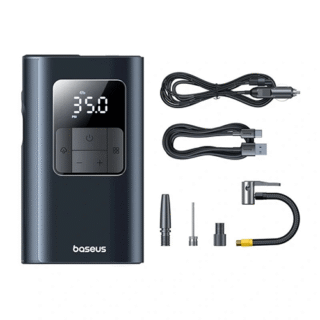
Baseus PrimeTrip VA1 2-in-1 Car Tire Inflator Price in Kenya is KShs 9000.Ensuring optimal tire pressure is crucial for vehicle performance, safety, and fuel efficiency. The**Baseus PrimeTrip VA1 2-in-1 Car Tire Inflator**is an all-in-one solution designed for drivers who prioritize convenience and reliability. Whether you**re at home, on the road, or in an emergency, this inflator ensures your tires remain at the perfect pressure while offering additional functions like a flashlight and power bank.Buy Baseus PrimeTrip VA1 2-in-1 Car Tire Inflator at**Adishnetservices Kenya
Wired and wireless pump modes
The machine is equipped with both pumping modes, allowing you to use it flexibly anywhere without having to depend on a fixed power source.
Detachable flashlight
The included flashlight makes it easy to use in low light conditions or when you need to inflate a tire at night.
Backup battery function
The machine not only inflates tires but also acts as a backup battery with a USB port, helping you charge electronic devices when needed.
Long lasting use
With up to 180 days of standby time, the product is guaranteed to be ready when you need it.
High precision
The device is capable of measuring pressure accurately with a resolution of 0.5psi, helping you control tire pressure effectively.

Reviews
There are no reviews yet.