

Hohem iSteady Pro 4 3-Axis Action Camera Gimbal Stabilizer – Kenya
KSh17,500.00
Hohem iSteady Pro 4 3-Axis Action Camera Gimbal Stabilizer in Kenya
Hohem iSteady Pro 4 3-Axis Action Camera Gimbal Stabilizer Price in Kenya is Ksh 17,500. Achieve smooth action camera footage using the Hohem iSteady Pro 4 3-Axis Action Camera Gimbal Stabilizer and its 360** of rotation, 600** of pan, and 320** of tilt control. A quick release clip efficiently secures your GoPro HERO, Insta360 ONE, or DJI Osmo Action series camera, and it provides easy detachment from the gimbal for transitioning between mounts. Bluetooth 5.1 connectivity allows the gimbal to be controlled with the compatible smartphone app. Buy Hohem iSteady Pro 4 3-Axis Action Camera Gimbal Stabilizer** price in Kenya from Adishnetservices.
Onboard buttons can manipulate the positioning of the gimbal and provide full wireless control to compatible GoPro cameras. A smartphone app toggles between shooting modes and adjusts parameters. The stabilizer boasts a 14-hour battery runtime that can be monitored with the LED indicator lights. You can charge your action camera and use the gimbal simultaneously with the included cables. The side and bottom of the device have 1/4**-20 threads to mount the tripod extension for a stabilized shot. A carry case allows you to bring all your accessories on the go.
Compatibility
For a full list of compatible cameras, please see the most current compatibility information on**the Hohem website.
Hohem ISteady Pro 4 Specs in Kenya.
Grip Design
Single Handgrip (Slanted)
Number of Axes
3: Roll, Horizontal, Vertical
Wireless Protocol
Bluetooth 5.0
Mounting
2 x 1/4**-20 Female
Weight
12.9**oz / 365**g (with Battery)
Gimbal
Number of Axes
3: Roll, Horizontal, Vertical
Rotation Range
Mechanical Range
Yaw (Pan): 600**
Pitch (Tilt): 320**
Roll: 320**
Compatibility
Camera Control
No
Supported Camera Dimensions
H: 2 x D: 1.2** / H: 51 x D: 30**mm
Connectivity
Wireless Protocol
Bluetooth 5.0
Battery
Battery Type
1x Built-In
Battery Capacity
3600 mAh
Battery Runtime
14 Hours
Battery Charging Time
3.5 Hours
Related products
-
 Read more
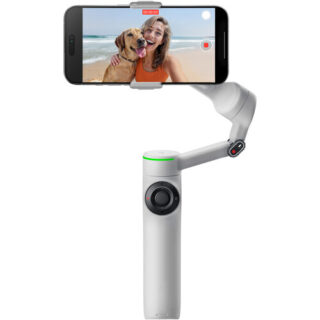
Insta360 Flow 2 Pro Smartphone Gimbal Stabilizer in Kenya
Insta360 Flow 2 Pro Smartphone Gimbal Stabilizer price in Kenya is KShs 24500.The updated gray Flow 2 Pro Smartphone Gimbal Stabilizer**from**Insta360 allows you to capture and stabilize smartphone footage in an all-in-one form factor with 1-tap pairing, native iOS tracking, a 10-hour runtime, and an integrated ring light to display when tracking is enabled. The included magnetic phone clamp secures smartphones 2.5 to 3.3** wide to the gimbal. Thanks to the gimbal**s built-in 8.3** selfie stick and tripod legs, there**s no need to bring additional expansion mounts. Buy Insta360 Flow 2 Pro Smartphone Gimbal Stabilizer at Adishnetservices Kenya.
1-Step Rapid Deploy
The Flow 2 Pro is designed for creators, vloggers, families, and travelers to add a cinematic touch to their phone content. Elevate your smartphone into a content creation tool with Insta360 Flow 2 Pro, the AI-powered stabilizer. Just unfold it once, and go with no need to untwist or even press the power button. When not in use, the gimbal folds to a compact size to fit in a bag or pocket.
360** Infinite Pan, Ring Light Indicator
The Flow 2 Pro can pan 360** around without interruptions to facilitate infinite pan tracking. This ensures your pan tracking remains smooth and seamless. An integrated ring light on the gimbal turns green when tracking mode is enabled.
3-Axis Stabilization
The Flow 2 Pro features 3-axis stabilization to make your shots look smooth and professional, whether you**re on the skateboard court or catching a wave. The gimbal can support loads up to 10.6 oz, accommodating most smartphones with ease. There is an integrated cold shoe mount for mounting fill lights or wireless receivers.
Deep Track 4.0
Deep Track 4.0 technology keeps subjects in the frame and in focus with unmatched tracking accuracy. If your subject moves out of frame, the gimbal will keep tracking it even when blocked from view.
Level up your slow-motion shots. Deep Track 4.0 is even supported for high frame rate videos.
Upon zooming in, the Flow not only can track your subject, but it will also automatically adjust gimbal settings for more stable shots.
Upgraded animal tracking accommodates more diverse subjects, from cats to dogs to horses.
Capture with iPhone Camera
Tap your iOS smartphone to the Flow 2 Pro to pair the devices via NFC and Apple DockKit. This way, your Flow 2 Pro automatically connects the next time you pull it out. The gimbal features Apple**s DockKit subject-tracking technology, which ensures you stay in frame in videos, live streams, and video calls with your iPhone**s native camera app and across different app platforms.
Compatibility with Third-Party Apps
Make conference calls with Teams, Facetime, or Zoom for business meetings, stream live online for content creation, or teach a class remotely; the Flow 2 Pro keeps your subject clear, centered, and in focus for all third-party applications.
USB-C Power Port and Battery
Use the USB-C port on the gimbal to charge your phone while filming or recharge your gimbal**s battery when depleted. The integrated 1100mAh battery can shoot for 10 hours and recharges in just two hours.
Selfie Shooting
Record on your own with the teleprompter feature that provides your script as you move and shoot your POV scene. There is also a selfie mirror on the back of the phone clamp that allows you to see your own image as you use the rear camera.
Smart ControlsYou can control the gimbal from a distance, so you don**t have to physically use the gimbal controls. You can use your smartphone or Apple Watch to set adjustments and start shooting, and you can also use a second smartphone to control your camera smartphone from a distance so you don**t have to be near your setup and capture a selfie scene.
AI-enabled gesture control can facilitate hands-free control over your gimbal. Hold up your hand to start recording and tracking, and raise it once more to stop without needing to press a single button.
Comprehensive Shooting Modes
Auto: Automatically adjusts gimbal settings based on the environment
Follow: Responds to your movements for precise control, ideal for vertical shooting
Pan Follow: Ideal for horizontal shooting
FPV: Simulate FPV drone-like movements with gimbal stabilization
Dolly Zoom: Create cinema-like dolly zooms to add drama
Motion Time-Lapse: Create time-lapses of your environment
TimeShift: Speed up time and space for impressive hyperlapses
360 Panorama: Set up your tripod and record immersive 360/240/180** or 3 x 3 grid panorama shots
Barrel Roll: The smartwheel facilitates exciting barrel roll shots
Cinematic Visuals
With a full tilt range and wide range of motion, cinematic movements such as rising and follow shots add drama to your scenes. The iPhone app also allows you to capture Apple ProRes format and utilize Dolby Vision and Advanced HDR color technology for rich, colorful cinema-quality visuals.
Hoop Mode
When shooting sports such as basketball, the app features hoop mode that keeps track of the court, follows highlighted players, and captures every basket with full-court tracking.
Intuitive SmartWheel Control
The SmartWheel boasts a minimalist design and gives you quick, easy access to various useful functions, from shooting controls to video replay and more. Single press the back button to toggle Deep Track 4.0, double press to re-center, triple press to flip the camera around for Max Selfie mode. It facilitates a quick ratio change, zoom control, video replay, and quick access to creative effects.
Insta360 App
Create cinematic effects with dynamic camera movements and speed controls in the Insta360 app, including Widescreen mode, Hoop mode, TimeShift, Motion Time-Lapse, Barrel Roll, and Dolly Zoom. Master your shots with AI-powered editing tools. FlashCut tells a story with your clips, editing together the highlights on the beat of the music. -
 Add to cart
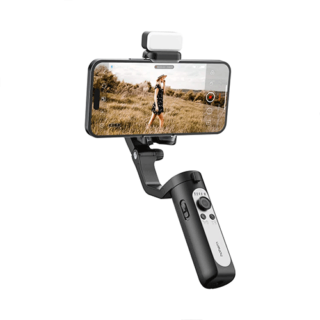
Hohem iSteady XE Smartphone Gimbal Stabilizer in Kenya
Hohem iSteady XE Smartphone Gimbal Stabilizer Price in Kenya is Kshs.**13,000.The Hohem iSteady XE Foldable Smartphone Gimbal Kit with Magnetic LED Light adds professional quality stabilization to your smartphone videos. High-torque motors and automated movement programs enable steady and captivating shots. Simple controls and foldable design make this an excellent choice for travel vloggers and other on-the-go content creators.Buy Hohem iSteady XE Smartphone Gimbal Stabilizer**at the best price in Kenya from**Adishnetservices.
In The Box
iSteady XE x 1
Tripod x 1
Storage Pouch x 1
USB-Type C Charging Cable x 1
User Manual x 1 -
 Read more
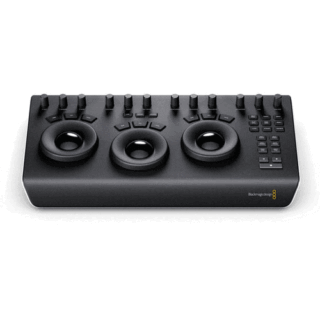
Blackmagic Design DaVinci Resolve Micro Panel with Resolve Studio Software in Kenya
Blackmagic Design DaVinci Resolve Micro Panel with Resolve Studio Software Price in Kenya is Ksh .Buy Blackmagic Design DaVinci Resolve Micro Panel with Resolve Studio Software price in Kenya from Adishnetservices.
DaVinci Resolve Micro Panel**from**Blackmagic Design**is a portable control surface that provides more control and a faster workflow to DaVinci Resolve Studio software than working with a keyboard and mouse alone. Suitable for editors and colorists that need a portable control surface, it features three high-resolution, weighted trackballs and 12 control knobs for accessing essential primary color-correction tools in the included Resolve software. Eighteen dedicated keys on the right side also give you access to the most commonly used grading features and playback controls.
The Micro Panel uses a USB 3.0 Type-C interface that allows you to connect to a computer or laptop and power the panel, alleviating the need for a separate power supply. It also interfaces with macOS, Windows, or select Linux systems. For the panel to work with Resolve, your computer must be running DaVinci Resolve 14.3 or DaVinci Resolve Studio 14.3 or later. An included USB 3.0 Type-A to USB Type-C cable provides backward compatibility for systems that have USB 3.0 Type-A ports.
**
Y lift Control: Adjust the contrast of the image in the darker areas, specifically in the Y (luminance) channel only. This adjustment allows changing the black point without changing saturation.
Y Gamma Control: Adjust the contrast of the image in the mid-tone areas, specifically in the Y (luminance) channel only. This control helps add depth and extra vibrancy to shots.
Contrast
Contrast Control: Increase contrast to make the blacks darker and the whites brighter, or decrease contrast to do the opposite.
Pivot: Change the center of tonality about which dark and bright parts of the image are stretched or narrowed during a contrast adjustment.
Mid-Tone Detail: Affect the contrast of regions of the image with high edge detail to increase or decrease the perception of image sharpness and definition. Often used for softening facial features, making it popular for beauty shots.
Detail
Color Boost Control: Raise the saturation in regions of the image with low saturation while leaving properly saturated areas alone. Also known as a vibrance operation, this is useful for adding color without oversaturating the image.
Shadow Control: Selectively lighten or darken shadow detail without affecting your image**s mid-tones.
Highlight Control: Enable retrieving blown-out highlight detail in high dynamic range media by lowering this parameter. This allows you to achieve a smooth blend between the retrieved highlights and unadjusted mid-tones for a natural-looking image.
Saturation
Increases or decreases overall image saturation. You can turn your color image into a grayscale image with this control.
Hue Control: Rotate all hues of the image around 360** of the color wheel. The default setting is 50, which retains the original distribution of hues.
Luminance Mix Control: Control the balance between the YRGB adjustments and Y-only adjustments made using the Y channel lift, gamma, and gain controls.
System Requirements for DaVinci Resolve
System requirements as of DaVinci Resolve 18:
Minimum System Requirements for Mac OS
macOS 11 Big Sur
8GB of system memory; 16GB when using Fusion
Blackmagic Design Desktop Video version 12.0 or later
Integrated GPU or discrete GPU with at least 2GB of VRAM
GPU that supports Metal or OpenCL 1.2
Minimum System Requirements for Windows
Windows 10 Creators Update
16GB of system memory; 32GB when using Fusion
Blackmagic Design Desktop Video 10.4.1 or later
Integrated GPU or discrete GPU with at least 2GB of VRAM
GPU that supports OpenCL 1.2 or CUDA 11
NVIDIA/AMD/Intel GPU Driver version**as required by your GPU
Minimum System Requirements for Linux
CentOS 7.3
32GB of system memory
Blackmagic Design Desktop Video 10.4.1 or later
Discrete GPU with at least 2GB of VRAM
GPU that supports OpenCL 1.2 or CUDA 11
NVIDIA/AMD Driver version**as required by your GPU
Blackmagic Design DaVinci Resolve Micro Specs in Kenya
Controls
30x Pre-Labeled Key
12x Dial
3x TrackballDisplay
NoOS Compatibility
Windows 10 or Later
macOS 10.15 or Later
CentOS 7.3 or LaterUSB I/O
1x USB-C Female Input
Power
Power Source
USBPower Consumption
2 W (Maximum) -
 Read more
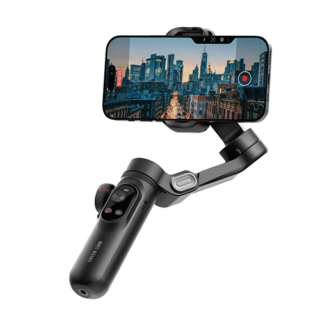
Green Lion New York Gimbal in Kenya
Green Lion New York Gimbal Price in Kenya is KShs. 10500.The Green Lion New York Gimbal Smart Face Tracking is a full-featured stabilizer designed to improve your photography and videography experience. Its 3-axis stabilization and 310** pan rotation guarantee accurate, fluid movements. This guarantees a professional-quality output. It has six shooting modes (LPF, FF, POV, DM, and GO) to meet any creative need. Its advanced face tracking tech keeps your subject centered in the frame. The gimbal has a 250g load capacity. It supports focus and zoom control for better accuracy and creativity. It is compatible with most smartphones and lightweight cameras. With its OLED display and built-in fill light, it offers great visibility and lighting for your photos. Its 3200mAh battery guarantees long-lasting performance with a working time of 7 to 10 hours. The Green Lion New York Gimbal Smart Face Tracking is a modern and portable accessory that is ideal for artists who are always on the move.Buy Green Lion New York Gimbal at Adishnetservices Kenya.
-
 Add to cart
Ugreen Suction Phone Mount LP200 Phone Holder in Kenya
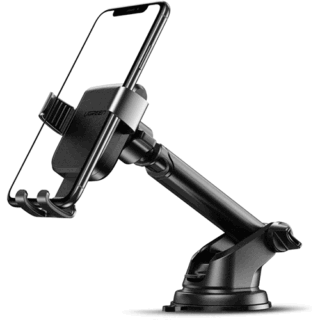
Ugreen Suction Phone Mount LP200 Phone Holder Price in Kenya is ksh.2,000.Gravity**car mount**that takes care of the safety of our phone first. The special**triangular design**guarantees it exceptional stability while driving, and**the gently bent jaws**do not allow it to fall out even under hard braking. In addition, thanks to the**auto-lock function, the gadget is extremely easy to use. Just put the phone down on it for the**arms to close automatically.Buy Ugreen Suction Phone Mount LP200 Phone Holder at the best price in Kenya from Adishnetservices.
The accessory**is made of high-quality materials and is designed to be mounted**on the windshield or dashboard of**the car. It has**a strong suction**cup that can be used repeatedly. Just wash it with water to regain its grip. On top of that, it is**highly adjustable**(including 360-degree rotation) and has a cutout that allows you to plug in a charger.
Full automation
No cumbersome adjustment of the accessory to the size of the phone. Just put your device down on it and**the jaws close automatically. It can**t get any easier!
Telescopic arm
The length of the arm is adjustable thanks to the telescopic design. It can reach a length from 111 mm to 168 mm.
Stability and safety
The triangular design of**the accessory guarantees the**stability and safety of the phone**even on the most uneven roads.
Head with 360** range of motion
The holder has a**360****moving**head. Thanks to it, we can adjust the position of our device. Too much rotation may cause the device to fall out of the holder.**Do not**adjust the holder horizontally, as this will negate the pressure on the lower latch and the device**may**also**fall out.
Top quality pad
The two-stage**pad allows you to adjust to the appropriate surface. One mode is ideal for**flat surfaces. The other, on the other hand, is designed for**rough surfaces. To attach the holder to the glass apply it to the glass and press the side **latch**. When you mount the holder on the dashboard leave the latch in the vertical position.
SPECIFICATIONS
1. Features: Car phone holder on inhalation on the windshield.
2. Color: Black
3. Material: PC + ABS
4. Can rotate 360 ****degrees according to need.
5. Compatible: Phones with screens from 4.6 to 6.5 inches
6. 100 g
7. 15 x 8 x 3 cm**



Reviews
There are no reviews yet.