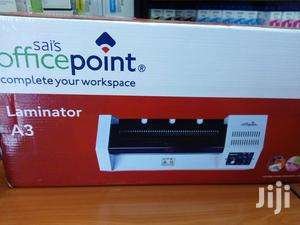
Office point A3/A4 laminator
KSh9,000.00
Description
Office point A3/A4 laminator
Office point A3/A4 laminator from the leading office point dealer in Nairobi kenya, buy online Office point A3/A4 laminator and have it delivered at your doorstep. Quick pre-heating Simple operation(Power on, temperature control) Stable control temperature system Perfect laminating effect Uniform rising temperature Can laminate from A5 and A4 Size of document.
A3 big size laminator with handle
Throat Width:330MM
Size:A3
Heater: Hot tube
Roller:4pcs
Roller diameter:25mm
Driving Motor: AC geared motor
Power: 220V/50HZ,620W
Laminating Speed:600mm/min
With Safety Handle:Yes
Operating Temperature:Up to 180ºC
Dimensions(W×L×H):500*200*110MM
Weight:7.5KGS
Related products
-
 Add to cart
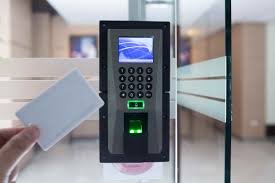
Access control System for Office and Business installation
An Access Control System for offices and businesses is a modern security solution designed to safeguard restricted areas by managing and monitoring entry. It offers a variety of authentication methods, including PIN codes, RFID cards, biometric options like fingerprint or facial recognition, and mobile-based access via Bluetooth or NFC. Centralized controllers act as the core, validating credentials, managing permissions, and integrating seamlessly with other security systems such as CCTV and alarms. These systems are scalable, allowing businesses to expand as needed, and provide real-time monitoring, detailed access logs, and role-based access controls through cloud-based or on-premises management platforms. Built for durability, these systems support wired or wireless connectivity, feature emergency override options for critical situations, and ensure operational efficiency by replacing traditional keys with traceable, automated solutions. Ideal for securing sensitive areas, access control systems enhance security, streamline operations, and improve accountability in professional environments
-
 Add to cart
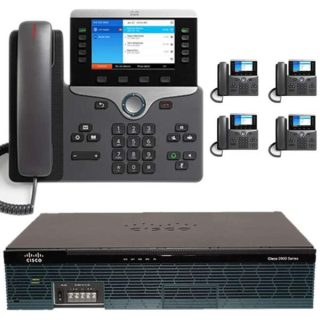
Advantages / Benefits of Cisco IP PBX Office Telephone Mtech
Cisco Small business PBX phone systems today are increasingly more sophisticated. Here’s a quick comparison of a conventional small business PBX system and a Unified Communications system that combines an Internet Protocol (IP) PBX and other features.
Cisco IP PBX can do everything a traditional small business PBX can do and more. It performs the switching and connecting of Voice over IP as well as landline calls.
A conventional PBX requires two networks, one for data and another for voice. An IP PBX system runs on an IP data network, which saves costs and minimizes network management.
Advantages of Cisco IP PBX System
Easier to install & configure than a proprietary phone system
An IP PBX runs as software on a computer and can leverage the advanced processing power of the computer and user interface as well as features. Anyone proficient in networking and computers can install and maintain an IP PBX. By contrast a proprietary phone system often requires an installer trained on that particular system!
Easier to manage because of web/GUI based configuration interface
An IP PBX can be managed via a web-based configuration interface or a GUI, allowing you to easily maintain and fine tune your phone system. Proprietary phone systems have difficult-to-use interfaces which are often designed to be used only by phone technicians.
Significant cost savings using VoIP providers
With an IP PBX you can easily use a voip provider for long distance and international calls. The monthly savings are significant. If you have branch offices, you can easily connect phone systems between branches and make free phone calls.
Eliminate phone wiring
An IP Telephone system allows you to connect hardware IP phones directly to a standard computer network port (which it can share with the adjacent computer). Software phones can be installed directly on the PC. You can now eliminate the phone wiring and make adding or moving of extensions much easier. In new offices you can completely eliminate the need for wiring extra ports to be used by the office phone system!
Eliminate vendor lock in
IP PBXs are based on the open SIP standard. You can mix and match any SIP hardware or software phone with any SIP-based IP PBX, PSTN Gateway or VOIP provider. In contrast, a proprietary phone system often requires proprietary phones to use advanced features, and proprietary extension modules to add features.
Scalable/ Expandle
Proprietary systems are easy to outgrow. Adding more phone lines or extensions often requires expensive hardware modules. In some cases you need an entirely new phone system. Not so with an IP PBX. A standard computer can easily handle a large number of phone lines and extensions – just add more phones to your network to expand!
Better customer service & productivity
With an IP PBX you can deliver better customer service and better productivity. Since the system is now computer-based, you can integrate phone functions with business applications. For example, bring up the customer record of the caller automatically when you receive his/her call, dramatically improving customer service and cutting costs by reducing time spent on each caller. Outbound calls can be placed directly from Outlook, removing the need for the user to type in the phone number.
8. Twice the phone system features for half the price
Since an IP PBX is software-based, it is easier for developers to add and improve feature sets. Most VoIP phone systems come with a rich feature set, including auto attendant, voice mail, ring groups, and advanced reporting. Unified Communications features are included, to support presence, video and audio conferences and free calls via the data network. These options are often very expensive in proprietary systems.
9. Allow hot desking & roaming
Hot desking, the process of being able to easily move offices/desks based on the task at hand, has become very popular. Unfortunately traditional PBXs require extensions to be re-patched to the new location. With an IP PBX the user simply takes his phone to his new desk – No patching required!
Users can roam too – if an employee has to work from home, he/she can simply fire up their SIP software phone and are able to answer calls to their extension, just as they would in the office. Calls can be diverted anywhere in the world because of the SIP protocol characteristics!
10. Better phone usability: SIP phones are easier to use!
Employees often struggle using advanced phone features. Setting up a conference, or transferring a call on an old PBX requires detailed instructions.
Not so with an IP PBX – all features are easily performed from a user friendly GUI. In addition, users get a better overview of the status of other extensions, of inbound calls, call queues, and presence via the clients. Proprietary systems often require expensive “system” phones to get an idea what is going on on your phone system and even then, status information is cryptic at best.
-
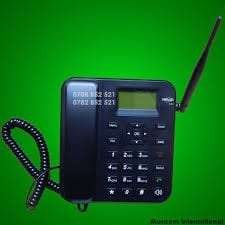
Dual Simcard Home/ Office Desktop Phone – Kenya
KSh4,200.00Add to cartDual Simcard Home/ Office Desktop Phone
The Dual SIM Card Home/Office Desktop Phone is a versatile communication device designed to integrate the convenience of mobile connectivity with the stability of a desktop phone. Featuring a 2.8-inch color LCD screen with adjustable brightness, it provides clear and easy-to-read information, including call details and SMS messages.
This phone supports dual SIM cards, allowing users to manage two different mobile networks simultaneously. It is compatible with GSM 850/900/1800/1900 MHz bands, making it suitable for use in various regions with 2G or 3G network coverage. The external antenna enhances signal reception, ensuring reliable connectivity.
The device includes a full-duplex hands-free speakerphone with adjustable volume, making it ideal for hands-free conversations and conference calls. It also features a phonebook that can store up to 500 contacts, and it records up to 100 incoming, outgoing, and missed calls in its call log.
With SMS functionality, users can send and receive text messages directly from the phone, adding to its versatility. The phone offers multiple ringtone options with adjustable volume settings, and it has configurable speed dial keys for quick access to frequently called numbers.
The Dual SIM Card Desktop Phone is powered by a rechargeable lithium-ion battery, providing up to 72 hours of standby time and 5 hours of talk time. For continuous use, it comes with an AC adapter, and the battery backup ensures that calls and messages are not missed during power interruptions.
Additional features include a 3.5mm headset port for wired headsets, a micro USB port for charging and data transfer, and a built-in alarm clock with a snooze function. The phone supports a multilingual user interface, accommodating various languages.
Designed with practicality in mind, the phone has dimensions of approximately 210 x 160 x 65 mm and weighs around 600 grams. It operates effectively within a temperature range of 0°C to 45°C and a humidity range of 10% to 90% non-condensing, making it a reliable choice for home or office use.
Overall, this dual SIM card desktop phone combines the functionality of traditional landline phones with the flexibility of mobile networks, making it an excellent choice for users who need both mobile and fixed-line connectivity.
-
 Read more
Benefits/ Advantages of Office phone system
Office telephone has so many advantages unlike keeping a messanger to be delivering information or by using mobile phones, below are the advantages.
Save time and money
Having a PBX system in your office saves time and money, Unlike the old age where an organization required a messanger to relay information from one department to the other using more time and resources, digital and ip phone system enable one to relay information at the comfort of their seat. When it come to cost calculations, Digital and IP PABX system are more cheap to maintain compared to using mobile phones to communicate, only one line is required hence billing is done to that line.
One-stop shop, with all the features
Switching to a business phone system simplifies your small business communications. Whether you need call management features like forwarding and call logs, or collaboration tools like conference call services and online meetings, consolidating your communications has several advantages. Moving to a business phone system also gives you access to new features that consumer phone lines can’t match; everything from rule-based call answering to call screening and advanced call notifications and team collaboration tools.
Stay connected anytime, anywhere
With a business phone system, you can work from anywhere, without worrying about hardware. Use the same tools and features that you’re familiar with, no matter where your business takes you. A business phone system also keeps you connected to telecommuters. Seamless call forwarding keeps employees connected to your clients no matter where they are, and either paid or free conference calling and collaboration tools ensure your team stays on the same page, even when they aren’t in the same room. This kind of flexibility is key as your business expands.
Project a professional image
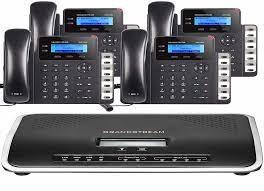
Office phone portrays a professional image unlike when mobile phones and messengers are used in an organization. Mtech avails the best office phone in the world, our best ranking office phone, Panasonic phone, Yeaster IP phone, Zycoo ip phones, cisco ip phones, Avaya and Grandstream ip phone.
Keep your private information private
When using mobile phone in the office, the users information is at threat as the mobile will not be private anymore, Office phone enables the users information to remain private as they will no longer use their mobile phone. Hence conversation with family and friends is kept private.

Reviews
There are no reviews yet.