
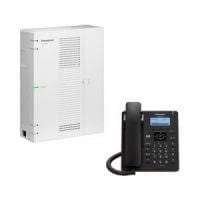
Panasonic KX-HTS32 Hybrid/IP PBX System No License Required
KSh55,000.00
Description
Panasonic KX-HTS32 Hybrid/IP PBX System No License Required
The Panasonic KX-HTS32 is a powerful and compact hybrid IP PBX system designed to meet the communication needs of small to medium-sized businesses. Combining the versatility of IP telephony with the reliability of traditional analog lines, this system is ideal for organizations looking to modernize their telecommunication infrastructure without the hassle of complex licensing requirements.
The KX-HTS32 supports up to 4 analog central office (CO) lines and up to 8 SIP trunks, providing flexibility in handling both traditional and VoIP calls. It accommodates up to 24 hybrid extensions, which include 4 built-in analog extensions, and up to 24 IP extensions, ensuring that businesses can scale their communication systems as needed.
This PBX system is equipped with a range of essential telephony features, such as call forwarding, call transfer, call waiting, caller ID, and voicemail. It also supports conference calling, with built-in 3-party conferencing and the ability to host up to 8-party conferences via IP. The auto-attendant feature and built-in voicemail enhance the system’s functionality, allowing for efficient call management and customer service.
Specs
Type KX-HTS32
Preinstalled Maximum
Total Number of Trunks 8 (6 if G.729a) 8 (6 if G.729a)
SIP 6 (G.711) 4 (G.729a) 6 (G.711) 4 (G.729a)
Analogue 4 8
Maximum Terminal Equipment
The following shows the number of each terminal equipment type supported by the KX-HTS32.
Type KX-HTS32
Preinstalled Maximum
Extensions 24 24
SIP 24 24
Analogue 8 24
DISA (ch) 4* 4*
Built-in VM (ch) 4* 4*
Doorphone (Analogue) 0 2
Door Opener (Analogue) 0 2
Related products
-
 Read more
Benefits/ Advantages of Office phone system
Office telephone has so many advantages unlike keeping a messanger to be delivering information or by using mobile phones, below are the advantages.
Save time and money
Having a PBX system in your office saves time and money, Unlike the old age where an organization required a messanger to relay information from one department to the other using more time and resources, digital and ip phone system enable one to relay information at the comfort of their seat. When it come to cost calculations, Digital and IP PABX system are more cheap to maintain compared to using mobile phones to communicate, only one line is required hence billing is done to that line.
One-stop shop, with all the features
Switching to a business phone system simplifies your small business communications. Whether you need call management features like forwarding and call logs, or collaboration tools like conference call services and online meetings, consolidating your communications has several advantages. Moving to a business phone system also gives you access to new features that consumer phone lines can’t match; everything from rule-based call answering to call screening and advanced call notifications and team collaboration tools.
Stay connected anytime, anywhere
With a business phone system, you can work from anywhere, without worrying about hardware. Use the same tools and features that you’re familiar with, no matter where your business takes you. A business phone system also keeps you connected to telecommuters. Seamless call forwarding keeps employees connected to your clients no matter where they are, and either paid or free conference calling and collaboration tools ensure your team stays on the same page, even when they aren’t in the same room. This kind of flexibility is key as your business expands.
Project a professional image
Office phone portrays a professional image unlike when mobile phones and messengers are used in an organization. Mtech avails the best office phone in the world, our best ranking office phone, Panasonic phone, Yeaster IP phone, Zycoo ip phones, cisco ip phones, Avaya and Grandstream ip phone.
Keep your private information private
When using mobile phone in the office, the users information is at threat as the mobile will not be private anymore, Office phone enables the users information to remain private as they will no longer use their mobile phone. Hence conversation with family and friends is kept private.
-
Atcom IP08 8 ports FXO/FXS IP-PBX – Kenya
KSh56,000.00Add to cartAtcom IP08 8 ports FXO/FXS IP-PBX
The Atcom IP08 is a versatile and compact IP-PBX designed to meet the telephony needs of small to medium-sized businesses. This system features 8 ports, comprising 4 FXO (Foreign Exchange Office) ports for connecting to external phone lines and 4 FXS (Foreign Exchange Station) ports for connecting analog telephones or fax machines.
The IP08 supports high-definition audio and a range of codecs including G.711, G.723.1, and G.729, ensuring clear and reliable voice communication. It offers essential telephony features such as call forwarding, call transfer, call hold, and call waiting. The integrated voicemail system and automated attendant (IVR) capabilities further enhance communication management, while conference calling support facilitates collaborative conversations.
For ease of management, the Atcom IP08 provides a web-based interface for configuration and remote management, allowing for straightforward setup and maintenance. Firmware updates can be performed over the air, ensuring that the system stays current with the latest features and security improvements.
The device is designed for flexible installation, with options for both desktop and wall mounting. It is powered by a standard AC supply (100-240V, 50/60Hz) and has a low power consumption of approximately 10W. The IP08 operates within a temperature range of 0°C to 40°C and a humidity range of 10% to 90% non-condensing.
Additional features include support for SIP TLS and SRTP for secure communication, making it compatible with standard SIP-based VoIP services and enhancing the security of communications. The Atcom IP08’s scalable design allows for expansion with additional IP phones and devices, making it a practical and adaptable solution for growing businesses.
Overall, the Atcom IP08 is a reliable and feature-rich IP-PBX system that provides comprehensive telephony functionality in a compact and user-friendly package. Its advanced features and ease of management make it an excellent choice for businesses looking to streamline their communication infrastructure.
IP08 8 ports FXO/FXS IP-PBX specifications
Hardware Features
LAN Port 1 10 / 100Mbps
WAN Port 1 10 / 100Mbps
Analog Port 8 RJ11
ATCOM Telephony Module supported Up to 8 Port FXO or 8 Port FXSAtcom IP08SIP Features
SIP Compatibility SIP(RFC3261), IAX2(RFC5457)
Concurrent Calls 16
Maximum Registered Users Supported 128
PBX Features
Basic Features Blacklist Caller ID Call Back Call Detial Records (CDR) Call Pickup (Group Pickup & Directed Pickup) Call Parking Call Queues Call Recording Call Routing Call Transfer (Blind Transfer & Attend Transfer) Call Waiting Conference Do Not Disturb (DND) Follow me Interactive Voice Response (IVR) Intercom/Paging Music on Hold (MoH) Ring Group Skypy Integration (Skype for SIP) Voice Mail to Email
Advance Features Auto Provision Call Recording Direct Inward System Access (DISA) Dual-OS Redundancy External Storeage Supported IP Restriction Personal Web Portal Storage Quota Privilege Tcpdump diagnostic tool Auto Provisioning Customized Dialplan
Audio Codec G711(A/**), G.722,G726,G729,GSM,Speex,ADPCM
Video Codec H261, H263,H263P,H264
Fax Features* T.38,Fax to Email
Network Features
DHCH Server / Client Yes
DDNS Yes
Static IP Yes
VLAN (802.1Q) Yes
VPN Yes (PPTP)
Port Forward Yes
Installation & Configuration
Installation Desktop or Wall mount
Configuration Web based configuration
Others
Power Consumption 5W
Storage Temperature 20°C – 65°C (-4°F – 149°F)
Operating Temperature 0°C – 40°C (32°F – 104°F)
Operating Humidity 10 – 9 -
 Add to cart
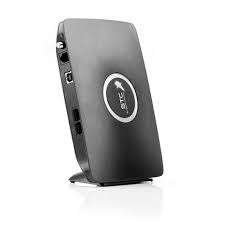
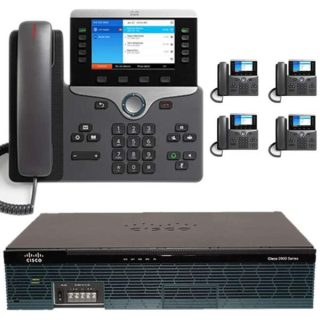
GSM gateway router for VoIP with Simcard slot
GSM gateway router for VoIP with Simcard slot is designed to work in conjunction with key phone systems and IP-PBX to provide GSM communications. GSM gateway router extensive compatibility of the GoIP makes it an ideal choice to be deployed in multi-vendor open architecture VoIP networks.
GoIP is a great way to provide fast phone service deployment where regular PSTN line may not be readily available. GSM gateway also provides significant savings in usage, infrastructure and maintenance cost compared to conventional PSTN.
GSM gateway router bi-directional password authentication (call authorization) and trust list authentication greatly minimize the risk of charge losses and the flexible routing function can meet special requirements of various call forwarding.
GSM gateway router supports multi device groups, with flexible setting of large GSM gateway groups with different channel numbers. With its low price, excellent voice quality, and powerful features, the GoIP series gateway is the first choice for system integrators, traffic operators, and softswitch manufacturers.
GSM gateway router specifications
Open Standard VoIP Protocols (IETF SIP V2)
Single or Multiple Server Registrations
Two 10/100 Ethernet for WAN / LAN connections
Peer-to-Peer IP Calls
Speech quality ensured by QoS at the Ethernet and IP layers and comprehensive jitter buffer
Line Echo Cancellation
VLAN and QoS support
NAT Transversal and Router functions
Voice prompts, HTTP Web, Auto Provision support for configuration and updates
Highly stable embedded Linux operating system in high performance ARM 9 Processor -
 Add to cart
Advantages / Benefits of Cisco IP PBX Office Telephone Mtech
Cisco Small business PBX phone systems today are increasingly more sophisticated. Here’s a quick comparison of a conventional small business PBX system and a Unified Communications system that combines an Internet Protocol (IP) PBX and other features.
Cisco IP PBX can do everything a traditional small business PBX can do and more. It performs the switching and connecting of Voice over IP as well as landline calls.
A conventional PBX requires two networks, one for data and another for voice. An IP PBX system runs on an IP data network, which saves costs and minimizes network management.
Advantages of Cisco IP PBX System
Easier to install & configure than a proprietary phone system
An IP PBX runs as software on a computer and can leverage the advanced processing power of the computer and user interface as well as features. Anyone proficient in networking and computers can install and maintain an IP PBX. By contrast a proprietary phone system often requires an installer trained on that particular system!
Easier to manage because of web/GUI based configuration interface
An IP PBX can be managed via a web-based configuration interface or a GUI, allowing you to easily maintain and fine tune your phone system. Proprietary phone systems have difficult-to-use interfaces which are often designed to be used only by phone technicians.
Significant cost savings using VoIP providers
With an IP PBX you can easily use a voip provider for long distance and international calls. The monthly savings are significant. If you have branch offices, you can easily connect phone systems between branches and make free phone calls.
Eliminate phone wiring
An IP Telephone system allows you to connect hardware IP phones directly to a standard computer network port (which it can share with the adjacent computer). Software phones can be installed directly on the PC. You can now eliminate the phone wiring and make adding or moving of extensions much easier. In new offices you can completely eliminate the need for wiring extra ports to be used by the office phone system!
Eliminate vendor lock in
IP PBXs are based on the open SIP standard. You can mix and match any SIP hardware or software phone with any SIP-based IP PBX, PSTN Gateway or VOIP provider. In contrast, a proprietary phone system often requires proprietary phones to use advanced features, and proprietary extension modules to add features.
Scalable/ Expandle
Proprietary systems are easy to outgrow. Adding more phone lines or extensions often requires expensive hardware modules. In some cases you need an entirely new phone system. Not so with an IP PBX. A standard computer can easily handle a large number of phone lines and extensions – just add more phones to your network to expand!
Better customer service & productivity
With an IP PBX you can deliver better customer service and better productivity. Since the system is now computer-based, you can integrate phone functions with business applications. For example, bring up the customer record of the caller automatically when you receive his/her call, dramatically improving customer service and cutting costs by reducing time spent on each caller. Outbound calls can be placed directly from Outlook, removing the need for the user to type in the phone number.
8. Twice the phone system features for half the price
Since an IP PBX is software-based, it is easier for developers to add and improve feature sets. Most VoIP phone systems come with a rich feature set, including auto attendant, voice mail, ring groups, and advanced reporting. Unified Communications features are included, to support presence, video and audio conferences and free calls via the data network. These options are often very expensive in proprietary systems.
9. Allow hot desking & roaming
Hot desking, the process of being able to easily move offices/desks based on the task at hand, has become very popular. Unfortunately traditional PBXs require extensions to be re-patched to the new location. With an IP PBX the user simply takes his phone to his new desk – No patching required!
Users can roam too – if an employee has to work from home, he/she can simply fire up their SIP software phone and are able to answer calls to their extension, just as they would in the office. Calls can be diverted anywhere in the world because of the SIP protocol characteristics!
10. Better phone usability: SIP phones are easier to use!
Employees often struggle using advanced phone features. Setting up a conference, or transferring a call on an old PBX requires detailed instructions.
Not so with an IP PBX – all features are easily performed from a user friendly GUI. In addition, users get a better overview of the status of other extensions, of inbound calls, call queues, and presence via the clients. Proprietary systems often require expensive “system” phones to get an idea what is going on on your phone system and even then, status information is cryptic at best.
-
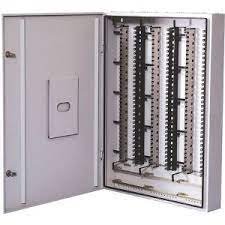
100 Pair MDF Box Telephone Discase – Kenya
KSh7,000.00Add to cart100 Pair MDF Box Telephone Discase** Mtech
100 Pair MDF Box Telephone Discase offer a range of low profile to high density termination of cables in plastic housings with all the cable anchoring and cable entry requirements catered for. Larger boxes can be mounted together. Knock-out sections in the lids permit concealed interconnection of jumpers whilst retaining a neat appearance.
100 Pair MDF Box Telephone Discase specifications
2. The Metal distribution box is installed with back mount frame inside for Krone LSA-PLUS 10 pair disconnection or connection module, and protection element installation. 3. Cable entries, cable fixing rings and wire guide rings installed. 4. Can be applicable as both Indoor and Outdoor Distribution Box. 5. Material: Cold Steel Finished By Paint. 6. Capacity: 100, 200 Pair 7. Color: RAL7035 8. Dimension: 100 Pair-180*430*150mm 200 Pair-180*430*150mm
100 Pair MDF Box Telephone Discase
Junction Box, 20 Pair, Discase, Krone Box
Krone Metal Box (100 Pair) buy in kenya
Krone Distribution Boxes
100 pair MDF box telephone discase
Krone box price from Mtech**


Reviews
There are no reviews yet.