
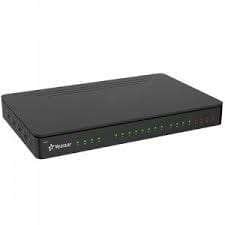
Yeastar N824 Smart Analog Phone System
KSh93,000.00
Description
Yeastar N824 Smart Analog Phone System Kenya Mtech
Yeastar N824 Smart Analog Phone System delivers advanced communications features of a large system to the small office. Yeastar N824 maximizes cost-effectiveness with8 CO lines, 24 analog extensions, 8 SIP extensions, 8 SIP trunks, and the ability to handle calls with your mobile phone.
Yeastar N824 smart analog PBX is easy to install and ready to play out of the box with plug-and-play facility. In rare circumstances when configuration is needed, the user-friendly web interface is easy and intuitive.You can enjoy the convenience and efficiency of powerful built-in features with Yeastar N824 without extra license fees:
Product Specification:
CO / FXO line 8 **included
Analog Extensions 24 **included
RJ21 Connectors 1 for FXS and 1 for FXO
SIP Extensions 8 **included
SIP Trunks 8
Network Interfaces 1 10/100Mbps
Protocol SIP (RFC3261)
Transport UDP, TCP, TLS, SRTP
DTMF RFC4733, SIP INFO, In-band
Codec G.711 (a-law, u-law), G.722, G.726, G.729 A/B, GSM, iLBC , Speex
Console Port 1
SD Card Slot 1
Dimensions 440 mm × 250 mm × 44 mm
Weight 1.5 kg
Power AC 100-240V (12V, 5.5A)
Operation Range 0°C to 40°C, 32°F to 104°F
Storage Range -20°C to 65°C, -4°F to 149°F
Humidity 10-90% non-condensing
Related products
-
 Add to cart
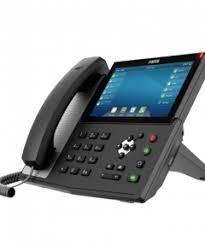
Advantages / Benefits of Fanvil IP Office Phones Mtech
Fanvil manufacture a range of cost-effective and feature rich VoIP telephones specifically designed for enterprise use. Fanvil SIP phones feature HD voice and have excellent usability, with the additional benefit of being fully compatible with 3CX, a software- based IP PBX.
3CX supports the Fanvil H Series and X Series of IP Phones. The interoperability between the two creates an end-to-end business telephony solution
Fanvil’s line is concentrated in 3 fundamental models of phones.
The X3P is also POE with dual Fast Ethernet ports (10/100 MBit/s), and 2 Sip extensions.
The X3P targets the low end space for single to dual line phones all in one elegant unit with a small footprint. The phone was designed to blend into modern office space, home office and is designed to be wide spectrum use general purpose basic IP Phone with a great price point.
Its GUI is very intuitive, buttons have internationally recognizable icons and screen menus are multilingual.
The X5G unit offers 6 SIP extensions with 8 BLF / Speed Dial buttons with a digital desi strip area. On the interface side it has one Gbit POE Ethernet port and one pass-through Gb ethernet switch port. This phone was designed as a office IP Phone to cover the middle market with its freely programmable BLF with digital display that can scroll over several pages of contacts. The keypad and Telephone User Interface are very intuitive. Buttons are designed with internationally recognizable icons and screen menus are multilingual.
Fanvil’s Video Phone the C600 Android unit is a 7” tablet style phone with 6 SIP extensions, a POE Gb Ehternet port and a Gb Ethernet pass-through port, USB and HDMI ports, Softkey BLF functions, Skype capable, and has an onboard camera.
Advantages of Fanvil IP Phones
Fanvil ip phones offers New innovative concept of a highly concentrated product line (only 3 models to focus on)
Fanvil IP Video phone has excellent processor speed and runs smoothly
Fanvil IP Video phone has Skype integration and built-in 3 way video conferencing
Fanvil C600 ip phone has an advanced and clean user interface. It doesn’t look like a tablet with a bunch of app icons but rather has the look of a high-end IP based smart business phone
Fanvil C600 has exceptional Microsoft Exhange and Google integration boasting total contact synchronization
Another unique feature is the way Fanvil presents users their fully synchronized calendars. The desk phone could become the calendar viewer of choice for many users
Fanvil IP Phone prices
Fanvil X4 4 Line Enterprise Multi Color Screens Phone Ksh 8,000 Buy
Fanvil X3SP| X3 2-Line PoE IP Phone Ksh 5,400 Buy
Fanvil X3SP SIP IP PoE phone Ksh 5,400 Buy
Fanvil X6 High-End VoIP IP Phone 4.3-Inch Color Display Ksh 17,000 Buy
Fanvil X5S 6 line Executive Gigabit Color Display Phone Ksh 10,000 Buy
Fanvil X6 Executive IP Phone Ksh 14,000 Buy
Fanvil X4 Enterprise IP Phone Ksh 8,000 Buy
Fanvil X5 IP Executive **Desk Phone Ksh 13,500 Buy
Fanvil C01 IP Phone Ksh 6,000 Buy
Fanvil C400 Android based VoIP Phone Ksh 25,000 Buy -
Atcom IP08 8 ports FXO/FXS IP-PBX – Kenya
KSh56,000.00Add to cartAtcom IP08 8 ports FXO/FXS IP-PBX
The Atcom IP08 is a versatile and compact IP-PBX designed to meet the telephony needs of small to medium-sized businesses. This system features 8 ports, comprising 4 FXO (Foreign Exchange Office) ports for connecting to external phone lines and 4 FXS (Foreign Exchange Station) ports for connecting analog telephones or fax machines.
The IP08 supports high-definition audio and a range of codecs including G.711, G.723.1, and G.729, ensuring clear and reliable voice communication. It offers essential telephony features such as call forwarding, call transfer, call hold, and call waiting. The integrated voicemail system and automated attendant (IVR) capabilities further enhance communication management, while conference calling support facilitates collaborative conversations.
For ease of management, the Atcom IP08 provides a web-based interface for configuration and remote management, allowing for straightforward setup and maintenance. Firmware updates can be performed over the air, ensuring that the system stays current with the latest features and security improvements.
The device is designed for flexible installation, with options for both desktop and wall mounting. It is powered by a standard AC supply (100-240V, 50/60Hz) and has a low power consumption of approximately 10W. The IP08 operates within a temperature range of 0°C to 40°C and a humidity range of 10% to 90% non-condensing.
Additional features include support for SIP TLS and SRTP for secure communication, making it compatible with standard SIP-based VoIP services and enhancing the security of communications. The Atcom IP08’s scalable design allows for expansion with additional IP phones and devices, making it a practical and adaptable solution for growing businesses.
Overall, the Atcom IP08 is a reliable and feature-rich IP-PBX system that provides comprehensive telephony functionality in a compact and user-friendly package. Its advanced features and ease of management make it an excellent choice for businesses looking to streamline their communication infrastructure.
IP08 8 ports FXO/FXS IP-PBX specifications
Hardware Features
LAN Port 1 10 / 100Mbps
WAN Port 1 10 / 100Mbps
Analog Port 8 RJ11
ATCOM Telephony Module supported Up to 8 Port FXO or 8 Port FXSAtcom IP08SIP Features
SIP Compatibility SIP(RFC3261), IAX2(RFC5457)
Concurrent Calls 16
Maximum Registered Users Supported 128
PBX Features
Basic Features Blacklist Caller ID Call Back Call Detial Records (CDR) Call Pickup (Group Pickup & Directed Pickup) Call Parking Call Queues Call Recording Call Routing Call Transfer (Blind Transfer & Attend Transfer) Call Waiting Conference Do Not Disturb (DND) Follow me Interactive Voice Response (IVR) Intercom/Paging Music on Hold (MoH) Ring Group Skypy Integration (Skype for SIP) Voice Mail to Email
Advance Features Auto Provision Call Recording Direct Inward System Access (DISA) Dual-OS Redundancy External Storeage Supported IP Restriction Personal Web Portal Storage Quota Privilege Tcpdump diagnostic tool Auto Provisioning Customized Dialplan
Audio Codec G711(A/**), G.722,G726,G729,GSM,Speex,ADPCM
Video Codec H261, H263,H263P,H264
Fax Features* T.38,Fax to Email
Network Features
DHCH Server / Client Yes
DDNS Yes
Static IP Yes
VLAN (802.1Q) Yes
VPN Yes (PPTP)
Port Forward Yes
Installation & Configuration
Installation Desktop or Wall mount
Configuration Web based configuration
Others
Power Consumption 5W
Storage Temperature 20°C – 65°C (-4°F – 149°F)
Operating Temperature 0°C – 40°C (32°F – 104°F)
Operating Humidity 10 – 9 -

Biometric Access control for office – Kenya
KSh60,000.00Add to cartBiometric Access control for office
A Biometric Access Control System for Offices provides a robust and highly secure solution for managing entry and ensuring the safety of corporate premises. Utilizing advanced biometric technologies like face recognition, fingerprint scanning, and iris scanning, this system ensures that only authorized personnel can access sensitive areas. It can accommodate up to 10,000 fingerprint templates, 3,000 face templates, and 30,000 card users (optional), providing flexible user management for various office sizes.
The system offers multiple authentication modes, including dual-factor authentication, combining biometrics with card or PIN entry for added security. With anti-tailgating features, real-time monitoring, and detailed audit trails of every access attempt, it provides a comprehensive security solution that not only restricts unauthorized access but also tracks entry times and activities. The system also includes alarm systems for unauthorized access attempts or forced entries, ensuring constant security vigilance.
Easy to integrate with existing security systems and time attendance software, this access control system supports various communication protocols (TCP/IP, RS485, Wiegand) and can connect to the cloud or local servers for remote management. It also features emergency access modes, such as quick unlocks during evacuations or emergencies.
Designed for reliability in both indoor and outdoor environments, it operates in temperatures from -10°C to 50°C, with IP65-rated weatherproofing for harsh environments. Whether it’s for a corporate office, restricted departments, or conference rooms, this biometric access control system offers a modern, secure, and efficient solution for businesses aiming to enhance workplace security while improving employee access management.
-
 Add to cart
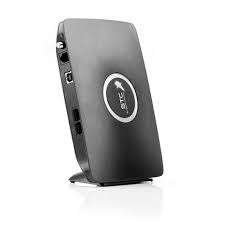
GSM gateway router for VoIP with Simcard slot
GSM gateway router for VoIP with Simcard slot is designed to work in conjunction with key phone systems and IP-PBX to provide GSM communications. GSM gateway router extensive compatibility of the GoIP makes it an ideal choice to be deployed in multi-vendor open architecture VoIP networks.
GoIP is a great way to provide fast phone service deployment where regular PSTN line may not be readily available. GSM gateway also provides significant savings in usage, infrastructure and maintenance cost compared to conventional PSTN.
GSM gateway router bi-directional password authentication (call authorization) and trust list authentication greatly minimize the risk of charge losses and the flexible routing function can meet special requirements of various call forwarding.
GSM gateway router supports multi device groups, with flexible setting of large GSM gateway groups with different channel numbers. With its low price, excellent voice quality, and powerful features, the GoIP series gateway is the first choice for system integrators, traffic operators, and softswitch manufacturers.
GSM gateway router specifications
Open Standard VoIP Protocols (IETF SIP V2)
Single or Multiple Server Registrations
Two 10/100 Ethernet for WAN / LAN connections
Peer-to-Peer IP Calls
Speech quality ensured by QoS at the Ethernet and IP layers and comprehensive jitter buffer
Line Echo Cancellation
VLAN and QoS support
NAT Transversal and Router functions
Voice prompts, HTTP Web, Auto Provision support for configuration and updates
Highly stable embedded Linux operating system in high performance ARM 9 Processor -
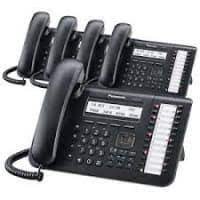
NS500 PBX, IP Panasonic System,+ 20 IP Phones package
KSh430,000.00Add to cartDescription
NS500 PBX IP Panasonic System+ 20 IP Phones package Mtech NetworksNS500 PBX IP Panasonic System+ 20 IP Phones package, with this package office movement will be reduced as there will be inter office communication by use of this phone, the package include, one KNS 500 IP PABX, one S-DSP Voip card KX-NS5110, 10 IP licenses for Hard Phones-KX-NSM510, one DSS Console- KX-DT543, IP Phone-KX-HDV130, 16 PORT POE SWITCH,
Description Unit QTY
KNS 500 IP PABX pcs 1
S-DSP Voip card KX-NS5110 pcs 1
20 IP licenses for Hard Phones-KX-NSM520 pcs 1
DSS Console- KX-NT543 pcs 1
Huawei Gateway GSM b932 1
IP Phone-KX-HDV130 pcs 19
24 PORT POE SWITCH pcs 1
configuration pcs 1





Reviews
There are no reviews yet.