

Logitech Logi Bolt USB Receiver – Kenya
KSh2,500.00
Logitech Logi Bolt USB Receiver in Kenya
Logitech Logi Bolt USB Receiver Price in Kenya is Ksh 2,500.Enjoy convenience and reliability by pairing your compatible wireless keyboard, mouse, or combo set with the Logi Bolt USB Receiver from Logitech. Designed to cut through congested areas with a range of up to 33 feet, Logi Bolt technology combines Bluetooth Low Energy security standards with Logitech**s proprietary features to establish a strong and reliable encrypted wireless connection. A single receiver can support up to six devices, which can eliminate the need to carry a keyboard and mouse to multiple locations. Simply keep a separate set of peripherals at home and work, then carry the receiver around in your pocket instead. Paired peripherals will automatically connect once the receiver is powered up and in range. With its ultra-compact design, you can even leave Logi Bolt receiver permanently plugged into the USB Type-A port of your Windows 10, macOS, Linux, or Chrome OS laptop.Buy Logitech Logi Bolt USB Receiver at best price in Kenya at Adishnetservices.
Logitech Logi Bolt USB Receiver Price in Kenya
Price in Kenya Ksh.2,500
USB
USB Type-A
Wireless Technology
Logi Bolt (Bluetooth LE)
Range
33** / 10 m
OS Compatibility
Windows 10 or Later
macOS 10.14 or Later
Linux
Chrome OS
Physical
Dimensions
0.7 x 0.6 x 0.3** / 18.4 x 14.4 x 6.6**mm
Compatibility
Logitech
**
Related products
-
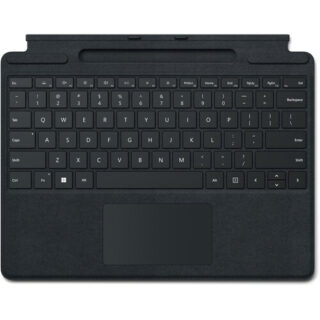
Microsoft Surface Pro Signature Keyboard – Kenya
KSh37,499.00Add to cartMicrosoft Surface Pro Signature Keyboard Price in Kenya
Microsoft Surface Pro Signature Keyboard Price in Kenya is Ksh 37,499. Enjoy a smooth and elegant typing experience while using your Surface Pro 8, Surface Pro 9, or Surface Pro X with the Microsoft Surface Pro Signature Keyboard. Made with luxurious Alcantara material, this stylish black mechanical keyboard cover attaches magnetically to your Surface Pro device to provide a smooth typing experience in almost any situation, whether youre working from your lap or at a desk. It also helps to optimize your workflow with a large glass touchpad along with Windows shortcut, media control, right click, and brightness adjustment buttons. The integrated fingerprint reader allows you to quickly log into Windows without having to enter a password. Additionally, its convenient tray securely stores and recharges your Surface Slim Pen 2, keeping it ready and close by when you need it. Once youre done, simply close the cover to protect your screen while traveling.
Microsoft Surface Pro Signature Keyboard Price in Kenya
Switch Type Mechanical
Key Rollover None
Dedicated Multimedia Keys Yes
Dedicated Macro Keys None
Windows Lock Key No -

Vention Laptop/Tablet Stand – Kenya
KSh3,500.00Add to cartVention Laptop/Tablet Stand Price in Kenya
Vention Laptop/Tablet Stand Price in Kenya is Ksh 3,500
The Vention Tablet Stand Holder Silver VEN-KDLI0 Specs include;
Six Heights Adjustment
Height adjustable about 69mm-118mm
Aluminum Alloy & Stable
Triangular structure +X-type tensile structure more stable support, static weighing about 30kg
Silicone Anti-slip Protect Computer
Soft non-slip silicone on the contact surface and bottom prevents computer wear and tear.
Aluminum Alloy & Stable
Silicone Anti-slip Protect Computer
Soft non-slip silicone on the contact surface and bottom prevents computer wear and tear
-
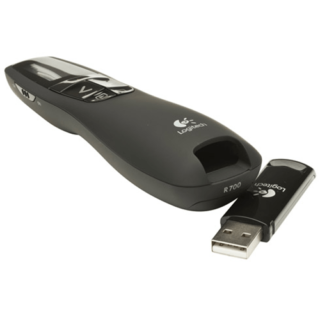
Logitech R700 Professional Laser Pointer – Kenya
KSh8,500.00Add to cartLogitech R700 Professional Laser Pointer in Kenya
Logitech R700 Professional Laser Pointer price in Kenya is 9000 Shillings. The Logitech Professional presenter R700 helps you navigate through slideshows and highlight your points using a brilliant red laser pointer. With a wireless range of up to 30 m, you can control your presentations, no matter where you are standing.
Youll enjoy the freedom to move around the room and mingle with your audience for greater impact. A reception-level indicator ensures you dont wander too far. Navigate through your presentation with confidence with the intuitive slideshow controls.
Theres no software to install. Just plug the receiver into a USB port to begin. And when the show is over, you can store the receiver in the presenter. A brilliant red laser pointer helps you get their attention and keep it. Keep track of time, battery, and wireless reception with a glance or with silent, vibrating alerts. You remain focused on your presentation, not the clock.
Logitech R700 Professional Laser Pointer price and specs in Kenya
Price in Kenya Ksh. 9000
Display LCD Display with Timer and Indicators
Range Up to 100-foot (30-meter) range
Presenter mode Yes
Laser Pointer Built-In red Laser Pointer
Wireless 2.4GHz RF Wireless Technology
Plug-and-Play Technology Yes
Intuitive slideshow controls Yes
Color Black
User experience Comfortable -
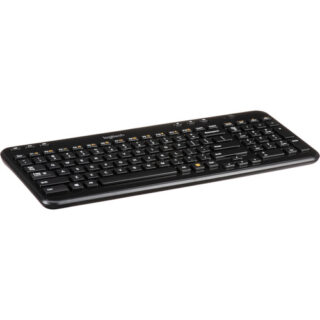
Logitech Wireless Keyboard K360 – Kenya
KSh3,800.00Add to cartLogitech K360 in Kenya
Logitech Wireless Keyboard K360 Price in Kenya is Ksh 3,800.The compact, convenient K360 Wireless Keyboard in black from Logitech employs a tiny leave-in receiver that plugs into the USB port on your Windows-based laptop. It features a space-saving design, familiar keyboard layout, and 3-year battery life with instant access to music, email and more. As the perfect laptop companion, the K360 lets you type in comfort while taking up minimal space. The legs allow for keyboard tilt adjustment while the rubber feet keep the keyboard from slipping while in use.
Advanced 2.4 GHz Wireless
The K360 offers a long-range wireless connection that virtually eliminates delays, dropouts and interference so you can work and play in more places
Hot Keys
Youll find six (6) hot keys that let you skip a song, pause a video, turn up the volume and more
Programmable F-Keys
Youre in charge with twelve (12) programmable F-keys that let you easily customize the keyboard to open your favorite applications, folders or web pages
Unifying Receiver
The tiny receiver stays in your laptop, and you can easily add a compatible wireless mouse, keyboard or number pad without the hassle of multiple USB receivers
Plug-and-Play
Enjoy simplified Plug-and-Play setup just plug the wireless receiver into a USB port, pull the battery tab and start using your keyboard right away without software
Adjustable Tilt Legs
You can extend the sturdy folding legs to increase the keyboard tilt by eight (8) degrees to address your personal comfort needs; also, the rubber feet prevent slipping
Long Battery Life
Type emails and surf the web at your leisure the K360 features a generous estimated battery life of three (3) years
Whisper-Quiet, Framed Keys
The framed keys look modern and barely make a sound, while providing a more comfortable typing experience than laptop and netbook keyboards
Compact Comfort
You can type in comfort with a familiar layour its about 20% smaller than Logitechs standard keyboards for a perfect fit in your office, living room and well, anywhere else you use your laptop! -
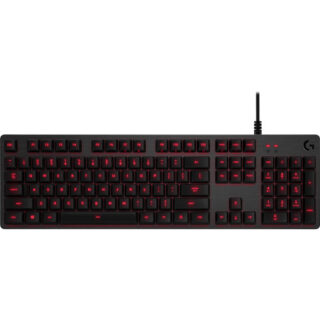
Logitech G413 Mechanical Keyboard – Kenya
KSh14,500.00Add to cartLogitech G G413 in Kenya
Logitech G413 Mechanical Keyboard Price in Kenya is Ksh 14,500. The G413 Mechanical Backlit Gaming Keyboard from Logitech is built with a durable aluminum top cover and gaming-friendly features to help you dominate the battlefield. It utilizes Logitechs Romer-G switches, which provide you with a balance of speed and precision, and has red LED backlighting so you can game in the dark. Moreover, built-in function keys grant you easy access to multimedia controls, lighting options, and more. Thanks to Logitechs downloadable gaming software, you can customize and program functions and macros on the F1 to F12 keys to execute complicated commands with a single click.
Logitech Romer-G Switches
The Logitech Romer-G switches have an actuation force of 45 g, an actuation distance of 0.06**, and a total travel distance of 0.12**. Moreover, they are rated to last up to 70 million clicks to provide you with durable, fast, and responsive gaming experience.
Logitech G413 Mechanical Keyboard Price in Kenya
Precision Key Lighting
Romer-G switches are also built with LED lighting in mind. The keys are always visible and offer precise and clean lighting through the keycaps without being too distracting.
Aircraft-Grade Aluminum Alloy
The top case of the keyboard is built with an aluminum-magnesium alloy for a tough and stylish finish.
USB Pass-Through
Located at the top of the keyboard is a USB pass-through port, which you can use to conveniently plug in your other USB peripherals. Be sure to plug in both USB cables for USB pass-through functionality.
Full Function Keys
Use the FN key to access multimedia controls, gaming mode, lighting options, and more.
Gaming Keycaps
Included are 12 additional keycaps and a keycap puller so you can swap out the keys for a different style.
Advanced FeaturesGame Mode Disable the Windows key to prevent accidents during crucial moments.
26-Key Rollover Press multiple keys at the same time and have them all accurately register.
Anti-Ghosting Reliable control when multiple commands are give simultaneously.
Programmable Macros
Download the optional Logitech Gaming Software to gain access to this keyboards full set of features including customizable macros.



Reviews
There are no reviews yet.