Microsoft Surface Pro Signature Keyboard – Kenya
KSh37,499.00
Microsoft Surface Pro Signature Keyboard Price in Kenya
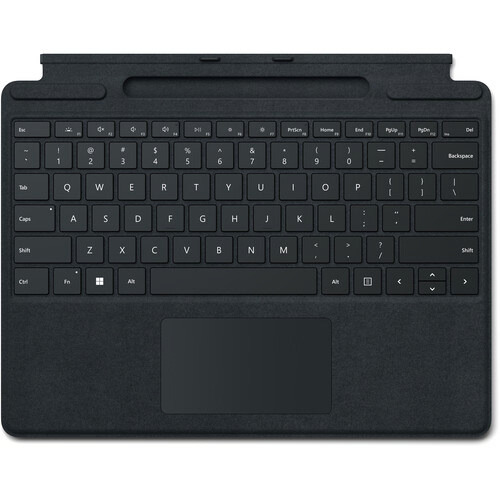
Microsoft Surface Pro Signature Keyboard Price in Kenya is Ksh 37,499. Enjoy a smooth and elegant typing experience while using your Surface Pro 8, Surface Pro 9, or Surface Pro X with the Microsoft Surface Pro Signature Keyboard. Made with luxurious Alcantara material, this stylish black mechanical keyboard cover attaches magnetically to your Surface Pro device to provide a smooth typing experience in almost any situation, whether youre working from your lap or at a desk. It also helps to optimize your workflow with a large glass touchpad along with Windows shortcut, media control, right click, and brightness adjustment buttons. The integrated fingerprint reader allows you to quickly log into Windows without having to enter a password. Additionally, its convenient tray securely stores and recharges your Surface Slim Pen 2, keeping it ready and close by when you need it. Once youre done, simply close the cover to protect your screen while traveling.
Microsoft Surface Pro Signature Keyboard Price in Kenya
Switch Type Mechanical
Key Rollover None
Dedicated Multimedia Keys Yes
Dedicated Macro Keys None
Windows Lock Key No
Related products
-
Samsung 75″ Flip Pro WM75B Interactive Display – Kenya
KSh410,000.00Add to cartSamsung 75** Flip Pro WM75B Interactive Display in Kenya
Samsung 75** Flip Pro WM75B Interactive Display Price in Kenya is Kshs.410,000.Buy Samsung 75** Flip Pro WM75B Interactive Display at Adishnetservices Kenya.
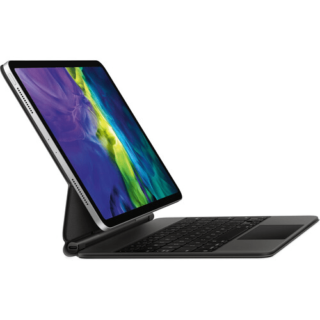
The future of classroom instruction is here with the**WM75B Flip Pro 75** 4K Interactive Touchscreen LED Display**from**Samsung. The messy blackboard is replaced with this touchscreen display, which provides 4K visuals for more engaging lessons and interactive features that increases student engagement. With up to 20-person multi-touch, students can still walk up to write on the **board,** or they can share their mobile screen from their seat with software like Apple**s AirPlay 2. The screen can accommodate the display of up to 4 screens at once. Additional features, such as video calling and pushed content, allows the Flip Pro to move beyond the classroom and interact with the school itself and those outside its walls.
Real-World Writing & Drawing
More than a simple display, the Flip Pro lets teachers and students write and draw on it as you would a traditional blackboard. However, with the Flip Pro, you can also annotate 4K visuals for stunning and immersive educational content. Why settle for chalk circles when you can interact with professional renditions of the solar system. The screen provides 2048 points of pressure with a low 26 ms of latency for a natural experience, and you can choose between pen or brush modes. Modes you can adjust with the quick tool and palette.
Quick Tool & Palette
The integrated quick tool and palette gives you the option of choosing different tip sizes, thicknesses, and colors. You can even add additional note layers and easily erase content with the swipe of a finger or hand.
Workspace Secured by Knox
Integrated Samsung Knox security software makes it possible to safely access remote PCs, network drives, and other third-party applications directly from the Flip Pro. Applications like Office 365, VMWare, or Boxlight MimioConnect. MimioConnect is included with the Flip Pro and provides a catalog of versatile learning content, including real-time data and analytics.
MagicINFO Remote Management
Content, alerts, and warnings can conveniently be pushed to each Flip Pro in a school or on campus to notify teachers and students of important information.
Front Control Panel
A front control panel makes it easy to manage the Flip Pro**s settings and plug in optional devices, such as a laptop. You get two USB Type-A inputs (one USB 3.0), and once each of the following: USB Type-B, USB Type-C, and HDMI. The USB Type-C port is a 3-in-1 port that allows for a simplified single cable connection to a laptop for screen mirroring, touch control, and up to 65W of charging.
Safe to Use
Samsung equipped the Flip Pro with an antimicrobial coating and shatterproof film for improved safety. The coating inhibits microbial growth, while the film keeps the screen intact if it were to accidentally break.
Additional Features
Up to 50 simultaneous device connections via SmartView+
Video call compatible with WebRTC (Real Time Communication API)
Google Duo built-in
OPT (Open Pluggable Specification) slot for third-party apps, tools & SIS (School Information Systems) integration
Ethernet network connection -
Microsoft Surface Pro 9 – Kenya
KSh125,000.00Add to cartMicrosoft Surface Pro 9 Price in Kenya
Microsoft Surface Pro 9 Price in Kenya 125,000. Be productive, creative, and entertained from almost anywhere with the 13** Microsoft Surface Pro 9, which combines the power of a laptop with the versatility of a tablet. Designed for everyday productivity, video conferencing, and gaming, this portable sapphire colored system is updated with an Intel i5 10-core processor and 16GB of LPDDR5 memory, giving it the flexibility to quickly multitask applications such as Microsoft Word, Adobe Fresco, and more installed onto its replaceable 256GB SSD. At the same time, the Surface Pro 9 maintains the familiar lightweight design of its predecessor, including a 13** 2880 x 1920 resolution PixelSense Flow touchscreen display, dual Thunderbolt 4 ports, and a convenient built-in kickstand. Wi-Fi 6E capabilities allow you to connect to compatible high-speed networks. Windows 11 Home is pre-installed. Buy Microsoft Surface Pro 9 online at best price in Kenya at Adishnetservices
Microsoft Surface Pro 9 Specs and Price in Kenya
Price in Kenya Ksh 125000
Processor
Quad-core 11th Gen Intel® Core i7-1185G7 ProcessorSecurity
Firmware TPM chip for enterprise-grade security and BitLocker support
Enterprise-grade protection with Windows Hello face sign-inSoftware
Windows 11 Home
Preloaded Microsoft 365 Apps8
Microsoft 365 Family 30-day trial9
Preloaded Xbox app
Xbox Game Pass Ultimate month trial9Sensors
Accelerometer
Gyroscope
Magnetometer
Ambient Color Sensor (brightness and color)
Surface Pro 9
12th Gen Intel Core 10-Core Processor
This system features a power-efficient Intel Core i5-1235U 10-core 12th generation processor, which contains two Performance cores with a Max Turbo frequency of 4.4 GHz to load a variety of applications while the eight Efficient cores handle background tasks for smooth multitasking.
PixelSense Flow Display
The Surface Pro 9 features a 13** edge-to-edge PixelSense Flow 10-point touchscreen display with a 2880 x 1920 resolution, delivering crisp images with 267 ppi (pixels per inch) and a 3:2 aspect ratio. The display also supports cinema-quality video with Dolby Vision IQ and comes with an ambient color sensor, which automatically adjusts the color temperature and brightness based on the lighting conditions. The default 60 Hz refresh rate may be increased to 120 Hz for smoother scrolling while browsing content in addition to minimizing motion blur when playing your favorite games.
High Resolution Cameras
Capture every moment in stunning detail with the 10MP rear camera, which records video at up to 4K resolution. Additionally, the 1080p front camera is ideal for video calls and supports quick logins via Windows Hello.
Fast Wi-Fi
Wi-Fi 6E (802.11ax) connectivity allows you to take advantage of the less congested 6 GHz band with compatible networks, delivering a clear high-speed signal for smooth video streaming, online gaming, and web browsing experiences.
Thunderbolt 4
Thunderbolt 4 is a hardware interface that utilizes the reversible USB Type-C connector and features a maximum throughput of 40 Gb/s when used with compatible devices. The connector also transmits data via USB4 at up to 20 Gb/s, and dual-bandwidth DisplayPort allows you to connect either one 8K monitor or up to two 4K displays simultaneously. Additionally, you can daisy chain up to six devices from a single port.
Power Through Your Day
The Surface Pro 9 offers up to 15.5 hours of battery life.
Complete Your Experience
Enhance your Surface Pro 9 with a separately purchased Surface Slim Pen 2 to make detailed illustrations and edits as though you were working with a pen and paper. Adding a Surface Pro Signature Keyboard provides you with a laptop experience. You can also pair the system with a variety of Bluetooth devices, including headsets, mice, and speakers.
Windows 11 Home
A New Start Position
Windows 11 has been completely redesigned from its predecessor to emphasize productivity, creativity, and ease of use. The customizable Start Menu is now at the center of the taskbar and utilizes the cloud, allowing you to quickly find and access recent files, regardless of what platform or device was previously used to view them. The streamlined Start Menu design also lets you pin apps and recent files in addition to powering down the system.
Making Productivity a Snap
Multitask with speed and efficiency with the ability to snap apps side-by-side. Snap Layouts and Snap Groups help to keep your windows organized using different layouts that are designed to fully optimize your screen space, no matter its size and resolution. Windows 11 also remembers their positions, so you can resume from where you left off when selecting Snap Groups from the task bar, allowing you to switch between both individual applications and entire projects. Snap Layouts are also automatically restored when docking laptops with external monitors.
Microsoft Teams Integration
Stay connected with friends, family, co-workers, and clients with Microsoft Teams Chat integrated onto the Windows 11 taskbar. With a touch, you can connect to your contacts via text, voice, and video, regardless of whether theyre using Windows, Android, or iOS devices. You can also communicate with those who dont have the Teams app installed using two-way SMS messaging.
Adapting to You
The Adaptive Input feature automatically optimizes the Windows 11 interface to however you prefer to interact with your device, whether its using a mouse, keyboard, touch, voice, or handwriting. -
Logitech MeetUp Video Conference Camera – Kenya
KSh96,000.00Add to cartLogitech MeetUp Video Conference Camera in Kenya
Logitech MeetUp Video Conference Camera Price in Kenya is Ksh 96,000.Add the MeetUp All-In-One 4K ConferenceCam from Logitech to your small conference room to capture audio and video of everyone in the room. The compact design keeps wiring to a minimum and can be easily mounted on a table or on the wall.
The camera features a 120° lens with a 5x zoom which captures a wide field of view, keeping all subjects in focus without a fisheye effect. The camera captures up to 1080p video over USB 2.0, and up to 4K UHD video with a separately available USB 3.0/3.1 Gen 1 cable at 30 fps. Its pan, tilt, zoom, volume, mute, and answer/hang-up functions can be controlled by the included RF remote control or by the ConferenceCam Soft Remote app for Android and iOS over Bluetooth. You can also connect your smartphone via Bluetooth to use the MeetUp speaker for rich, clear sound.
The ConferenceCams audio features include three built-in microphones that have a range of 8**. If you have a larger room to cover, an optional Expansion Mic for MeetUp can be added to extend your audio capture range to 14**. Microphone features include a low-distortion algorithm, background noise reduction, and echo cancellation. The built-in speaker provides clear audio and peak-limiting to prevent clipping.
The MeetUp connects to a macOS or Windows computer via plug-and-play USB, and supports numerous conferencing applications such as Skype for Business, Microsoft Cortana, Cisco Jabber, and WebEx. It also integrates with Logitech Collaboration Program (LCP) members which include BlueJeans, Broadsoft, LifeSize Cloud, Vidyo, and Zoom.
You can mount your MeetUp on a table or wall with the included wall mount, or an optional TV mount can be purchased to mount above or below a wall-mounted flat-panel TV with standard VESA mounts. A built-in Kensington security slot allows you to lock down your MeetUp when not in use. The unit also comes with a 16** USB cable and power adapter.
System Requirements
Windows 7, Windows 8.1, or Windows 10.
macOS 10.10 or higher.
Chrome OS Version 29.0.1547.70 and higher.
USB 2.0 port (USB 3.0/3.1 Gen 1 required for 4K video).
Camera Optics
MeetUp features camera optics that capture a wide field of view without distorting faces and furniture with a fisheye effect. Faces look natural, whiteboard writing remains legible, and straight lines stay straight.
5x Zoom Lens
Zoom in on whiteboards and objects so remote participants can see what you see. Thanks to its advanced 4K image sensor, video remains sharp and clear, even when you zoom in on the details.
Camera Operation
The camera features three presets and motorized pan/tilt operation.
Built-In Microphone, Optional Expansion Mic
MeetUps built-in beamforming mics are optimized for up to 8**. To extend that range up to 14**, add an optional Expansion Mic. Whether people are seated at a table, sitting against the wall, or walking around the room, the Expansion Mic for MeetUp means everyone will be heard.
Bluetooth Speakerphone
If youre already connected on your smartphone or dialing into an audio conference, pair MeetUp with your smartphone or tablet to enjoy outstanding audio clarity, volume, and range that handheld devices cant match.
RF Remote Control
With a multi-directional remote control, you can easily operate camera controls, adjust volume, and mute/unmute from anywhere in the room. Featuring a low-profile design, durable materials, and a non-slip base, the MeetUp Remote Control feels as good on the tabletop as it does in your hand.
Smartphone Remote Control
The ConferenceCam Soft Remote app for Android and iOS (available on Google Play and iTunes) replicates every function of the physical MeetUp remote on your smartphone or tablet.
Wall Mount or Optional TV Mount
The MeetUp includes a mounting kit with the hardware you need to mount the unit on a wall or mount onto a table. The optional Logitech TV Mount for MeetUp lets you mount the MeetUp ConferenceCam either above or below a flat-panel monitor, and attaches to the industry-standard VESA mounting points available on most TVs and monitors.
Kensington Security Slot
Secure the MeetUp when not in the conference room with a Kensington-compatible security slot.
Software Compatibility
MeetUp works with most any video conferencing application or meetings service.
Skype for Business certified.
Microsoft Cortana certified.
Cisco Jabber and WebEx compatible.
Enhanced integration with Logitech Collaboration Program (LCP) members, including BlueJeans, Broadsoft, LifeSize Cloud, Vidyo, and Zoom. -
Read more
Logitech MX Master 3s in Kenya
Logitech MX Master 3s price in Kenya is Ksh 15,000. Stay comfortable and productive with the black Logitech MX Master 3S Wireless Mouse by your side. Updated with an 8000 dpi Darkfield optical sensor, this versatile mouse is designed to provide precise tracking on almost any surface, including glass. At the same time, its Quiet Click buttons provide a satisfying feel while producing 90% less noise than the original MX Master, and the MagSpeed scroll wheel provides fast yet precise scrolling at up to 1000 lines per second. The ergonomic design fits most right hands and includes a convenient thumb rest area where you can quickly access buttons and a side scroll function. Enhance your workflow by using the Logi Options+ software for Windows and macOS to customize the MX Master 3S buttons with different functions. Buy Logitech MX Master 3S at the best price in Kenya from Adishnetservices.
Logitech MX Master 3S specs and price
Connection Wireless (2.4 GHz or Bluetooth Low Energy)
Sensor 8K DPI sensor
DPI 200 8,000 DPI (in 50 DPI increments)
Buttons 7
Special features MagSpeed scroll wheel with SmartShift, thumbwheel, Logitech Flow
Shape Right-handed
Battery Rechargeable (500 mAh) lithium-polymer battery
Battery life Up to 70 days on a full battery charge
Size 124.9 x 84.3 x 51 mm (H x W x D)
Weight 141 g
Colors Black, Graphite, Light Gray
Scope of delivery MX Master 3S mouseUSB-A receiver
USB-C charging cable
Instruction manual
Price in Kenya Ksh 15,400
About the Logitech MX Master 3s Wireless MouseIntroducing Quiet Clicks create, make and do with the same click feel, but less noise. Quiet Clicks deliver satisfying, soft tactile feedback with 90% less click noise Compared to MX Master, MX Master 3S has 90% less Sound Power Level left and right-click, measured at 1m. Add that to a remarkably quiet MagSpeed electromagnetic scroll wheel for a high-performance experience with zero distraction. The MX Master 3s comes in color Black, Graphite, and Light Gray
8K dpi any-surface tracking
MX Master 3S is outfitted with our most accurate sensor ever, with next-gen precision and responsiveness. The 8,000 DPI optical sensor tracks virtually anywhere even on glass mm minimum glass thickness. You can adjust your tracking sensitivity in Logi Options+ Requires Logi Options+ software, available for Windows and macOS, and set the right level for your workflow and monitor resolution.
Scroll 1,000 lines per second
MagSpeed Electromagnetic scrolling is precise enough to stop on a pixel and quick enough to scroll 1,000 lines per second. Oh, and its nearly silent. The wheels machined steel gives it a premium tactility and enough weight to offer dynamic inertia you feel but dont hear.
Upgrade your workflow
Work between devices and operating systems, customize individual buttons, set app-specific customizations, optimize nearly every action of your workflow, and set tracking speed in Logi Options+ Requires Logi Options+ software, available for Windows and macOS.
Countless customizations
MX Master 3S is fully customizable in virtually every app you use. Youll work faster with predefined customizations optimized for your favorite apps such as Adobe Photoshop, Adobe Premiere Pro, Final Cut Pro, Google Chrome, Safari, Zoom, Microsoft Teams, Word, Excel, PowerPoint, and Edge.
Work seamlessly
Logi Options+ lets you flow between computers by simply moving your cursor to the edge of the screen. Your MX keyboard follows your MX Master 3S and lets your workstream flow between Windows and macOS Requires Logi Options+ software, available for Windows and macOS. Effortlessly transfer text, images, and files between computers just copy on one and paste to the other.
Charge quickly, connect instantly
MX Master 3S stays powered for up to 70 days on a full charge and gets three hours of use from a one-minute quick charge. Battery life may vary based on user and computing conditions. Use the included USB-C charging cable to top up the power.
MX Master 3S is compatible with all major operating systems19Device basic functions will be supported without software for operating systems other than Windows and macOS right out of the box such as Windows, macOS, Chrome OS, or Linux®. Your mouse instantly pairs with up to three devices via Bluetooth Low Energy or the included Logi Bolt USB Receiver Not compatible with Logitech Unifying technology.
Hand sculpted all-day comfort.
Work comfortably with an ergonomic silhouette crafted to support your palm and fingers. Textured surfaces provide a confident grip for total control. The unique tilt angle of MX Master 3S positions your arm in a more natural posture for better comfort.
Optimally placed thumb controls are positioned for quick, intuitive access and fast navigation. The side scroll wheel follows the natural movement of the thumb for fluid and intuitive horizontal navigation.
Made with recycled plastic
The plastic parts in MX Master 3S include certified post-consumer recycled plastic 27% for Graphite and 22% for Pale Grey to give a second life to end-of-life plastic from old consumer electronics and help reduce our carbon footprint.*Excludes plastic in printed wiring assembly (PWA), receiver, wire, FFC cable, and packaging.
Responsible packaging
The paper packaging of MX Master 3S comes from FSC®-certified forests and other controlled sources. By choosing this product, you are supporting responsible management of the worlds forests.
Certified carbon neutral
Rest easy knowing that the carbon footprint of your MX Master 3S has been reduced to zero. Thats because beyond designing for sustainability, we also offset our residual impact by supporting forestry, renewables, and climate-impacted communities that reduce carbon.
In the Box
Mouse
Logi Bolt USB receiver
USB-C charging cable (USB-A to USB-C)
User documentationVisit the official website to learn more.
-
Logitech G413 Mechanical Keyboard – Kenya
KSh14,500.00Add to cartLogitech G G413 in Kenya
Logitech G413 Mechanical Keyboard Price in Kenya is Ksh 14,500. The G413 Mechanical Backlit Gaming Keyboard from Logitech is built with a durable aluminum top cover and gaming-friendly features to help you dominate the battlefield. It utilizes Logitechs Romer-G switches, which provide you with a balance of speed and precision, and has red LED backlighting so you can game in the dark. Moreover, built-in function keys grant you easy access to multimedia controls, lighting options, and more. Thanks to Logitechs downloadable gaming software, you can customize and program functions and macros on the F1 to F12 keys to execute complicated commands with a single click.
Logitech Romer-G Switches
The Logitech Romer-G switches have an actuation force of 45 g, an actuation distance of 0.06**, and a total travel distance of 0.12**. Moreover, they are rated to last up to 70 million clicks to provide you with durable, fast, and responsive gaming experience.
Logitech G413 Mechanical Keyboard Price in Kenya
Precision Key Lighting
Romer-G switches are also built with LED lighting in mind. The keys are always visible and offer precise and clean lighting through the keycaps without being too distracting.
Aircraft-Grade Aluminum Alloy
The top case of the keyboard is built with an aluminum-magnesium alloy for a tough and stylish finish.
USB Pass-Through
Located at the top of the keyboard is a USB pass-through port, which you can use to conveniently plug in your other USB peripherals. Be sure to plug in both USB cables for USB pass-through functionality.
Full Function Keys
Use the FN key to access multimedia controls, gaming mode, lighting options, and more.
Gaming Keycaps
Included are 12 additional keycaps and a keycap puller so you can swap out the keys for a different style.
Advanced FeaturesGame Mode Disable the Windows key to prevent accidents during crucial moments.
26-Key Rollover Press multiple keys at the same time and have them all accurately register.
Anti-Ghosting Reliable control when multiple commands are give simultaneously.
Programmable Macros
Download the optional Logitech Gaming Software to gain access to this keyboards full set of features including customizable macros.