

Logitech R700 Professional Laser Pointer – Kenya
KSh8,500.00
Logitech R700 Professional Laser Pointer in Kenya
Logitech R700 Professional Laser Pointer price in Kenya is 9000 Shillings. The Logitech Professional presenter R700 helps you navigate through slideshows and highlight your points using a brilliant red laser pointer. With a wireless range of up to 30 m, you can control your presentations, no matter where you are standing.
Youll enjoy the freedom to move around the room and mingle with your audience for greater impact. A reception-level indicator ensures you dont wander too far. Navigate through your presentation with confidence with the intuitive slideshow controls.
Theres no software to install. Just plug the receiver into a USB port to begin. And when the show is over, you can store the receiver in the presenter. A brilliant red laser pointer helps you get their attention and keep it. Keep track of time, battery, and wireless reception with a glance or with silent, vibrating alerts. You remain focused on your presentation, not the clock.
Logitech R700 Professional Laser Pointer price and specs in Kenya
Price in Kenya Ksh. 9000
Display LCD Display with Timer and Indicators
Range Up to 100-foot (30-meter) range
Presenter mode Yes
Laser Pointer Built-In red Laser Pointer
Wireless 2.4GHz RF Wireless Technology
Plug-and-Play Technology Yes
Intuitive slideshow controls Yes
Color Black
User experience Comfortable
Related products
-

Apple Magic Mouse 3 – Kenya
KSh11,000.00Add to cartApple Magic Mouse 3 Price in Kenya
Apple Magic Mouse 3 Price in Kenya is Ksh 11000. Magic Mouse 3 is wireless and rechargeable, with an optimized foot design that lets it glide smoothly across your desk
The Multi-Touch surface allows you to perform simple gestures such as swiping between web pages and scrolling through documents.
The incredibly long-lasting internal battery will power your Magic Mouse for about a month or more between charges
Its ready to go right out of the box and pairs automatically with your Mac, and it includes a woven USB-C to Lightning Cable that lets you pair and charge by connecting to a USB-C port on your Mac.
System Requirements: Bluetooth-enabled Mac with OS X 10.11 or later , iPad with iPadOS 13.4 or later
IPad Pro 12.9-inch (1st 2nd 3rd 4th and 5th generation) iPad Pro 11-inch (1st 2nd and 3rd generation) iPad Pro 10.5-inch iPad Pro 9.7-inch iPad (5th 6th 7th 8th and 9th generation) iPad Air (3rd and 4th generation) iPad Air 2 iPad mini (5th and 6th generation) iPad mini 4 IMac (24-inch M1 2021) iMac (Retina 4K 21.5-inch 2019) iMac (Retina 4K 21.5-inch 2017) iMac (Retina 4K 21.5-inch Late 2015) iMac (Retina 5K 27-inch 2019 2020) iMac (Retina 5K 27-inch 2017) iMac (Retina 5K 27-inch Late 2014 2015) iMac Pro (2017) Mac mini (M1 2020) Mac mini (2018) Mac mini (Late 2014) Mac Pro (2019) Mac Pro (Late 2013) MacBook Air (M1 2020) MacBook Air (Retina 13-inch 2020) MacBook Air (Retina 13-inch 2018 2019) MacBook Air (13-inch Early 2015 2017) MacBook Air (11-inch Early 2015) MacBook Pro (14-inch 2021) MacBook Pro (16-inch 2021) MacBook Pro (13-inch M1 2020) MacBook Pro (13-inch 2020) MacBook Pro (13-inch 2016 2019) MacBook Pro (Retina 13-inch Late 2012 2015) MacBook Pro (16-inch 2019) MacBook Pro (15-inch 2016 2019) MacBook Pro (Retina 15-inch Mid 2012 2015) MacBook (Retina 12-inch Early 2015 2017)
-
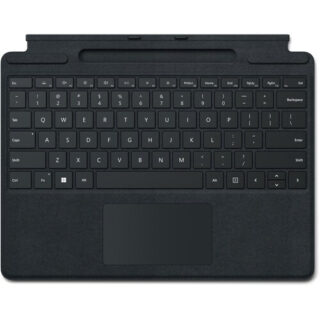
Microsoft Surface Pro Signature Keyboard – Kenya
KSh37,499.00Add to cartMicrosoft Surface Pro Signature Keyboard Price in Kenya
Microsoft Surface Pro Signature Keyboard Price in Kenya is Ksh 37,499. Enjoy a smooth and elegant typing experience while using your Surface Pro 8, Surface Pro 9, or Surface Pro X with the Microsoft Surface Pro Signature Keyboard. Made with luxurious Alcantara material, this stylish black mechanical keyboard cover attaches magnetically to your Surface Pro device to provide a smooth typing experience in almost any situation, whether youre working from your lap or at a desk. It also helps to optimize your workflow with a large glass touchpad along with Windows shortcut, media control, right click, and brightness adjustment buttons. The integrated fingerprint reader allows you to quickly log into Windows without having to enter a password. Additionally, its convenient tray securely stores and recharges your Surface Slim Pen 2, keeping it ready and close by when you need it. Once youre done, simply close the cover to protect your screen while traveling.
Microsoft Surface Pro Signature Keyboard Price in Kenya
Switch Type Mechanical
Key Rollover None
Dedicated Multimedia Keys Yes
Dedicated Macro Keys None
Windows Lock Key No -
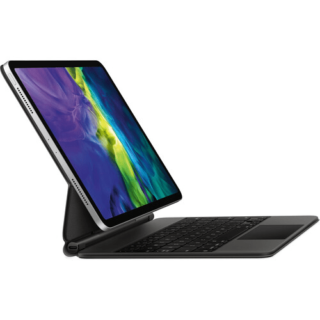
Apple Magic Keyboard for 11? iPad Pro – Kenya
KSh39,000.00Add to cartApple Magic iPad Pro 11** 2nd Gen Price in Kenya
Apple Magic Keyboard for 11** iPad Pro price in Kenya is Ksh 39,000. Use the black Magic Keyboard for iPad Pro from Apple to give your tablet a feel that rivals laptops. With its floating cantilever design, your 11** iPad Pro magnetically attaches to the Magic Keyboard for smooth viewing angle adjustments. Its full-size, backlit keys feature a scissor mechanism with 1mm travel for fast and quiet typing. The keyboard also has a built-in multi-gesture touchpad that allows precise interaction with iPadOS applications. A USB Type-C pass-through charging port is located on the keyboard folios hinge, freeing the iPad Pros port for peripherals such as external storage drives. Once youre done, the keyboard doubles as a cover that protects the front and back of your iPad Pro.
Apple Magic Keyboard Features
Designed for Comfort
The Magic Keyboard features a floating cantilever design, which allows you to magnetically attach your 11** iPad Pro and adjust it to the most comfortable viewing angle.
iPadOS Touchpad
The multi-gesture touchpad lets you move a cursor around in iPadOS applications such as word processors and spreadsheets.
USB Type-C Charging
Charge your iPad Pro using the Magic Keyboards integrated USB Type-C power pass-through port and use your iPad Pros port for other accessories.
Compatibility11** iPad Pro (1st Gen), 11** iPad Pro (2nd Gen), 11** iPad Pro (3rd Gen), 11** iPad Pro (4th Gen), 10.9** iPad Air (4th Gen), 10.9** iPad Air (5th Gen)
-
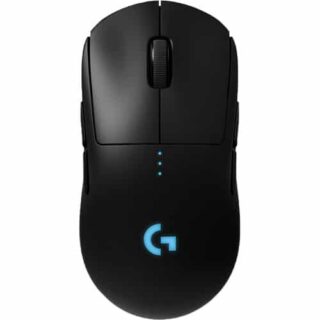
Logitech G PRO Wireless Gaming Mouse – Kenya
KSh17,999.00Add to cartLogitech G PRO Wireless Gaming Mouse in Kenya
Logitech G PRO Wireless Gaming Mouse Price in Nairobi,Kenya is Ksh 17,999
DESIGNED WITH PROS, ENGINEERED TO WIN
PRO Wireless was designed to be the ultimate gaming mouse for esports professionals. Over a 2 year period, Logitech G collaborated with more than 50 professional players to find the perfect shape, weight and feel combined with our LIGHTSPEED wireless and HERO 25k sensor technologies. The result is a gaming mouse with unrivaled performance and precision, giving you the tools and confidence needed to win.
OUR MOST ACCURATE GAMING SENSOR
As esports professionals strive for ever greater speed and accuracy, so too does Logitech G. With the invention of HERO 25K, the next-gen gaming sensor, the world now has a new leader. For PRO Wireless, HERO 25K has been optimized to track insane flicks at speeds over 400 IPS without spinning out. HERO 25K delivers peak performance at any sensitivity with zero smoothing, acceleration, or filtering from 100 to 25,600 DPI. HERO 25K also consumes 10x less power than predecessors, like PMW3366, enabling a lighter battery and longer battery life. Pros require the best, and thats HERO 25K.
LIGHTSPEED WIRELESS
For pros, cutting the cord is vital. Cord drag produces friction and distraction that is unacceptable in professional esports. This innovative, end-to-end wireless technology overcomes the limitations of latency, connectivity and power to provide consistent, lag-free, 1 ms report rate connectionwithout a wire.
ULTRA LIGHTWEIGHT
The latest endoskeleton design from Logitech G achieves an unreal 80-gram weight. The incredibly thin outer shell, as thin as 1 mm, uses an innovative ladder-chassis design for tournament-ready strength and structural support.
The advanced LiPo battery is incredibly long-lasting and lightweight for no-hassles, worry-free wireless gaming. Charge before a tournament and you can forget all about the battery while you compete.4-8 PROGRAMMABLE BUTTONS
Removable left and right side buttons make PRO Wireless truly ambidextrous, and let pros decide how many side buttons they wantfrom zero to four. The DPI button1Logitech G HUB software is required to reprogram DPI button and will be available starting 9/3/2018 is located on the underside of the mouse to eliminate unintentional DPI shifts in-game. Logitech G PRO Wireless Gaming Mouse can be used out-of-the-box with preset button settings or can be fully configured to your custom preferences using Logitech G HUB.
LIGHTSYNC RGB
PRO Wireless comes complete with ~16.8M color customization2Advanced features require Logitech G HUB, available for download at logitechG.com/downloads thats perfect for representing your team colors, personalizing your setup, or synchronizing with other G products. LIGHTSYNC also features game-driven lighting effects that respond to in-game action, audio visualization, screen color sampling and more. Program it all with G HUB.
ONBOARD MEMORY
With an onboard memory, you can use G HUB to save your preferences directly to the mouse for fast and easy use on tournament systems. Your mouse settings remain consistent from home to stage. Skip installing custom software or reconfiguring your settings. Get straight to the game.
MECHANICAL BUTTON TENSIONING SYSTEM
PRO Wireless is equipped with the latest primary button engineering. Using a metal spring to tension separated left and right button keyplates, the travel distance and actuation force (force required to click) have been reduced and refined. The result is an incredibly accurate, consistent and tight feel for every click.
ENDURING PERFORMANCE
Built on over 35 years of Logitech expertise in engineering, building, testing mice, PRO Wireless is designed to withstand pro esports players during training and tournaments. The surface of PRO is coated for durability and grip while the feet are tested to perform for over 250 km of use.
PLAY TO WIN
PRO Series gear is purpose-built for professional gaming. The most advanced technology and highest performance specsdesigned in partnership with professional players worldwidedeliver the precision, speed, and endurance required to win. Everything pros need. Nothing they dont.Other Computer Accessories available in Stock
-
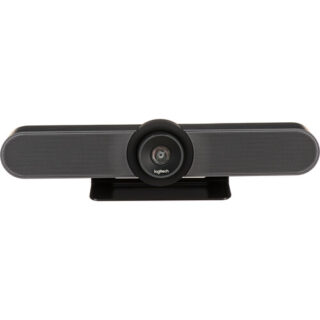
Logitech MeetUp Video Conference Camera – Kenya
KSh96,000.00Add to cartLogitech MeetUp Video Conference Camera in Kenya
Logitech MeetUp Video Conference Camera Price in Kenya is Ksh 96,000.Add the MeetUp All-In-One 4K ConferenceCam from Logitech to your small conference room to capture audio and video of everyone in the room. The compact design keeps wiring to a minimum and can be easily mounted on a table or on the wall.
The camera features a 120° lens with a 5x zoom which captures a wide field of view, keeping all subjects in focus without a fisheye effect. The camera captures up to 1080p video over USB 2.0, and up to 4K UHD video with a separately available USB 3.0/3.1 Gen 1 cable at 30 fps. Its pan, tilt, zoom, volume, mute, and answer/hang-up functions can be controlled by the included RF remote control or by the ConferenceCam Soft Remote app for Android and iOS over Bluetooth. You can also connect your smartphone via Bluetooth to use the MeetUp speaker for rich, clear sound.
The ConferenceCams audio features include three built-in microphones that have a range of 8**. If you have a larger room to cover, an optional Expansion Mic for MeetUp can be added to extend your audio capture range to 14**. Microphone features include a low-distortion algorithm, background noise reduction, and echo cancellation. The built-in speaker provides clear audio and peak-limiting to prevent clipping.
The MeetUp connects to a macOS or Windows computer via plug-and-play USB, and supports numerous conferencing applications such as Skype for Business, Microsoft Cortana, Cisco Jabber, and WebEx. It also integrates with Logitech Collaboration Program (LCP) members which include BlueJeans, Broadsoft, LifeSize Cloud, Vidyo, and Zoom.
You can mount your MeetUp on a table or wall with the included wall mount, or an optional TV mount can be purchased to mount above or below a wall-mounted flat-panel TV with standard VESA mounts. A built-in Kensington security slot allows you to lock down your MeetUp when not in use. The unit also comes with a 16** USB cable and power adapter.
System Requirements
Windows 7, Windows 8.1, or Windows 10.
macOS 10.10 or higher.
Chrome OS Version 29.0.1547.70 and higher.
USB 2.0 port (USB 3.0/3.1 Gen 1 required for 4K video).
Camera Optics
MeetUp features camera optics that capture a wide field of view without distorting faces and furniture with a fisheye effect. Faces look natural, whiteboard writing remains legible, and straight lines stay straight.
5x Zoom Lens
Zoom in on whiteboards and objects so remote participants can see what you see. Thanks to its advanced 4K image sensor, video remains sharp and clear, even when you zoom in on the details.
Camera Operation
The camera features three presets and motorized pan/tilt operation.
Built-In Microphone, Optional Expansion Mic
MeetUps built-in beamforming mics are optimized for up to 8**. To extend that range up to 14**, add an optional Expansion Mic. Whether people are seated at a table, sitting against the wall, or walking around the room, the Expansion Mic for MeetUp means everyone will be heard.
Bluetooth Speakerphone
If youre already connected on your smartphone or dialing into an audio conference, pair MeetUp with your smartphone or tablet to enjoy outstanding audio clarity, volume, and range that handheld devices cant match.
RF Remote Control
With a multi-directional remote control, you can easily operate camera controls, adjust volume, and mute/unmute from anywhere in the room. Featuring a low-profile design, durable materials, and a non-slip base, the MeetUp Remote Control feels as good on the tabletop as it does in your hand.
Smartphone Remote Control
The ConferenceCam Soft Remote app for Android and iOS (available on Google Play and iTunes) replicates every function of the physical MeetUp remote on your smartphone or tablet.
Wall Mount or Optional TV Mount
The MeetUp includes a mounting kit with the hardware you need to mount the unit on a wall or mount onto a table. The optional Logitech TV Mount for MeetUp lets you mount the MeetUp ConferenceCam either above or below a flat-panel monitor, and attaches to the industry-standard VESA mounting points available on most TVs and monitors.
Kensington Security Slot
Secure the MeetUp when not in the conference room with a Kensington-compatible security slot.
Software Compatibility
MeetUp works with most any video conferencing application or meetings service.
Skype for Business certified.
Microsoft Cortana certified.
Cisco Jabber and WebEx compatible.
Enhanced integration with Logitech Collaboration Program (LCP) members, including BlueJeans, Broadsoft, LifeSize Cloud, Vidyo, and Zoom.


