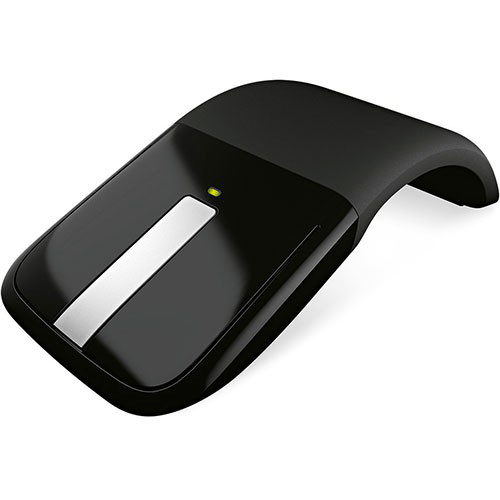
Microsoft Arc Touch Mouse Laser Wireless – Kenya
KSh10,500.00
Microsoft Arc Touch Mouse Laser Wireless Price in Kenya
Microsoft Arc Touch Mouse Laser Wireless Price in Kenya is Ksh 10,500. The Microsoft Arc Touch Mouse Laser Wireless in gray is a flexible mouse with a 2.4GHz wireless USB nano transciever that snaps into the bottom of the mouse. It offers a 30-foot wireless range and battery life of up to six months. Buy Microsoft Arc Touch Mouse Laser Wireless at best price in Kenya at Adishnetservices.
This unique mouse curves to turn on, and flattens to turn off without the use of a button. A green light shows the battery is working and powers off to conserve battery life. It accommodates both left and right handed users. Its flexible design allows for optimum comfort and performance, while it also flattens to make portable use easy.
Easy to Use
2.4 GHz wireless USB Nano Transceiver connects wirelessly
Up to 30 feet (9 m) of wireless range
BlueTrack technology works on difficult surfaces
Green light flashes to show the battery is working, turns off to save battery life
Access common tasks, including product information, registration, and settings
Up to 6 months of battery life
Flexible Design
Curve to turn on, flatten to turn off
Works for left or right-handed control
Curved design flattens for portable use
Operating System Compatibility
Windows 7, Windows Vista, Windows XP (excluding Windows XP 64-bit)
Related products
-
 Add to cart
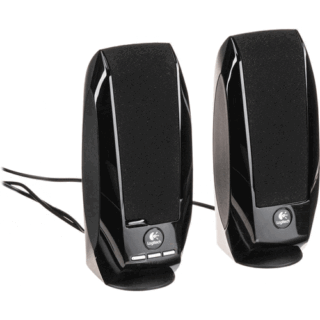
Logitech S-150 USB Digital Speaker System in Kenya
Logitech S-150 USB Digital Speaker System Price in Kenya is Ksh 3,000 .Buy Logitech S-150 USB Digital Speaker System at the best price in Kenya from Adishnetservices.S-150 USB Digital Speaker System**from**Logitech**is a compact stereo speaker system for computers that feature a USB interface. Both power and audio are transmitted via USB. The speakers feature a compact design, ideal for use with notebook computers.
Logitech S150 Specs in Kenya
Channel Configuration
2.0-ChannelAmplifier Power Rating
1.2 W RMSDrivers
2** / 5.1**cm Full-RangeFrequency Response
90 Hz to 20 kHzInputs/Outputs
1x USB-A (on Hard-Wired Cable)
Speaker System
Channel Configuration
2.0-ChannelAmplifier Power Rating
1.2 W RMSDrivers
2** / 5.1**cm Full-RangeFrequency Response
90 Hz to 20 kHzMagnetic Shielding
YesInputs/Outputs
1x USB-A (on Hard-Wired Cable)Controls
Mute, Volume
Power
DC Input Power
USB Bus Power -

Logitech C920s HD Pro – Kenya
KSh12,500.00Add to cartLogitech C920s HD Pro Price in Kenya
The Logitech C920s HD Pro Price in Kenya is Ksh 12,500. Chat, stream, and record with the C920s HD Pro Webcam from Logitech. This webcam supports up to 1080p video at 30 fps and features HD auto-focus and automatic light correction for clear details whether youre in dimly- or brightly-lit environments. Thanks to its dual microphones, your voice will sound natural and clear. Also, an included privacy cover keeps your privacy protected. This webcam is compatible with Windows systems, but can also work in USB Video Device Class (UVC) mode with supported video-calling clients on macOS, Xbox one, Chrome OS, and Android.
HD Auto-Focus & Light Correction
HD Auto-Focus ensures your capture is detailed while the light correction features enables you to be seen in dimly- or brightly-lit environments.
Logitech Capture Software
Using the Logitech Capture software, you can record high-quality video, customize recording, adjust camera settings, and more with its intuitive interface.
Chat in Full Stereo
Two built-in microphones on the left and right side ensure you can be clearly heard from every angle.
Maintain Your Privacy
This webcam comes with a privacy cover, which you can flip up or down whenever necessary.
Logitech C920s HD Pro Webcam specs and price in Kenya
Price in Kenya Ksh. 13000SENSOR
Resolution and Frame Rate 1080p at up to 30 fps
720p at up to 30 fps
Sensor Type CMOS Sensor
Sensor Resolution 2 MP
Field of View 78°GENERAL
Microphone Yes
OS Compatibility Windows 7 or Later
macOS 10.10 or Later
Chrome OS
Android 5.0 or Later
Low-Light Correction Yes
Power Source Bus Powered
Focus Type AutoHost Connection
USB Type-A USB 2.0PHYSICAL
Privacy Shutter
yes
Attachment Method Clip, Tripod
Housing Material Plastic
Cable Length 5** / 1.52 m -
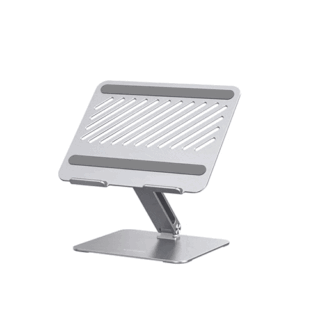
UGREEN Swivel Laptop Stand LP592 – Kenya
KSh7,400.00Add to cartUGREEN Swivel Laptop Stand LP592 in Kenya
UGREEN Swivel Laptop Stand LP592 Price in Kenya is ksh.7,400.
360 Degree Rotation
Featuring a 360** rotatable axis on the base, UGREEN laptop stand for desk allows you to swivel your laptop to any side more flexibly. It enables you to share your PC screen to your partners in the meeting, more convenient and practical for office and home.Buy UGREEN Swivel Laptop Stand LP592 at the best price in Kenya from Adishnetservices.
Ergonomic Design
This laptop stand holder could be easily adjusted to your preferred viewing angle. It effectively ease your neck pain by elevating your laptop to your eye level to fix your posture. You can choose different angles and rise it up higher or lower to meet your needs.
Stylish and Stable
This laptop desk stand is made of premium aluminum alloy. With the thicken base and enhanced arm, this sturdy computer stand supports up to 11 lb and holds your notebook more securely, no worry about tipping over.
Broad Compatibility
Work with all laptops up to 17.3-inch, the adjustable laptop stand is compatible with MacBook Pro 13** 14** 16**, MacBook Air, Microsoft Surface Book, Lenovo Ideapad 3, Acer Aspire 5, ASUS TUF F15 Gaming Laptop, HP Notebook, Dell Chromebook, Samsung Galaxy Book, etc.
Keep Laptop Cool
The open cutout design of the aluminum stand provides good ventilation and airflow to prevent your laptop from overheating.
**
-
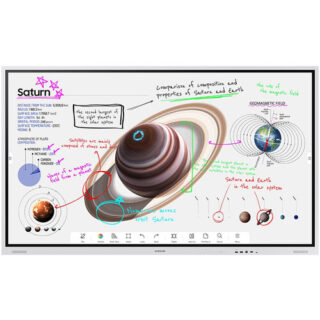
Samsung 75″ Flip Pro WM75B Interactive Display – Kenya
KSh410,000.00Add to cartSamsung 75** Flip Pro WM75B Interactive Display in Kenya
Samsung 75** Flip Pro WM75B Interactive Display Price in Kenya is Kshs.410,000.Buy Samsung 75** Flip Pro WM75B Interactive Display at Adishnetservices Kenya.
The future of classroom instruction is here with the**WM75B Flip Pro 75** 4K Interactive Touchscreen LED Display**from**Samsung. The messy blackboard is replaced with this touchscreen display, which provides 4K visuals for more engaging lessons and interactive features that increases student engagement. With up to 20-person multi-touch, students can still walk up to write on the **board,** or they can share their mobile screen from their seat with software like Apple**s AirPlay 2. The screen can accommodate the display of up to 4 screens at once. Additional features, such as video calling and pushed content, allows the Flip Pro to move beyond the classroom and interact with the school itself and those outside its walls.
Real-World Writing & Drawing
More than a simple display, the Flip Pro lets teachers and students write and draw on it as you would a traditional blackboard. However, with the Flip Pro, you can also annotate 4K visuals for stunning and immersive educational content. Why settle for chalk circles when you can interact with professional renditions of the solar system. The screen provides 2048 points of pressure with a low 26 ms of latency for a natural experience, and you can choose between pen or brush modes. Modes you can adjust with the quick tool and palette.
Quick Tool & Palette
The integrated quick tool and palette gives you the option of choosing different tip sizes, thicknesses, and colors. You can even add additional note layers and easily erase content with the swipe of a finger or hand.
Workspace Secured by Knox
Integrated Samsung Knox security software makes it possible to safely access remote PCs, network drives, and other third-party applications directly from the Flip Pro. Applications like Office 365, VMWare, or Boxlight MimioConnect. MimioConnect is included with the Flip Pro and provides a catalog of versatile learning content, including real-time data and analytics.
MagicINFO Remote Management
Content, alerts, and warnings can conveniently be pushed to each Flip Pro in a school or on campus to notify teachers and students of important information.
Front Control Panel
A front control panel makes it easy to manage the Flip Pro**s settings and plug in optional devices, such as a laptop. You get two USB Type-A inputs (one USB 3.0), and once each of the following: USB Type-B, USB Type-C, and HDMI. The USB Type-C port is a 3-in-1 port that allows for a simplified single cable connection to a laptop for screen mirroring, touch control, and up to 65W of charging.
Safe to Use
Samsung equipped the Flip Pro with an antimicrobial coating and shatterproof film for improved safety. The coating inhibits microbial growth, while the film keeps the screen intact if it were to accidentally break.
Additional Features
Up to 50 simultaneous device connections via SmartView+
Video call compatible with WebRTC (Real Time Communication API)
Google Duo built-in
OPT (Open Pluggable Specification) slot for third-party apps, tools & SIS (School Information Systems) integration
Ethernet network connection -
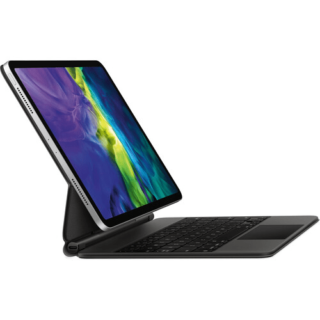
Apple Magic Keyboard for 11? iPad Pro – Kenya
KSh39,000.00Add to cartApple Magic iPad Pro 11** 2nd Gen Price in Kenya
Apple Magic Keyboard for 11** iPad Pro price in Kenya is Ksh 39,000. Use the black Magic Keyboard for iPad Pro from Apple to give your tablet a feel that rivals laptops. With its floating cantilever design, your 11** iPad Pro magnetically attaches to the Magic Keyboard for smooth viewing angle adjustments. Its full-size, backlit keys feature a scissor mechanism with 1mm travel for fast and quiet typing. The keyboard also has a built-in multi-gesture touchpad that allows precise interaction with iPadOS applications. A USB Type-C pass-through charging port is located on the keyboard folios hinge, freeing the iPad Pros port for peripherals such as external storage drives. Once youre done, the keyboard doubles as a cover that protects the front and back of your iPad Pro.
Apple Magic Keyboard Features
Designed for Comfort
The Magic Keyboard features a floating cantilever design, which allows you to magnetically attach your 11** iPad Pro and adjust it to the most comfortable viewing angle.
iPadOS Touchpad
The multi-gesture touchpad lets you move a cursor around in iPadOS applications such as word processors and spreadsheets.
USB Type-C Charging
Charge your iPad Pro using the Magic Keyboards integrated USB Type-C power pass-through port and use your iPad Pros port for other accessories.
Compatibility11** iPad Pro (1st Gen), 11** iPad Pro (2nd Gen), 11** iPad Pro (3rd Gen), 11** iPad Pro (4th Gen), 10.9** iPad Air (4th Gen), 10.9** iPad Air (5th Gen)