
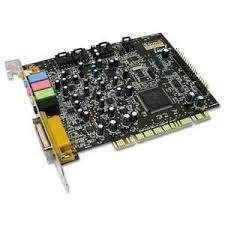
PC I/O Card
KSh1,200.00
Description
PC I/O Card
PC I/O Card are the right answer to the need to acquire digital and analogical inputs and outputs from a PC in an industrial environment. The state of the digital inputs and outputs is shown through LEDs on the board. USB, Ethernet, WiFi, CAN or RS232 interface allows our cards high speed, hardware independence, and flexibility in the expansion of connected cards.
The board is low and standard size so that it can be easily integrated into several systems. PC I/O cards have their digital inputs and outputs galvanically isolated to protect from electromagnetic disturbances and ground loops, improving its reliability and quality. On request, all the cards sized as standard European Format Card can be furnished mounted on a euro DIN rail.
PC I/O instruments provide inputs and outputs to data acquisition devices, programmable logic controllers (PLC), and other computerized machinery.As data acquisition products, I/O modules are involved in processing inputs from sensors, timers, relays, and solid state circuits to monitor, analyze, or control processes. I/O modules may provide inputs and outputs for devices that lack them, or may act as expansion modules to increase a DAQ board’s input count.
PC I/O Card specifications
Printed circuit boards (PCB) attach to enclosures or plug directly into computers.
Panel mount modules are bolted onto a chassis or attach to a panel.
Rack mount devices fit inside enclosures such as a standard 19″ telecom rack.
DIN rail products are mounted on a rail standardized by the Deutsches Institut für Normung, a German national standards body. Common DIN rail widths include 15 mm, 35 mm, and 75 mm.
Stand-alone units are placed on a bench or floor. They include a full casing or cabinet as well as an integral interface.
Related products
-
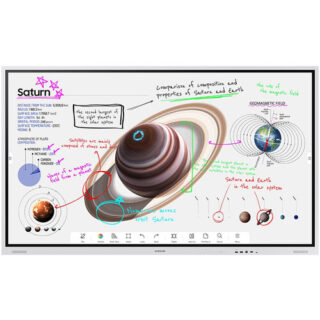
Samsung 75″ Flip Pro WM75B Interactive Display – Kenya
KSh410,000.00Add to cartSamsung 75** Flip Pro WM75B Interactive Display in Kenya
Samsung 75** Flip Pro WM75B Interactive Display Price in Kenya is Kshs.410,000.Buy Samsung 75** Flip Pro WM75B Interactive Display at Adishnetservices Kenya.
The future of classroom instruction is here with the**WM75B Flip Pro 75** 4K Interactive Touchscreen LED Display**from**Samsung. The messy blackboard is replaced with this touchscreen display, which provides 4K visuals for more engaging lessons and interactive features that increases student engagement. With up to 20-person multi-touch, students can still walk up to write on the **board,** or they can share their mobile screen from their seat with software like Apple**s AirPlay 2. The screen can accommodate the display of up to 4 screens at once. Additional features, such as video calling and pushed content, allows the Flip Pro to move beyond the classroom and interact with the school itself and those outside its walls.
Real-World Writing & Drawing
More than a simple display, the Flip Pro lets teachers and students write and draw on it as you would a traditional blackboard. However, with the Flip Pro, you can also annotate 4K visuals for stunning and immersive educational content. Why settle for chalk circles when you can interact with professional renditions of the solar system. The screen provides 2048 points of pressure with a low 26 ms of latency for a natural experience, and you can choose between pen or brush modes. Modes you can adjust with the quick tool and palette.
Quick Tool & Palette
The integrated quick tool and palette gives you the option of choosing different tip sizes, thicknesses, and colors. You can even add additional note layers and easily erase content with the swipe of a finger or hand.
Workspace Secured by Knox
Integrated Samsung Knox security software makes it possible to safely access remote PCs, network drives, and other third-party applications directly from the Flip Pro. Applications like Office 365, VMWare, or Boxlight MimioConnect. MimioConnect is included with the Flip Pro and provides a catalog of versatile learning content, including real-time data and analytics.
MagicINFO Remote Management
Content, alerts, and warnings can conveniently be pushed to each Flip Pro in a school or on campus to notify teachers and students of important information.
Front Control Panel
A front control panel makes it easy to manage the Flip Pro**s settings and plug in optional devices, such as a laptop. You get two USB Type-A inputs (one USB 3.0), and once each of the following: USB Type-B, USB Type-C, and HDMI. The USB Type-C port is a 3-in-1 port that allows for a simplified single cable connection to a laptop for screen mirroring, touch control, and up to 65W of charging.
Safe to Use
Samsung equipped the Flip Pro with an antimicrobial coating and shatterproof film for improved safety. The coating inhibits microbial growth, while the film keeps the screen intact if it were to accidentally break.
Additional Features
Up to 50 simultaneous device connections via SmartView+
Video call compatible with WebRTC (Real Time Communication API)
Google Duo built-in
OPT (Open Pluggable Specification) slot for third-party apps, tools & SIS (School Information Systems) integration
Ethernet network connection -
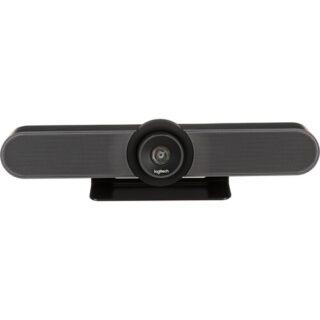
Logitech MeetUp Video Conference Camera – Kenya
KSh96,000.00Add to cartLogitech MeetUp Video Conference Camera in Kenya
Logitech MeetUp Video Conference Camera Price in Kenya is Ksh 96,000.Add the MeetUp All-In-One 4K ConferenceCam from Logitech to your small conference room to capture audio and video of everyone in the room. The compact design keeps wiring to a minimum and can be easily mounted on a table or on the wall.
The camera features a 120° lens with a 5x zoom which captures a wide field of view, keeping all subjects in focus without a fisheye effect. The camera captures up to 1080p video over USB 2.0, and up to 4K UHD video with a separately available USB 3.0/3.1 Gen 1 cable at 30 fps. Its pan, tilt, zoom, volume, mute, and answer/hang-up functions can be controlled by the included RF remote control or by the ConferenceCam Soft Remote app for Android and iOS over Bluetooth. You can also connect your smartphone via Bluetooth to use the MeetUp speaker for rich, clear sound.
The ConferenceCams audio features include three built-in microphones that have a range of 8**. If you have a larger room to cover, an optional Expansion Mic for MeetUp can be added to extend your audio capture range to 14**. Microphone features include a low-distortion algorithm, background noise reduction, and echo cancellation. The built-in speaker provides clear audio and peak-limiting to prevent clipping.
The MeetUp connects to a macOS or Windows computer via plug-and-play USB, and supports numerous conferencing applications such as Skype for Business, Microsoft Cortana, Cisco Jabber, and WebEx. It also integrates with Logitech Collaboration Program (LCP) members which include BlueJeans, Broadsoft, LifeSize Cloud, Vidyo, and Zoom.
You can mount your MeetUp on a table or wall with the included wall mount, or an optional TV mount can be purchased to mount above or below a wall-mounted flat-panel TV with standard VESA mounts. A built-in Kensington security slot allows you to lock down your MeetUp when not in use. The unit also comes with a 16** USB cable and power adapter.
System Requirements
Windows 7, Windows 8.1, or Windows 10.
macOS 10.10 or higher.
Chrome OS Version 29.0.1547.70 and higher.
USB 2.0 port (USB 3.0/3.1 Gen 1 required for 4K video).
Camera Optics
MeetUp features camera optics that capture a wide field of view without distorting faces and furniture with a fisheye effect. Faces look natural, whiteboard writing remains legible, and straight lines stay straight.
5x Zoom Lens
Zoom in on whiteboards and objects so remote participants can see what you see. Thanks to its advanced 4K image sensor, video remains sharp and clear, even when you zoom in on the details.
Camera Operation
The camera features three presets and motorized pan/tilt operation.
Built-In Microphone, Optional Expansion Mic
MeetUps built-in beamforming mics are optimized for up to 8**. To extend that range up to 14**, add an optional Expansion Mic. Whether people are seated at a table, sitting against the wall, or walking around the room, the Expansion Mic for MeetUp means everyone will be heard.
Bluetooth Speakerphone
If youre already connected on your smartphone or dialing into an audio conference, pair MeetUp with your smartphone or tablet to enjoy outstanding audio clarity, volume, and range that handheld devices cant match.
RF Remote Control
With a multi-directional remote control, you can easily operate camera controls, adjust volume, and mute/unmute from anywhere in the room. Featuring a low-profile design, durable materials, and a non-slip base, the MeetUp Remote Control feels as good on the tabletop as it does in your hand.
Smartphone Remote Control
The ConferenceCam Soft Remote app for Android and iOS (available on Google Play and iTunes) replicates every function of the physical MeetUp remote on your smartphone or tablet.
Wall Mount or Optional TV Mount
The MeetUp includes a mounting kit with the hardware you need to mount the unit on a wall or mount onto a table. The optional Logitech TV Mount for MeetUp lets you mount the MeetUp ConferenceCam either above or below a flat-panel monitor, and attaches to the industry-standard VESA mounting points available on most TVs and monitors.
Kensington Security Slot
Secure the MeetUp when not in the conference room with a Kensington-compatible security slot.
Software Compatibility
MeetUp works with most any video conferencing application or meetings service.
Skype for Business certified.
Microsoft Cortana certified.
Cisco Jabber and WebEx compatible.
Enhanced integration with Logitech Collaboration Program (LCP) members, including BlueJeans, Broadsoft, LifeSize Cloud, Vidyo, and Zoom. -

Apple Mac mini with M4 Chip – Kenya
KSh94,999.00Add to cartApple Mac mini with M4 Chip in Kenya
Apple Mac mini with M4 Chip Price in Kenya is KShs 165,000. At just five by five inches, the Apple Mac mini is less than half the size of the previous Mac mini. The compact Mac mini has a small footprint in your workspace and its lightweight design makes it easy to move, mount, and rack. Now housing the powerful M4 10-Core chip, the Mac mini delivers up to 1.8x faster CPU performance and 2.2x faster GPU performance over the M1 model. Add 16GB of unified RAM, 1TB of storage, Wi-Fi 6E, Gigabit LAN, and Thunderbolt 4, and the Mac mini is a tiny powerhouse. The Mac mini also features Apple Intelligence, the personal intelligence system that transforms the way you express yourself, all while protecting your privacy. As Apple**s first carbon neutral Mac, the Mac mini has seen over 80 percent reduction in greenhouse gas emissions across its materials, manufacturing, transportation, and customer use.Buy Apple Mac mini with M4 Chip at Adishnetservices Kenya
This Mac comes preloaded with macOS. Updates can be downloaded for free via the Mac App Store. Please check Apple**s website for upgrade eligibility. Also, please note that a keyboard and mouse are not included.
Supercharged by M4
The M4 chip brings a performance boost to Mac mini. Featuring a faster 10-Core CPU, the Mac mini is up to 1.8x faster than Mac mini with M1. Users will feel this performance across everyday activities like multitasking between their favorite apps and browsing webpages in Safari. And with a powerful GPU, featuring Apple**s advanced graphics architecture, Mac mini with M4 handles more intense workloads, like photo editing and gaming, up to 2.2x faster than the Mac mini with M1. The M4 also brings hardware-accelerated ray tracing to the Mac mini for the first time. The Mac mini comes standard with 16GB of faster unified memory. The Neural Engine in the M4 is now over 3x faster than on Mac mini with M1, making it a solid option for AI, and accelerating the pace at which users can get things done.
Looks Small. Lives Large.
Measuring in at just five by five inches, the Mac mini saves a lot of space on your desk. I ts smaller design reduces aluminum use in the enclosure by 85 percent compared to the previous generation. Weighing just 1.5 pounds, the Mac mini is easy to move, rack, or mount just about anywhere.
Built to Chill
A smaller design requires an improved thermal architecture to keep temperatures low. Within the Mac mini, air is guided to different levels of the system, and all of it flows through the foot. Combined with Apple silicon**s power efficiency, the Mac mini can breeze through intensive workloads at fast speeds without overheating.
A New Era with Apple Intelligence on the MacApple Intelligence harnesses the power of Apple Silicon and the Neural Engine to unlock new ways for users to work, communicate, and express themselves on Mac. It is available in U.S. English with macOS Sequoia 15.1. With systemwide Writing Tools, users can refine their words by rewriting, proofreading, and summarizing text nearly everywhere they write. With the newly redesigned Siri, users can move fluidly between spoken and typed requests to accelerate tasks throughout their day, and Siri can answer thousands of questions about Mac and other Apple products. New Apple Intelligence features will be available in December, with additional capabilities rolling out in the coming months. Image Playground gives users a new way to create fun original images, and Genmoji allows them to create custom emoji in seconds. Siri will become even more capable, with the ability to take actions across the system and draw on a user**s personal context to deliver intelligence that is tailored to them. In December, ChatGPT will be integrated into Siri and Writing Tools, allowing users to access its expertise without needing to jump between tools.
Apple Intelligence does all this while protecting users** privacy at every step. At its core, is on-device processing, and for more complex tasks, Private Cloud Compute gives users access to Apple**s even larger, server-based models and offers groundbreaking protections for personal information. In addition, users can access ChatGPT for free without creating an account, and privacy protections are built in-their IP addresses are obscured and OpenAI won**t store requests. For those who choose to connect their account, OpenAI**s data-use policies apply.
Writing Tools
Apple Intelligence can proofread your text and rewrite different versions until the tone and wording are just right, and summarize selected text with a click.
Image Playground
Create fun, original images based on a , a concept, or even a person from your Photos library.
Natural Language Search in Photos
Search for photos and videos simply by describing what you**re looking for.
PortsThe back of the Mac mini features three Thunderbolt 4 ports, delivering 40 Gb/s of data throughput. There is also an HDMI port and a Gigabit Ethernet RJ45 LAN jack. At the front, there are two 10 Gb/s USB-C 3.2 Gen 2 ports and a 3.5mm headphone jack.
The Mac mini can simultaneously support up to three displays, two 6K 60 Hz displays over Thunderbolt 4 and a 4K 60 Hz display over HDMI. For higher resolutions, the Mac mini can support two displays, one 5K 60 Hz display over Thunderbolt and an 8K 60 Hz or 4K 240 Hz display over Thunderbolt or HDMI.
macOS ** Let Your Apps Fly
The Mac mini comes loaded with built-in apps, privacy and security, and amazing features for work and play. And macOS brings more speed and responsiveness to all your go-to apps-from Microsoft Word, Excel, and Outlook to Slack and Adobe Photoshop.
Mac + iPhone: The One-Two Punch
Use your Mac mini and iPhone together in perfect harmony. Make and answer calls and text messages from your iPhone directly on your Mac. Don**t have a webcam** You can use your iPhone instead. Left your iPhone in another room** You can access it wirelessly with the iPhone Mirroring app in the Dock.
Plug and Slay
The Mac mini is designed to pair perfectly with the Apple Studio Display, Magic Keyboard, and Magic Mouse (all sold separately). However, the Mac mini is also ready to work with third-party displays and accessories you already own. You can mix, match, and make the Mac mini truly yours.
The First Carbon Neutral MacThis Mac mini is Apple**s first carbon neutral Mac, marking a significant milestone toward Apple 2030, the company**s goal to be carbon neutral across the entire carbon footprint by the end of this decade.
The Mac mini is made with over 50 percent recycled content overall, including 100 percent recycled aluminum in the enclosure, 100 percent recycled gold plating in all Apple-designed printed circuit boards, and 100 percent recycled rare earth elements in all magnets. Apple also used renewable energy to manufacture the Mac mini. Apple also invested in clean energy projects and prioritized lower-carbon modes of shipping, like ocean freight, to further reduce emissions from transportation. Together, these actions have reduced the carbon footprint of the Mac mini by over 80 percent. For the small amount of remaining emissions, Apple applies high-quality carbon credits from nature-based projects, like those generated by its innovative Restore Fund.
In another first for the Mac mini, the packaging is now entirely fiber-based, bringing Apple closer to its goal to remove plastic from its packaging by 2025.
-
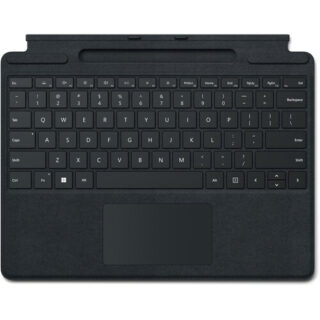
Microsoft Surface Pro Signature Keyboard – Kenya
KSh37,499.00Add to cartMicrosoft Surface Pro Signature Keyboard Price in Kenya
Microsoft Surface Pro Signature Keyboard Price in Kenya is Ksh 37,499. Enjoy a smooth and elegant typing experience while using your Surface Pro 8, Surface Pro 9, or Surface Pro X with the Microsoft Surface Pro Signature Keyboard. Made with luxurious Alcantara material, this stylish black mechanical keyboard cover attaches magnetically to your Surface Pro device to provide a smooth typing experience in almost any situation, whether youre working from your lap or at a desk. It also helps to optimize your workflow with a large glass touchpad along with Windows shortcut, media control, right click, and brightness adjustment buttons. The integrated fingerprint reader allows you to quickly log into Windows without having to enter a password. Additionally, its convenient tray securely stores and recharges your Surface Slim Pen 2, keeping it ready and close by when you need it. Once youre done, simply close the cover to protect your screen while traveling.
Microsoft Surface Pro Signature Keyboard Price in Kenya
Switch Type Mechanical
Key Rollover None
Dedicated Multimedia Keys Yes
Dedicated Macro Keys None
Windows Lock Key No -
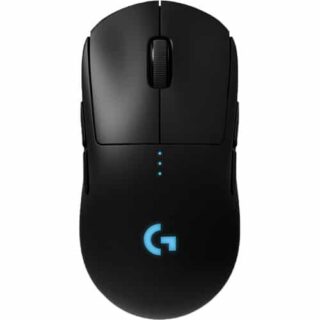
Logitech G PRO Wireless Gaming Mouse – Kenya
KSh17,999.00Add to cartLogitech G PRO Wireless Gaming Mouse in Kenya
Logitech G PRO Wireless Gaming Mouse Price in Nairobi,Kenya is Ksh 17,999
DESIGNED WITH PROS, ENGINEERED TO WIN
PRO Wireless was designed to be the ultimate gaming mouse for esports professionals. Over a 2 year period, Logitech G collaborated with more than 50 professional players to find the perfect shape, weight and feel combined with our LIGHTSPEED wireless and HERO 25k sensor technologies. The result is a gaming mouse with unrivaled performance and precision, giving you the tools and confidence needed to win.
OUR MOST ACCURATE GAMING SENSOR
As esports professionals strive for ever greater speed and accuracy, so too does Logitech G. With the invention of HERO 25K, the next-gen gaming sensor, the world now has a new leader. For PRO Wireless, HERO 25K has been optimized to track insane flicks at speeds over 400 IPS without spinning out. HERO 25K delivers peak performance at any sensitivity with zero smoothing, acceleration, or filtering from 100 to 25,600 DPI. HERO 25K also consumes 10x less power than predecessors, like PMW3366, enabling a lighter battery and longer battery life. Pros require the best, and thats HERO 25K.
LIGHTSPEED WIRELESS
For pros, cutting the cord is vital. Cord drag produces friction and distraction that is unacceptable in professional esports. This innovative, end-to-end wireless technology overcomes the limitations of latency, connectivity and power to provide consistent, lag-free, 1 ms report rate connectionwithout a wire.
ULTRA LIGHTWEIGHT
The latest endoskeleton design from Logitech G achieves an unreal 80-gram weight. The incredibly thin outer shell, as thin as 1 mm, uses an innovative ladder-chassis design for tournament-ready strength and structural support.
The advanced LiPo battery is incredibly long-lasting and lightweight for no-hassles, worry-free wireless gaming. Charge before a tournament and you can forget all about the battery while you compete.4-8 PROGRAMMABLE BUTTONS
Removable left and right side buttons make PRO Wireless truly ambidextrous, and let pros decide how many side buttons they wantfrom zero to four. The DPI button1Logitech G HUB software is required to reprogram DPI button and will be available starting 9/3/2018 is located on the underside of the mouse to eliminate unintentional DPI shifts in-game. Logitech G PRO Wireless Gaming Mouse can be used out-of-the-box with preset button settings or can be fully configured to your custom preferences using Logitech G HUB.
LIGHTSYNC RGB
PRO Wireless comes complete with ~16.8M color customization2Advanced features require Logitech G HUB, available for download at logitechG.com/downloads thats perfect for representing your team colors, personalizing your setup, or synchronizing with other G products. LIGHTSYNC also features game-driven lighting effects that respond to in-game action, audio visualization, screen color sampling and more. Program it all with G HUB.
ONBOARD MEMORY
With an onboard memory, you can use G HUB to save your preferences directly to the mouse for fast and easy use on tournament systems. Your mouse settings remain consistent from home to stage. Skip installing custom software or reconfiguring your settings. Get straight to the game.
MECHANICAL BUTTON TENSIONING SYSTEM
PRO Wireless is equipped with the latest primary button engineering. Using a metal spring to tension separated left and right button keyplates, the travel distance and actuation force (force required to click) have been reduced and refined. The result is an incredibly accurate, consistent and tight feel for every click.
ENDURING PERFORMANCE
Built on over 35 years of Logitech expertise in engineering, building, testing mice, PRO Wireless is designed to withstand pro esports players during training and tournaments. The surface of PRO is coated for durability and grip while the feet are tested to perform for over 250 km of use.
PLAY TO WIN
PRO Series gear is purpose-built for professional gaming. The most advanced technology and highest performance specsdesigned in partnership with professional players worldwidedeliver the precision, speed, and endurance required to win. Everything pros need. Nothing they dont.Other Computer Accessories available in Stock



Reviews
There are no reviews yet.