
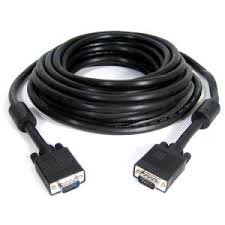
VGA 20M Cable Black
KSh2,900.00
Description
VGA 20M Cable Black
The VGA 20M Cable (Black) is a high-quality video cable designed to deliver reliable performance for connecting computers to monitors, projectors, and other VGA-enabled display devices over extended distances. With a generous length of 20 meters, this cable provides the flexibility needed for various setups, whether in educational environments, corporate presentations, or home theaters.
Featuring 15-pin male connectors on both ends, the VGA cable ensures a secure and stable connection, minimizing the risk of signal loss. The connectors are crafted with sturdy metal housings, offering durability and resistance to corrosion, which enhances the cable’s longevity. Internally, the cable is constructed with high-quality copper conductors that facilitate excellent signal transmission, supported by foil shielding to reduce interference and crosstalk, ensuring clear, uninterrupted video quality.
The VGA 20M Cable supports resolutions up to 1920 x 1080 (1080p) and higher, providing sharp and vibrant visuals for any display application. Its sleek black design fits seamlessly into any setup, maintaining a professional appearance.
Engineered for versatility, this VGA cable is compatible with a wide range of devices, making it suitable for both personal and professional use. Its robust construction allows it to operate effectively within a temperature range of -10°C to +50°C, making it ideal for various environments.
Overall, the VGA 20M Cable (Black) is an essential tool for anyone looking to establish long-distance video connections without compromising on quality, ensuring that you can enjoy clear and reliable visuals wherever you need them.
Related products
-
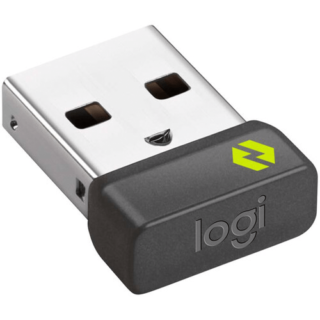
Logitech Logi Bolt USB Receiver – Kenya
KSh2,500.00Add to cartLogitech Logi Bolt USB Receiver in Kenya
Logitech Logi Bolt USB Receiver Price in Kenya is Ksh 2,500.Enjoy convenience and reliability by pairing your compatible wireless keyboard, mouse, or combo set with the Logi Bolt USB Receiver from Logitech. Designed to cut through congested areas with a range of up to 33 feet, Logi Bolt technology combines Bluetooth Low Energy security standards with Logitech**s proprietary features to establish a strong and reliable encrypted wireless connection. A single receiver can support up to six devices, which can eliminate the need to carry a keyboard and mouse to multiple locations. Simply keep a separate set of peripherals at home and work, then carry the receiver around in your pocket instead. Paired peripherals will automatically connect once the receiver is powered up and in range. With its ultra-compact design, you can even leave Logi Bolt receiver permanently plugged into the USB Type-A port of your Windows 10, macOS, Linux, or Chrome OS laptop.Buy Logitech Logi Bolt USB Receiver at best price in Kenya at Adishnetservices.
Logitech Logi Bolt USB Receiver Price in Kenya
Price in Kenya Ksh.2,500
USB
USB Type-AWireless Technology
Logi Bolt (Bluetooth LE)Range
33** / 10 mOS Compatibility
Windows 10 or Later
macOS 10.14 or Later
Linux
Chrome OS
Physical
Dimensions
0.7 x 0.6 x 0.3** / 18.4 x 14.4 x 6.6**mmCompatibility
Logitech**
-
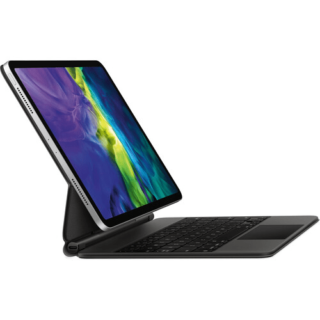
Apple Magic Keyboard for 11? iPad Pro – Kenya
KSh39,000.00Add to cartApple Magic iPad Pro 11** 2nd Gen Price in Kenya
Apple Magic Keyboard for 11** iPad Pro price in Kenya is Ksh 39,000. Use the black Magic Keyboard for iPad Pro from Apple to give your tablet a feel that rivals laptops. With its floating cantilever design, your 11** iPad Pro magnetically attaches to the Magic Keyboard for smooth viewing angle adjustments. Its full-size, backlit keys feature a scissor mechanism with 1mm travel for fast and quiet typing. The keyboard also has a built-in multi-gesture touchpad that allows precise interaction with iPadOS applications. A USB Type-C pass-through charging port is located on the keyboard folios hinge, freeing the iPad Pros port for peripherals such as external storage drives. Once youre done, the keyboard doubles as a cover that protects the front and back of your iPad Pro.
Apple Magic Keyboard Features
Designed for Comfort
The Magic Keyboard features a floating cantilever design, which allows you to magnetically attach your 11** iPad Pro and adjust it to the most comfortable viewing angle.
iPadOS Touchpad
The multi-gesture touchpad lets you move a cursor around in iPadOS applications such as word processors and spreadsheets.
USB Type-C Charging
Charge your iPad Pro using the Magic Keyboards integrated USB Type-C power pass-through port and use your iPad Pros port for other accessories.
Compatibility11** iPad Pro (1st Gen), 11** iPad Pro (2nd Gen), 11** iPad Pro (3rd Gen), 11** iPad Pro (4th Gen), 10.9** iPad Air (4th Gen), 10.9** iPad Air (5th Gen)
-
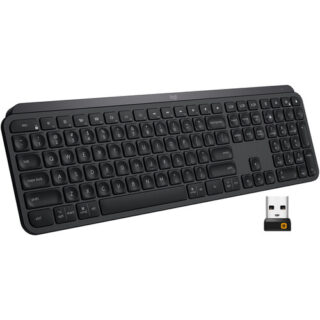
Logitech MX Keys Wireless Keyboard – Kenya
KSh16,500.00Add to cartLogitech MX Keys Wireless Keyboard Price in Kenya
Logitech MX Keys Wireless Keyboard Price in Kenya is Ksh 16,500.Get working with the Logitech MX Keys Wireless Keyboard for a comfortable typing experience. Featuring 2.4 GHz and Bluetooth wireless connectivity as well as compatibility with multiple platforms and devices, the MX Keys offers users a seamless way to work across systems. By downloading the Logitech Options software and using the Logitech Flow feature, users can navigate, copy/paste text, images, and files between three Windows and Mac computers simultaneously. Moreover, it features Smart Illumination, which automatically turns on the backlight when youre near and can also adjust its brightness depending on your surroundings. On a normal use basis, the MX Keys can last up to 10 days; however, with backlight off, its rated to last up to 5 months. Please note that actual battery life will depend on usage.
Smart Illumination
Smart Illumination enables this keyboards backlight to automatically turn on once your hands are near. It can also automatically adjust brightness to fit your ambient lighting conditions.
Perfect Stroke Keys
Perfect Stroke keys are indented and have improved stability for an ergonomic, responsive, and silent typing experience.
Logitech Flow
Logitech Flow enables users to work across multiple Windows and Mac systems using the same set of Flow-enabled peripherals. This can help to reduce distractions and streamline users workflow. Please note that this requires the Logitech Options software.
Compatibility
Users can pair this keyboard with up to three devices via Bluetooth LE or its included Unifying USB receiver. By adjusting settings in the Logitech Options software, users can easily switch between devices with the tap of a button.
Battery
The built-in battery is rated for up to 10 days of use or up to 5 months with backlighting off. When power is low, plug in the included USB Type-C cable to your system to recharge it.
System Requirements
Internet connection for software download
Logitech Options software on macOS and Windows
USB port or Bluetooth Low Energy technology enabled device with keyboard support
USB Receiver: Windows 7 and above, macOS 10.11 and above, Linux, Android 6 or later
Bluetooth: Windows 8 and above, macOS 10.12 and above, Linux, iOS 9 or later, Android 6 or later -
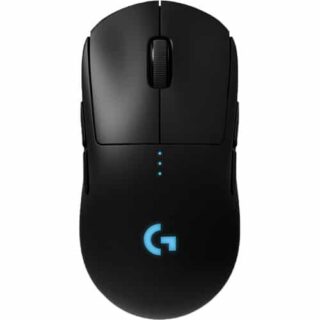
Logitech G PRO Wireless Gaming Mouse – Kenya
KSh17,999.00Add to cartLogitech G PRO Wireless Gaming Mouse in Kenya
Logitech G PRO Wireless Gaming Mouse Price in Nairobi,Kenya is Ksh 17,999
DESIGNED WITH PROS, ENGINEERED TO WIN
PRO Wireless was designed to be the ultimate gaming mouse for esports professionals. Over a 2 year period, Logitech G collaborated with more than 50 professional players to find the perfect shape, weight and feel combined with our LIGHTSPEED wireless and HERO 25k sensor technologies. The result is a gaming mouse with unrivaled performance and precision, giving you the tools and confidence needed to win.
OUR MOST ACCURATE GAMING SENSOR
As esports professionals strive for ever greater speed and accuracy, so too does Logitech G. With the invention of HERO 25K, the next-gen gaming sensor, the world now has a new leader. For PRO Wireless, HERO 25K has been optimized to track insane flicks at speeds over 400 IPS without spinning out. HERO 25K delivers peak performance at any sensitivity with zero smoothing, acceleration, or filtering from 100 to 25,600 DPI. HERO 25K also consumes 10x less power than predecessors, like PMW3366, enabling a lighter battery and longer battery life. Pros require the best, and thats HERO 25K.
LIGHTSPEED WIRELESS
For pros, cutting the cord is vital. Cord drag produces friction and distraction that is unacceptable in professional esports. This innovative, end-to-end wireless technology overcomes the limitations of latency, connectivity and power to provide consistent, lag-free, 1 ms report rate connectionwithout a wire.
ULTRA LIGHTWEIGHT
The latest endoskeleton design from Logitech G achieves an unreal 80-gram weight. The incredibly thin outer shell, as thin as 1 mm, uses an innovative ladder-chassis design for tournament-ready strength and structural support.
The advanced LiPo battery is incredibly long-lasting and lightweight for no-hassles, worry-free wireless gaming. Charge before a tournament and you can forget all about the battery while you compete.4-8 PROGRAMMABLE BUTTONS
Removable left and right side buttons make PRO Wireless truly ambidextrous, and let pros decide how many side buttons they wantfrom zero to four. The DPI button1Logitech G HUB software is required to reprogram DPI button and will be available starting 9/3/2018 is located on the underside of the mouse to eliminate unintentional DPI shifts in-game. Logitech G PRO Wireless Gaming Mouse can be used out-of-the-box with preset button settings or can be fully configured to your custom preferences using Logitech G HUB.
LIGHTSYNC RGB
PRO Wireless comes complete with ~16.8M color customization2Advanced features require Logitech G HUB, available for download at logitechG.com/downloads thats perfect for representing your team colors, personalizing your setup, or synchronizing with other G products. LIGHTSYNC also features game-driven lighting effects that respond to in-game action, audio visualization, screen color sampling and more. Program it all with G HUB.
ONBOARD MEMORY
With an onboard memory, you can use G HUB to save your preferences directly to the mouse for fast and easy use on tournament systems. Your mouse settings remain consistent from home to stage. Skip installing custom software or reconfiguring your settings. Get straight to the game.
MECHANICAL BUTTON TENSIONING SYSTEM
PRO Wireless is equipped with the latest primary button engineering. Using a metal spring to tension separated left and right button keyplates, the travel distance and actuation force (force required to click) have been reduced and refined. The result is an incredibly accurate, consistent and tight feel for every click.
ENDURING PERFORMANCE
Built on over 35 years of Logitech expertise in engineering, building, testing mice, PRO Wireless is designed to withstand pro esports players during training and tournaments. The surface of PRO is coated for durability and grip while the feet are tested to perform for over 250 km of use.
PLAY TO WIN
PRO Series gear is purpose-built for professional gaming. The most advanced technology and highest performance specsdesigned in partnership with professional players worldwidedeliver the precision, speed, and endurance required to win. Everything pros need. Nothing they dont.Other Computer Accessories available in Stock
-
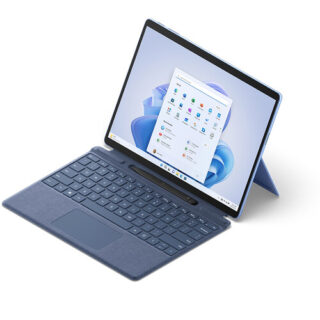
Microsoft Surface Pro 9 – Kenya
KSh125,000.00Add to cartMicrosoft Surface Pro 9 Price in Kenya
Microsoft Surface Pro 9 Price in Kenya 125,000. Be productive, creative, and entertained from almost anywhere with the 13** Microsoft Surface Pro 9, which combines the power of a laptop with the versatility of a tablet. Designed for everyday productivity, video conferencing, and gaming, this portable sapphire colored system is updated with an Intel i5 10-core processor and 16GB of LPDDR5 memory, giving it the flexibility to quickly multitask applications such as Microsoft Word, Adobe Fresco, and more installed onto its replaceable 256GB SSD. At the same time, the Surface Pro 9 maintains the familiar lightweight design of its predecessor, including a 13** 2880 x 1920 resolution PixelSense Flow touchscreen display, dual Thunderbolt 4 ports, and a convenient built-in kickstand. Wi-Fi 6E capabilities allow you to connect to compatible high-speed networks. Windows 11 Home is pre-installed. Buy Microsoft Surface Pro 9 online at best price in Kenya at Adishnetservices
Microsoft Surface Pro 9 Specs and Price in Kenya
Price in Kenya Ksh 125000
Processor
Quad-core 11th Gen Intel® Core i7-1185G7 ProcessorSecurity
Firmware TPM chip for enterprise-grade security and BitLocker support
Enterprise-grade protection with Windows Hello face sign-inSoftware
Windows 11 Home
Preloaded Microsoft 365 Apps8
Microsoft 365 Family 30-day trial9
Preloaded Xbox app
Xbox Game Pass Ultimate month trial9Sensors
Accelerometer
Gyroscope
Magnetometer
Ambient Color Sensor (brightness and color)
Surface Pro 9
12th Gen Intel Core 10-Core Processor
This system features a power-efficient Intel Core i5-1235U 10-core 12th generation processor, which contains two Performance cores with a Max Turbo frequency of 4.4 GHz to load a variety of applications while the eight Efficient cores handle background tasks for smooth multitasking.
PixelSense Flow Display
The Surface Pro 9 features a 13** edge-to-edge PixelSense Flow 10-point touchscreen display with a 2880 x 1920 resolution, delivering crisp images with 267 ppi (pixels per inch) and a 3:2 aspect ratio. The display also supports cinema-quality video with Dolby Vision IQ and comes with an ambient color sensor, which automatically adjusts the color temperature and brightness based on the lighting conditions. The default 60 Hz refresh rate may be increased to 120 Hz for smoother scrolling while browsing content in addition to minimizing motion blur when playing your favorite games.
High Resolution Cameras
Capture every moment in stunning detail with the 10MP rear camera, which records video at up to 4K resolution. Additionally, the 1080p front camera is ideal for video calls and supports quick logins via Windows Hello.
Fast Wi-Fi
Wi-Fi 6E (802.11ax) connectivity allows you to take advantage of the less congested 6 GHz band with compatible networks, delivering a clear high-speed signal for smooth video streaming, online gaming, and web browsing experiences.
Thunderbolt 4
Thunderbolt 4 is a hardware interface that utilizes the reversible USB Type-C connector and features a maximum throughput of 40 Gb/s when used with compatible devices. The connector also transmits data via USB4 at up to 20 Gb/s, and dual-bandwidth DisplayPort allows you to connect either one 8K monitor or up to two 4K displays simultaneously. Additionally, you can daisy chain up to six devices from a single port.
Power Through Your Day
The Surface Pro 9 offers up to 15.5 hours of battery life.
Complete Your Experience
Enhance your Surface Pro 9 with a separately purchased Surface Slim Pen 2 to make detailed illustrations and edits as though you were working with a pen and paper. Adding a Surface Pro Signature Keyboard provides you with a laptop experience. You can also pair the system with a variety of Bluetooth devices, including headsets, mice, and speakers.
Windows 11 Home
A New Start Position
Windows 11 has been completely redesigned from its predecessor to emphasize productivity, creativity, and ease of use. The customizable Start Menu is now at the center of the taskbar and utilizes the cloud, allowing you to quickly find and access recent files, regardless of what platform or device was previously used to view them. The streamlined Start Menu design also lets you pin apps and recent files in addition to powering down the system.
Making Productivity a Snap
Multitask with speed and efficiency with the ability to snap apps side-by-side. Snap Layouts and Snap Groups help to keep your windows organized using different layouts that are designed to fully optimize your screen space, no matter its size and resolution. Windows 11 also remembers their positions, so you can resume from where you left off when selecting Snap Groups from the task bar, allowing you to switch between both individual applications and entire projects. Snap Layouts are also automatically restored when docking laptops with external monitors.
Microsoft Teams Integration
Stay connected with friends, family, co-workers, and clients with Microsoft Teams Chat integrated onto the Windows 11 taskbar. With a touch, you can connect to your contacts via text, voice, and video, regardless of whether theyre using Windows, Android, or iOS devices. You can also communicate with those who dont have the Teams app installed using two-way SMS messaging.
Adapting to You
The Adaptive Input feature automatically optimizes the Windows 11 interface to however you prefer to interact with your device, whether its using a mouse, keyboard, touch, voice, or handwriting.


Reviews
There are no reviews yet.