Zhiyun-Tech WEEBILL-2 3-Axis Gimbal Stabilizer with Rotating Touchscreen – Kenya
KSh54,999.00
Zhiyun-Tech WEEBILL-2 3-Axis Gimbal Stabilizer with Rotating Touchscreen in Kenya
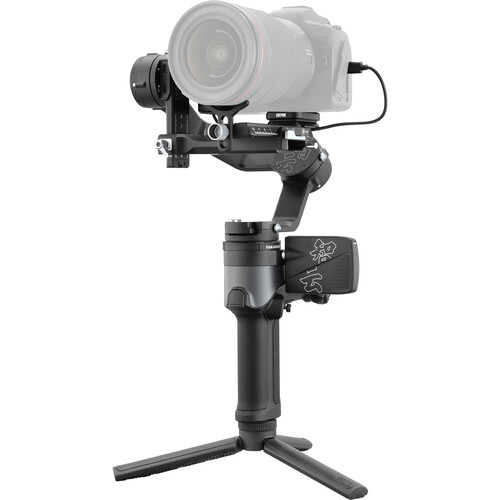
Zhiyun-Tech WEEBILL-2 Price in Kenya is Ksh.54,999.The Zhiyun-Tech WEEBILL 2 handheld 3-axis gimbal stabilizer, designed slightly larger than its predecessor, supports up to 7.3 lb and features an Infineon sensor that improves stability and responsiveness, allowing for enhanced smooth operation. It has a built-in 2.9** flip-out color touchscreen display that can be rotated to a desired angle and folded in when not needed. The touchscreen allows you to adjust settings, monitor your shot, and select certain functions, such as panorama, time-lapse, and motion-lapse, without having to resort to the companion mobile app. A focus control wheel operates electronic focus, aperture, and ISO when used with compatible cameras and lenses. It can also be used to control optional Zhiyun lens motors.GET Zhiyun-Tech WEEBILL-2 3-Axis Gimbal Stabilizer with Rotating Touchscreen at the best price in Nairobi,Kenya from Adishnetservices Technologies.
The included mini tripod can be attached above the main handgrip of the gimbal to use as an underslung handle for low-angle shots. It can also be attached to the bottom of the main handgrip to function as an extension grip or a stand. The WEEBILL 2 runs up to 9 hours on the included batteries, which are fully rechargeable in approximately 1.5 hours when using a 15V USB PD fast charger, sold separately.
The included iOS/Android mobile app offers features such as balance check, mode switching, and remote camera triggering for photo and video capture. For remote operation, the mini tripod allows you to set the gimbal down on a flat surface while you stand at a distance and operate the camera from your smartphone or tablet.
Additional Features
360° pan rotation
340° tilt and roll rotation
Portrait and landscape modes
Rosette mount with a 1/4**-20 center thread on the side of the gimbal
2.4 GHz operating frequency
Bluetooth 5.0
Camera control cables included for operating select functions of compatible Canon, Panasonic, and Sony cameras
Partially foldable for transport and storage
Other Gimbals available in Stock
[table id=11 /]
Kenya
Related products
-
Read more
Blackmagic Design DaVinci Resolve Micro Panel with Resolve Studio Software in Kenya
Blackmagic Design DaVinci Resolve Micro Panel with Resolve Studio Software Price in Kenya is Ksh .Buy Blackmagic Design DaVinci Resolve Micro Panel with Resolve Studio Software price in Kenya from Adishnetservices.
DaVinci Resolve Micro Panel**from**Blackmagic Design**is a portable control surface that provides more control and a faster workflow to DaVinci Resolve Studio software than working with a keyboard and mouse alone. Suitable for editors and colorists that need a portable control surface, it features three high-resolution, weighted trackballs and 12 control knobs for accessing essential primary color-correction tools in the included Resolve software. Eighteen dedicated keys on the right side also give you access to the most commonly used grading features and playback controls.
The Micro Panel uses a USB 3.0 Type-C interface that allows you to connect to a computer or laptop and power the panel, alleviating the need for a separate power supply. It also interfaces with macOS, Windows, or select Linux systems. For the panel to work with Resolve, your computer must be running DaVinci Resolve 14.3 or DaVinci Resolve Studio 14.3 or later. An included USB 3.0 Type-A to USB Type-C cable provides backward compatibility for systems that have USB 3.0 Type-A ports.
**
Y lift Control: Adjust the contrast of the image in the darker areas, specifically in the Y (luminance) channel only. This adjustment allows changing the black point without changing saturation.
Y Gamma Control: Adjust the contrast of the image in the mid-tone areas, specifically in the Y (luminance) channel only. This control helps add depth and extra vibrancy to shots.
Contrast
Contrast Control: Increase contrast to make the blacks darker and the whites brighter, or decrease contrast to do the opposite.
Pivot: Change the center of tonality about which dark and bright parts of the image are stretched or narrowed during a contrast adjustment.
Mid-Tone Detail: Affect the contrast of regions of the image with high edge detail to increase or decrease the perception of image sharpness and definition. Often used for softening facial features, making it popular for beauty shots.
Detail
Color Boost Control: Raise the saturation in regions of the image with low saturation while leaving properly saturated areas alone. Also known as a vibrance operation, this is useful for adding color without oversaturating the image.
Shadow Control: Selectively lighten or darken shadow detail without affecting your image**s mid-tones.
Highlight Control: Enable retrieving blown-out highlight detail in high dynamic range media by lowering this parameter. This allows you to achieve a smooth blend between the retrieved highlights and unadjusted mid-tones for a natural-looking image.
Saturation
Increases or decreases overall image saturation. You can turn your color image into a grayscale image with this control.
Hue Control: Rotate all hues of the image around 360** of the color wheel. The default setting is 50, which retains the original distribution of hues.
Luminance Mix Control: Control the balance between the YRGB adjustments and Y-only adjustments made using the Y channel lift, gamma, and gain controls.
System Requirements for DaVinci Resolve
System requirements as of DaVinci Resolve 18:
Minimum System Requirements for Mac OS
macOS 11 Big Sur
8GB of system memory; 16GB when using Fusion
Blackmagic Design Desktop Video version 12.0 or later
Integrated GPU or discrete GPU with at least 2GB of VRAM
GPU that supports Metal or OpenCL 1.2
Minimum System Requirements for Windows
Windows 10 Creators Update
16GB of system memory; 32GB when using Fusion
Blackmagic Design Desktop Video 10.4.1 or later
Integrated GPU or discrete GPU with at least 2GB of VRAM
GPU that supports OpenCL 1.2 or CUDA 11
NVIDIA/AMD/Intel GPU Driver version**as required by your GPU
Minimum System Requirements for Linux
CentOS 7.3
32GB of system memory
Blackmagic Design Desktop Video 10.4.1 or later
Discrete GPU with at least 2GB of VRAM
GPU that supports OpenCL 1.2 or CUDA 11
NVIDIA/AMD Driver version**as required by your GPU
Blackmagic Design DaVinci Resolve Micro Specs in Kenya
Controls
30x Pre-Labeled Key
12x Dial
3x TrackballDisplay
NoOS Compatibility
Windows 10 or Later
macOS 10.15 or Later
CentOS 7.3 or LaterUSB I/O
1x USB-C Female Input
Power
Power Source
USBPower Consumption
2 W (Maximum) -
Add to cart
Hohem iSteady Pro 4 3-Axis Action Camera Gimbal Stabilizer in Kenya
Hohem iSteady Pro 4 3-Axis Action Camera Gimbal Stabilizer Price in Kenya is Ksh 17,500. Achieve smooth action camera footage using the Hohem iSteady Pro 4 3-Axis Action Camera Gimbal Stabilizer and its 360** of rotation, 600** of pan, and 320** of tilt control. A quick release clip efficiently secures your GoPro HERO, Insta360 ONE, or DJI Osmo Action series camera, and it provides easy detachment from the gimbal for transitioning between mounts. Bluetooth 5.1 connectivity allows the gimbal to be controlled with the compatible smartphone app. Buy Hohem iSteady Pro 4 3-Axis Action Camera Gimbal Stabilizer** price in Kenya from Adishnetservices.
Onboard buttons can manipulate the positioning of the gimbal and provide full wireless control to compatible GoPro cameras. A smartphone app toggles between shooting modes and adjusts parameters. The stabilizer boasts a 14-hour battery runtime that can be monitored with the LED indicator lights. You can charge your action camera and use the gimbal simultaneously with the included cables. The side and bottom of the device have 1/4**-20 threads to mount the tripod extension for a stabilized shot. A carry case allows you to bring all your accessories on the go.
Compatibility
For a full list of compatible cameras, please see the most current compatibility information on**the Hohem website.
Hohem ISteady Pro 4 Specs in Kenya.
Grip Design
Single Handgrip (Slanted)Number of Axes
3: Roll, Horizontal, VerticalWireless Protocol
Bluetooth 5.0Mounting
2 x 1/4**-20 FemaleWeight
12.9**oz / 365**g (with Battery)
Gimbal
Number of Axes
3: Roll, Horizontal, VerticalRotation Range
Mechanical Range
Yaw (Pan): 600**
Pitch (Tilt): 320**
Roll: 320**
Compatibility
Camera Control
NoSupported Camera Dimensions
H: 2 x D: 1.2** / H: 51 x D: 30**mm
Connectivity
Wireless Protocol
Bluetooth 5.0
Battery
Battery Type
1x Built-InBattery Capacity
3600 mAhBattery Runtime
14 HoursBattery Charging Time
3.5 Hours -
Read more
DJI RS 4 Pro Gimbal Stabilizer Combo in Kenya
DJI RS 4 Gimbal Stabilizer Combo Price in Kenya is Ksh 135,000.Enhanced operation efficiency, native vertical shooting, and an expanded accessory ecosystem make the DJI RS 4 Pro**a powerful tool for the mirrorless camera shooter. The gimbal only weighs around 2.74 lb and sports a load capacity of 10 lb capable of supporting your compact camera build. The combo includes a Focus Pro Motor with a rod mount kit, a Ronin Image Transmitter, a focus gear strip, a briefcase handle, and a carrying case. Teflon-coated axes reduce friction for a smoother balancing and operating experience. Other intuitive features include a fine-tuning knob, auto-locking OLED screen, and RSA communication port for use with expanded accessories.
Second-Generation Quick Release Plate Design
With the familiar dual-layered quick release plates of its predecessor, the RS 4 makes mounting and balancing your camera a breeze. The horizontal plate is newly designed for faster transitions to native vertical shooting. A fine-tuning knob adjusts the tilt axis to move your camera forward or backward. The upper plate has added placement guides for secure camera mounting. Buy DJI RS 4 Pro Gimbal Stabilizer Combo at the best price in Kenya from Adishnetservices.
DJI RS 4 Pro Gimbal Stabilizer Combo Price in Kenya
Price in Kenya
Ksh135,000Load Capacity
9.9**lb / 4.5**kgNumber of Axes
3: Pitch (Tilt), Roll, Yaw (Pan)Wireless Frequency
2.4 GHzWireless Protocol
Bluetooth 5.0Mobile App Compatible
Yes: Android & iOS
App Name: Ronin AppMounting
1 x 1/4**-20 Female
2 x NATO RailWeight
2.73**lb / 1.24**kg
Compatibility
For a full list of compatible cameras, please see the most current compatibility information on the DJI website.
Second-Generation Automated Axis Locks
When the gimbal is powered off, you can press and hold the power button, and the three axes unlock while the gimbal expands automatically, allowing you to start working in just two seconds. Press the power button once, and the axes automatically lock and enter sleep mode, making a move or storage significantly more efficient. The second iteration of this design has created smaller gaps when locked to further reduce gimbal shake.
RSA Communication Port
The RSA communication port allows you to integrate Ronin series accessories into your gimbal configuration. Add Ronin-specific or third-party accessories with control capabilities to switch between different shooting configurations. The DJI RS SDK protocol will allow third-party manufacturers and other developers to create future customized functions for the RS 4.
Wireless Shutter Control
By implementing Dual-Mode Bluetooth, the RS 4 Pro supports wireless shutter control, saving time and effort with every use. After the initial Bluetooth pairing, you can control video and photo shooting by simply pressing the record button on the stabilizer. Previously paired cameras can automatically reconnect after the first use, eliminating the need for a camera control cable.
Updated ActiveTrack Pro
Tracking on the Ronin series has never been more accurate or responsive. The next-generation ActiveTrack Pro can directly read images from the camera built into the Focus Pro LiDAR Autofocus with no need for the Ronin Image Transmitter. When using ActiveTrack Pro, you can directly monitor or frame the subject on the RS 4 Pro**s OLED touchscreen. The new optional LiDAR unit can project 76,800 ranging points within a 20-meter area.
Integrated Controls
By simply sliding the new gimbal mode switch, you can alternate between Pan follow, Pan and Tilt follow, and FPV modes. The FPV mode selection is also customizable to 3D Roll 360, Portrait, or Custom, allowing you to adjust your equipment and get started as fast as possible. Other intelligent features include motion-lapse, track, and panorama.
The trigger button can be customized to FPV mode, which causes the three axes to follow the direction of the grip**s movement when held down.
Car Mount Mode
The new car mount mode optimizes stabilization specifically to accommodate vehicle vibrations and wind resistance for steady capture.
Fourth-Gen RS Stabilization Algorithm
Empowered by a next-generation stabilization algorithm, the RS 4 Pro provides enhanced stability over the RS 3, effortlessly managing vertical shooting, fast-paced movements, and low-angle shots. The motor torque on all three axes has been increased by 20% for greater power.
Auto-Locking OLED Screen
The RS 4 Pro is equipped with a fixed OLED touchscreen with a new auto-lock feature. Once locked, the screen will display the current gimbal and joystick moves at a low brightness to prevent accidental switching and conserve battery.
Integrated Monitoring and Control
Remotely adjust camera exposure directly in the Ronin app, or control the gimbal with the virtual joystick to get an integrated monitoring and control experience. With the Ronin Image Transmitter, a smartphone can be used as a motion controller to remotely control the RS 4 Pro gimbal for more flexible and dynamic camera movements.
Enhanced Battery and Fast Charging
The RS 4 Pro battery grip features a cartridge design, making it easier to swap batteries and smaller for storage. It can even be charged separately from the gimbal. The new battery grip provides an extended runtime of up to 13 hours, enough for continuous shooting all day. It supports 18W PD fast charging with a charge time of just 1.5 hours. It can even be used while charging to keep RS 4 Pro powered almost indefinitely. -
Zhiyun Smooth 5S AI 3-Axis Smartphone Gimbal – Kenya
KSh22,000.00Add to cartZhiyun Smooth 5S AI 3-Axis Smartphone Gimbal in Kenya
Zhiyun Smooth 5S AI 3-Axis Smartphone Gimbal price in Kenya is Kshs 22000.With updated stabilization and high-torque motors with the option to add an AI tracking module, the Smooth 5S AI 3-Axis Smartphone Gimbal**from**Zhiyun-Tech helps you achieve ultra-smooth tracking in your next vlog. It features 360** rotation for an immersive Vortex Mode, among other tracking modes, that can be enhanced by the separately available AI tracker module. The gimbal can support 5.3 to 10.6 oz loads and smartphones measuring 2 to 3.6** wide. The arms have a new clear design for easy adjustments and improved high-torque motors for smoother movements.
An integrated fill light on the tilt axis arm boasts a 650 lux peak output. Magnetic mounting points on either side of the smartphone clamp support the attachment of the AI tracker or magnetic fill lights. The control panel has been redesigned for more intuitive mode switching and fill light adjustment, among other parameters. The gimbal has Bluetooth 5.1 connectivity for compatibility with the ZY Cami and StaCam apps for even more creative control. A built-in 2600mAh battery can operate for 26 hours in standby mode and fully recharges in 2 hours via PD fast charging protocol. Buy Zhiyun Smooth 5S AI 3-Axis Smartphone Gimbal at Adishnetservices Kenya.
Integrated Fill Light
The fill light has a 680 lux peak illuminance and features an airflow design for efficient heat dissipation.
All-in-One Control Panel
Mode display
Rotary dial
Menu button
Fill light
Joystick
Mode button
Photo/Video button
Gimbal Modes
Pan Follow Mode: tilt and roll axis motors are locked and the pan axis follows movement
Lock Mode: all three motors are locked
Follow Mode: roll axis motor is locked and the tilt and pan axis motors follow movement
Point of View Mode: all three motors follow movement
Vortex Mode: tilt motor rotates upward by 90** and the three motors follow the rotation of the handle
Go Mode: the camera pans and filts following the movement of the gimbal, roll axis is locked
Smartphone Apps
The ZY Cami app features a SMART mode, SmartFollow 3.0 mode, Gesture Control, Live Stream Master, and the ZY Cami Editor.
The StaCam supports customizable framing, lens focal length adjustments, depth beauty effects, and advanced video customization. -
DJI Osmo Action 4 Camera Standard Combo – Kenya
KSh44,000.00Add to cartDJI Osmo Action 4 Camera Standard Combo in Kenya
DJI Osmo Action 4 Camera Standard Combo Price in Kenya is Ksh 44,000.Capture steady, high-definition footage in virtually any scenario with the Osmo Action 4 Camera Standard Combo**from**DJI. The Osmo Action 4 features many of the same features as its predecessor, like dual screens, RockSteady and HorizonSteady stabilization systems, and a waterproof camera body. A slightly bigger sensor with a higher MP count, a new 10-bit D-Log M color mode, and an upgraded microSD slot capable of supporting larger card sizes make up the Action 4**s improved design..Buy DJI Osmo Action 4 Camera Standard Combo at best price in Kenya at Adishnetservices.
High-Definition Video with Wide Dynamic Range
The camera features a 1/1.3** sensor to record up to UHD 4K120 video and capture experiences in dynamic, smooth detail. A super-wide 155** FOV ensures all the action is in frame. 10-bit D-Log M color mode provides you with over one billion colors and a wider dynamic range for vivid footage.
Color Temperature Calibration
The Action 4**s color temperature sensor intelligently adjusts white balance and auto-exposure for highly accurate colors, even in complex lighting environments like when scuba or free diving deep below the surface. Sync with the DJI Mimo app for improved detail rendering underwater.
RockSteady 3.0
An intelligent stabilization algorithm eliminates camera shake in all directions to ensure your high-adrenaline mountain biking or skiing shots maintain smooth movements. It supports use while recording at up to 4K120, providing a stable and immersive first-person perspective.
HorizonSteady and HorizonBalancing
This smart stabilization feature helps to eliminate camera shake in all directions, and even horizontally corrects tilt at any angle in 2.7K60 video. That means footage can remain horizontally level, even through heavy bumps and 360** rotations. In addition, you can activate HorizonBalancing, which corrects the tilt horizontally within **45** and supports recording stable 4K60 videos.
Efficient Shooting Configurations
The magnetic quick release design of the Action 4 allows you to easily switch things up when needed. Detach and switch between different mounts and accessories. The horizontal-vertical protective frame lets you natively shoot vertical video for social media platforms.
Custom Modes and Quick-Switch Button
Use features like SnapShot to ensure you never miss a moment. Save frequently used settings to the five built-in shortcuts to switch modes on the fly using the quick-switch button or voice prompts.
Voice Prompt and Voice Control
Intuitive control, even if you can**t see the screens. Short press the Quick Switch button, and the camera will voice broadcast the current shooting mode. Even if the camera is installed on a helmet or other hard-to-see location, you can accurately select the required mode and be confident you**ll never miss the moment you want to record. You can even add up to five sets of custom parameters to the shooting mode list. Remotely control your camera with just your voice. Ideal for scenarios where your hands are busy, the Action 4 recognizes voice commands with a high recognition rate, letting you stay locked into the moment.
Dual Touchscreens
The 1.4** front screen is convenient for vlogging and framing selfies and supports commonly used touch control functions. No more turning the camera around for parameter adjustments, mode switching, or video playback. When the camera is switched between horizontal and vertical orientations, the user interface adapts accordingly. The touchscreens are also sensitive enough to be operated easily with wet hands.
AI Selfie Stick Removal
Use the upgraded InvisiStick function with the DJI Mimo app to fully eliminate the selfie stick from your shots to maintain your camera**s POV without interference from your mounting equipment.
Wi-Fi Live Streaming
Live stream directly from your Action 4 using the built-in dual-band Wi-Fi or your phone**s hotspot. Choose your preferred platform and resolution to connect anywhere and record your footage.
Onboard Audio Interface
Three built-in omnidirectional microphones record accurate and clear sound. A hidden microphone at the bottom of the Action 4 suppresses wind noise for windy or fast-moving scenarios. Connect the separately available DJI Mic for a portable, easy-to-mount audio solution with a transmission distance of 820**. The camera can connect to other external microphones using an optional USB-C to 3.5mm cable.
Waterproof
The camera body can be fully submerged up to 59**, enhancing your underwater adventures without the need for additional accessories.
Long Battery Life with Fast Charge
Continuously record for 2.6 hours with the 1770mAh high-capacity battery capable of operating in temperatures as low as -4**F. Fast charging technology allows you to power up the battery 80% in just 18 minutes.
Timecode Sync
Built-in timecode in the Action 4 allows you to easily synchronize footage in multi-camera shooting scenarios.
LightCut Video Editor
The LightCut video editor app is thoroughly optimized for use with the Action 4. It can automatically select clips and intelligently match them with exclusive templates to generate ready-to-share video edits. It supports a direct connection with the Action 4 for quick, convenient footage previews. After shooting, simply let the AI select your highlight moments and generate 4K HD videos. Choose from a number of fun templates designed for fast-paced footage. Whether biking, snowboarding, or diving, epic little edits are right at your fingertips.