Logitech MK470 Slim Wireless Keyboard and Mouse Combo – Kenya
KSh8,500.00
Logitech MK470 Slim Wireless Keyboard and Mouse Combo in Kenya
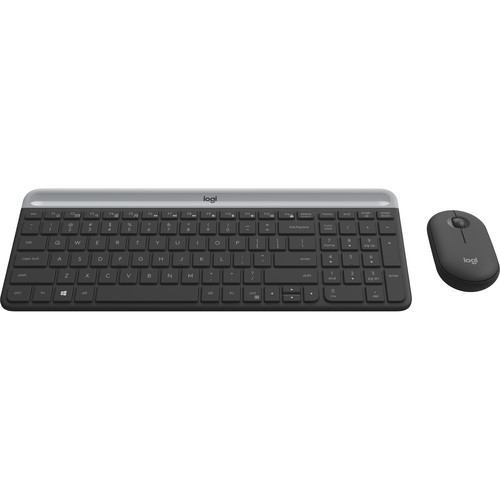
Logitech MK470 Slim Wireless Keyboard and Mouse Combo Price in Nairobi,Kenya is 8,000. The Logitech MK470 Slim Wireless Keyboard and Mouse Combo features a slim and minimalistic design, fit for space-conscious setups. The keyboard, complete with a numberpad, is built with scissor-switch keys, which offer a similar typing experience to that of a laptop. Its also quiet, so you can work without distractions. On the other hand, the ambidextrous wireless mouse also has a low-profile design and functions quietly. Both devices are wireless and connect to your system via the included USB receiver. The keyboard utilizes two AAA batteries and is rated for 36 months of use, whereas the mouse needs just one AA battery that can last for up to 18 months of use.
Related products
-
Microsoft Arc Touch Mouse Laser Wireless – Kenya
KSh10,500.00Add to cartMicrosoft Arc Touch Mouse Laser Wireless Price in Kenya
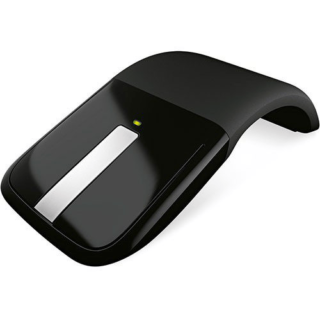
Microsoft Arc Touch Mouse Laser Wireless Price in Kenya is Ksh 10,500. The Microsoft Arc Touch Mouse Laser Wireless in gray is a flexible mouse with a 2.4GHz wireless USB nano transciever that snaps into the bottom of the mouse. It offers a 30-foot wireless range and battery life of up to six months. Buy Microsoft Arc Touch Mouse Laser Wireless at best price in Kenya at Adishnetservices.
This unique mouse curves to turn on, and flattens to turn off without the use of a button. A green light shows the battery is working and powers off to conserve battery life. It accommodates both left and right handed users. Its flexible design allows for optimum comfort and performance, while it also flattens to make portable use easy.
Easy to Use
2.4 GHz wireless USB Nano Transceiver connects wirelessly
Up to 30 feet (9 m) of wireless range
BlueTrack technology works on difficult surfaces
Green light flashes to show the battery is working, turns off to save battery life
Access common tasks, including product information, registration, and settings
Up to 6 months of battery life
Flexible Design
Curve to turn on, flatten to turn off
Works for left or right-handed control
Curved design flattens for portable use
Operating System Compatibility
Windows 7, Windows Vista, Windows XP (excluding Windows XP 64-bit) -

Apple Mac mini with M4 Chip – Kenya
KSh94,999.00Add to cartApple Mac mini with M4 Chip in Kenya
Apple Mac mini with M4 Chip Price in Kenya is KShs 165,000. At just five by five inches, the Apple Mac mini is less than half the size of the previous Mac mini. The compact Mac mini has a small footprint in your workspace and its lightweight design makes it easy to move, mount, and rack. Now housing the powerful M4 10-Core chip, the Mac mini delivers up to 1.8x faster CPU performance and 2.2x faster GPU performance over the M1 model. Add 16GB of unified RAM, 1TB of storage, Wi-Fi 6E, Gigabit LAN, and Thunderbolt 4, and the Mac mini is a tiny powerhouse. The Mac mini also features Apple Intelligence, the personal intelligence system that transforms the way you express yourself, all while protecting your privacy. As Apple**s first carbon neutral Mac, the Mac mini has seen over 80 percent reduction in greenhouse gas emissions across its materials, manufacturing, transportation, and customer use.Buy Apple Mac mini with M4 Chip at Adishnetservices Kenya
This Mac comes preloaded with macOS. Updates can be downloaded for free via the Mac App Store. Please check Apple**s website for upgrade eligibility. Also, please note that a keyboard and mouse are not included.
Supercharged by M4
The M4 chip brings a performance boost to Mac mini. Featuring a faster 10-Core CPU, the Mac mini is up to 1.8x faster than Mac mini with M1. Users will feel this performance across everyday activities like multitasking between their favorite apps and browsing webpages in Safari. And with a powerful GPU, featuring Apple**s advanced graphics architecture, Mac mini with M4 handles more intense workloads, like photo editing and gaming, up to 2.2x faster than the Mac mini with M1. The M4 also brings hardware-accelerated ray tracing to the Mac mini for the first time. The Mac mini comes standard with 16GB of faster unified memory. The Neural Engine in the M4 is now over 3x faster than on Mac mini with M1, making it a solid option for AI, and accelerating the pace at which users can get things done.
Looks Small. Lives Large.
Measuring in at just five by five inches, the Mac mini saves a lot of space on your desk. I ts smaller design reduces aluminum use in the enclosure by 85 percent compared to the previous generation. Weighing just 1.5 pounds, the Mac mini is easy to move, rack, or mount just about anywhere.
Built to Chill
A smaller design requires an improved thermal architecture to keep temperatures low. Within the Mac mini, air is guided to different levels of the system, and all of it flows through the foot. Combined with Apple silicon**s power efficiency, the Mac mini can breeze through intensive workloads at fast speeds without overheating.
A New Era with Apple Intelligence on the MacApple Intelligence harnesses the power of Apple Silicon and the Neural Engine to unlock new ways for users to work, communicate, and express themselves on Mac. It is available in U.S. English with macOS Sequoia 15.1. With systemwide Writing Tools, users can refine their words by rewriting, proofreading, and summarizing text nearly everywhere they write. With the newly redesigned Siri, users can move fluidly between spoken and typed requests to accelerate tasks throughout their day, and Siri can answer thousands of questions about Mac and other Apple products. New Apple Intelligence features will be available in December, with additional capabilities rolling out in the coming months. Image Playground gives users a new way to create fun original images, and Genmoji allows them to create custom emoji in seconds. Siri will become even more capable, with the ability to take actions across the system and draw on a user**s personal context to deliver intelligence that is tailored to them. In December, ChatGPT will be integrated into Siri and Writing Tools, allowing users to access its expertise without needing to jump between tools.
Apple Intelligence does all this while protecting users** privacy at every step. At its core, is on-device processing, and for more complex tasks, Private Cloud Compute gives users access to Apple**s even larger, server-based models and offers groundbreaking protections for personal information. In addition, users can access ChatGPT for free without creating an account, and privacy protections are built in-their IP addresses are obscured and OpenAI won**t store requests. For those who choose to connect their account, OpenAI**s data-use policies apply.
Writing Tools
Apple Intelligence can proofread your text and rewrite different versions until the tone and wording are just right, and summarize selected text with a click.
Image Playground
Create fun, original images based on a , a concept, or even a person from your Photos library.
Natural Language Search in Photos
Search for photos and videos simply by describing what you**re looking for.
PortsThe back of the Mac mini features three Thunderbolt 4 ports, delivering 40 Gb/s of data throughput. There is also an HDMI port and a Gigabit Ethernet RJ45 LAN jack. At the front, there are two 10 Gb/s USB-C 3.2 Gen 2 ports and a 3.5mm headphone jack.
The Mac mini can simultaneously support up to three displays, two 6K 60 Hz displays over Thunderbolt 4 and a 4K 60 Hz display over HDMI. For higher resolutions, the Mac mini can support two displays, one 5K 60 Hz display over Thunderbolt and an 8K 60 Hz or 4K 240 Hz display over Thunderbolt or HDMI.
macOS ** Let Your Apps Fly
The Mac mini comes loaded with built-in apps, privacy and security, and amazing features for work and play. And macOS brings more speed and responsiveness to all your go-to apps-from Microsoft Word, Excel, and Outlook to Slack and Adobe Photoshop.
Mac + iPhone: The One-Two Punch
Use your Mac mini and iPhone together in perfect harmony. Make and answer calls and text messages from your iPhone directly on your Mac. Don**t have a webcam** You can use your iPhone instead. Left your iPhone in another room** You can access it wirelessly with the iPhone Mirroring app in the Dock.
Plug and Slay
The Mac mini is designed to pair perfectly with the Apple Studio Display, Magic Keyboard, and Magic Mouse (all sold separately). However, the Mac mini is also ready to work with third-party displays and accessories you already own. You can mix, match, and make the Mac mini truly yours.
The First Carbon Neutral MacThis Mac mini is Apple**s first carbon neutral Mac, marking a significant milestone toward Apple 2030, the company**s goal to be carbon neutral across the entire carbon footprint by the end of this decade.
The Mac mini is made with over 50 percent recycled content overall, including 100 percent recycled aluminum in the enclosure, 100 percent recycled gold plating in all Apple-designed printed circuit boards, and 100 percent recycled rare earth elements in all magnets. Apple also used renewable energy to manufacture the Mac mini. Apple also invested in clean energy projects and prioritized lower-carbon modes of shipping, like ocean freight, to further reduce emissions from transportation. Together, these actions have reduced the carbon footprint of the Mac mini by over 80 percent. For the small amount of remaining emissions, Apple applies high-quality carbon credits from nature-based projects, like those generated by its innovative Restore Fund.
In another first for the Mac mini, the packaging is now entirely fiber-based, bringing Apple closer to its goal to remove plastic from its packaging by 2025.
-
UGREEN Swivel Laptop Stand LP592 – Kenya
KSh7,400.00Add to cartUGREEN Swivel Laptop Stand LP592 in Kenya
UGREEN Swivel Laptop Stand LP592 Price in Kenya is ksh.7,400.
360 Degree Rotation
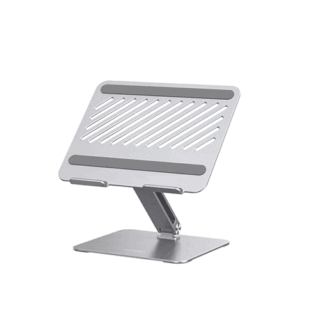
Featuring a 360** rotatable axis on the base, UGREEN laptop stand for desk allows you to swivel your laptop to any side more flexibly. It enables you to share your PC screen to your partners in the meeting, more convenient and practical for office and home.Buy UGREEN Swivel Laptop Stand LP592 at the best price in Kenya from Adishnetservices.
Ergonomic Design
This laptop stand holder could be easily adjusted to your preferred viewing angle. It effectively ease your neck pain by elevating your laptop to your eye level to fix your posture. You can choose different angles and rise it up higher or lower to meet your needs.
Stylish and Stable
This laptop desk stand is made of premium aluminum alloy. With the thicken base and enhanced arm, this sturdy computer stand supports up to 11 lb and holds your notebook more securely, no worry about tipping over.
Broad Compatibility
Work with all laptops up to 17.3-inch, the adjustable laptop stand is compatible with MacBook Pro 13** 14** 16**, MacBook Air, Microsoft Surface Book, Lenovo Ideapad 3, Acer Aspire 5, ASUS TUF F15 Gaming Laptop, HP Notebook, Dell Chromebook, Samsung Galaxy Book, etc.
Keep Laptop Cool
The open cutout design of the aluminum stand provides good ventilation and airflow to prevent your laptop from overheating.
**
-
 Add to cart
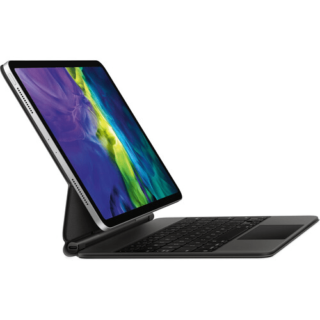
Apple Magic iPad Pro 11** 2nd Gen Price in Kenya
Apple Magic Keyboard for 11** iPad Pro price in Kenya is Ksh 45000. Use the black Magic Keyboard for iPad Pro from Apple to give your tablet a feel that rivals laptops. With its floating cantilever design, your 11** iPad Pro magnetically attaches to the Magic Keyboard for smooth viewing angle adjustments. Its full-size, backlit keys feature a scissor mechanism with 1mm travel for fast and quiet typing. The keyboard also has a built-in multi-gesture touchpad that allows precise interaction with iPadOS applications. A USB Type-C pass-through charging port is located on the keyboard folios hinge, freeing the iPad Pros port for peripherals such as external storage drives. Once youre done, the keyboard doubles as a cover that protects the front and back of your iPad Pro.
Apple Magic Keyboard Features
Designed for Comfort
The Magic Keyboard features a floating cantilever design, which allows you to magnetically attach your 11** iPad Pro and adjust it to the most comfortable viewing angle.
iPadOS Touchpad
The multi-gesture touchpad lets you move a cursor around in iPadOS applications such as word processors and spreadsheets.
USB Type-C Charging
Charge your iPad Pro using the Magic Keyboards integrated USB Type-C power pass-through port and use your iPad Pros port for other accessories.
Compatibility11** iPad Pro (1st Gen), 11** iPad Pro (2nd Gen), 11** iPad Pro (3rd Gen), 11** iPad Pro (4th Gen), 10.9** iPad Air (4th Gen), 10.9** iPad Air (5th Gen)
-
Microsoft Surface Pro 9 – Kenya
KSh125,000.00Add to cartMicrosoft Surface Pro 9 Price in Kenya
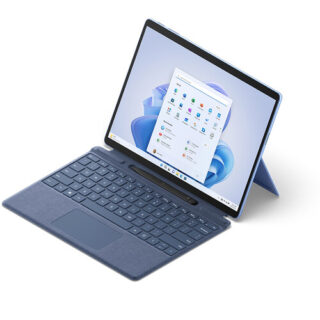
Microsoft Surface Pro 9 Price in Kenya 125,000. Be productive, creative, and entertained from almost anywhere with the 13** Microsoft Surface Pro 9, which combines the power of a laptop with the versatility of a tablet. Designed for everyday productivity, video conferencing, and gaming, this portable sapphire colored system is updated with an Intel i5 10-core processor and 16GB of LPDDR5 memory, giving it the flexibility to quickly multitask applications such as Microsoft Word, Adobe Fresco, and more installed onto its replaceable 256GB SSD. At the same time, the Surface Pro 9 maintains the familiar lightweight design of its predecessor, including a 13** 2880 x 1920 resolution PixelSense Flow touchscreen display, dual Thunderbolt 4 ports, and a convenient built-in kickstand. Wi-Fi 6E capabilities allow you to connect to compatible high-speed networks. Windows 11 Home is pre-installed. Buy Microsoft Surface Pro 9 online at best price in Kenya at Adishnetservices
Microsoft Surface Pro 9 Specs and Price in Kenya
Price in Kenya Ksh 125000
Processor
Quad-core 11th Gen Intel® Core i7-1185G7 ProcessorSecurity
Firmware TPM chip for enterprise-grade security and BitLocker support
Enterprise-grade protection with Windows Hello face sign-inSoftware
Windows 11 Home
Preloaded Microsoft 365 Apps8
Microsoft 365 Family 30-day trial9
Preloaded Xbox app
Xbox Game Pass Ultimate month trial9Sensors
Accelerometer
Gyroscope
Magnetometer
Ambient Color Sensor (brightness and color)
Surface Pro 9
12th Gen Intel Core 10-Core Processor
This system features a power-efficient Intel Core i5-1235U 10-core 12th generation processor, which contains two Performance cores with a Max Turbo frequency of 4.4 GHz to load a variety of applications while the eight Efficient cores handle background tasks for smooth multitasking.
PixelSense Flow Display
The Surface Pro 9 features a 13** edge-to-edge PixelSense Flow 10-point touchscreen display with a 2880 x 1920 resolution, delivering crisp images with 267 ppi (pixels per inch) and a 3:2 aspect ratio. The display also supports cinema-quality video with Dolby Vision IQ and comes with an ambient color sensor, which automatically adjusts the color temperature and brightness based on the lighting conditions. The default 60 Hz refresh rate may be increased to 120 Hz for smoother scrolling while browsing content in addition to minimizing motion blur when playing your favorite games.
High Resolution Cameras
Capture every moment in stunning detail with the 10MP rear camera, which records video at up to 4K resolution. Additionally, the 1080p front camera is ideal for video calls and supports quick logins via Windows Hello.
Fast Wi-Fi
Wi-Fi 6E (802.11ax) connectivity allows you to take advantage of the less congested 6 GHz band with compatible networks, delivering a clear high-speed signal for smooth video streaming, online gaming, and web browsing experiences.
Thunderbolt 4
Thunderbolt 4 is a hardware interface that utilizes the reversible USB Type-C connector and features a maximum throughput of 40 Gb/s when used with compatible devices. The connector also transmits data via USB4 at up to 20 Gb/s, and dual-bandwidth DisplayPort allows you to connect either one 8K monitor or up to two 4K displays simultaneously. Additionally, you can daisy chain up to six devices from a single port.
Power Through Your Day
The Surface Pro 9 offers up to 15.5 hours of battery life.
Complete Your Experience
Enhance your Surface Pro 9 with a separately purchased Surface Slim Pen 2 to make detailed illustrations and edits as though you were working with a pen and paper. Adding a Surface Pro Signature Keyboard provides you with a laptop experience. You can also pair the system with a variety of Bluetooth devices, including headsets, mice, and speakers.
Windows 11 Home
A New Start Position
Windows 11 has been completely redesigned from its predecessor to emphasize productivity, creativity, and ease of use. The customizable Start Menu is now at the center of the taskbar and utilizes the cloud, allowing you to quickly find and access recent files, regardless of what platform or device was previously used to view them. The streamlined Start Menu design also lets you pin apps and recent files in addition to powering down the system.
Making Productivity a Snap
Multitask with speed and efficiency with the ability to snap apps side-by-side. Snap Layouts and Snap Groups help to keep your windows organized using different layouts that are designed to fully optimize your screen space, no matter its size and resolution. Windows 11 also remembers their positions, so you can resume from where you left off when selecting Snap Groups from the task bar, allowing you to switch between both individual applications and entire projects. Snap Layouts are also automatically restored when docking laptops with external monitors.
Microsoft Teams Integration
Stay connected with friends, family, co-workers, and clients with Microsoft Teams Chat integrated onto the Windows 11 taskbar. With a touch, you can connect to your contacts via text, voice, and video, regardless of whether theyre using Windows, Android, or iOS devices. You can also communicate with those who dont have the Teams app installed using two-way SMS messaging.
Adapting to You
The Adaptive Input feature automatically optimizes the Windows 11 interface to however you prefer to interact with your device, whether its using a mouse, keyboard, touch, voice, or handwriting.