
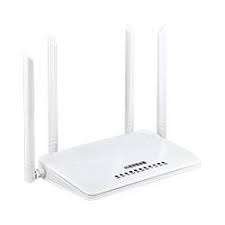
4G/3G Wifi Wireless Router With Sim-Card Slot – Kenya
KSh10,000.00
4G/3G Wifi Wireless Router With Sim-Card Slot MC118 Mtech
4G/3G Wifi Wireless Router With Sim-Card Slot MC118 is a wireless 3G/4G/Wi-Fi Router GPS for GPS Asset tracking. With Istartek MC118 Router GPS you can connect up to 32 users or external terminals with the (Wireless data connectivity – 2.4Ghz 2T2R MIMO 300Mbps) and make the GPS Asset tracking in wireless mode.
4G/3G Wifi Wireless Router 4 (WAN/LAN 10/100Mbps) ports of Istartek MC118 Router GPS with Ethernet connectivity you can connect any type of external hardware that need to be located by wire install or wireless mode. Istartek MC118 can work as a Router GPS and offer Ethernet/Wi-Fi connectivity to different fixed assets or mobile assets,
3G/4G Signal To Lan
Insert relevant SIM card, then you can transmit the 3G/4G signal to Lan
3G/4G Signal to WIFI Signal
Insert relevant SIM card, then you can transmit 3G/4G signal to wifi signal
Hardware WatchDog Design Support
Support anticrash functions. Protect equipment work stable and reliable
Hardware WatchDog Design Support
Support anticrash functions. Protect equipment work stable and reliable
Compatible With Power Bank Charging
Equipped with a micro USB interface, which does not need a voltage convert line and can be charged directly with power bank
4 High Gain Antennas
Inbuild dual 3G/4G antennas+duel 2.4G antennas), to keep strong signal receiving
Strong Heat Dissipation
Add UART port, GPIO port, and micro USB port, multi-interface to meet your different needs
Industry Grade PCB Board
Used brand chipset and PCB design, with overcurrent protection more stable and safe
Support 32Max Terminal Customers
In 300mbps wifi mode, you can connect up to 32 users or terminals at the same time
MC118 Wi-Fi Wireless Router Streams and share smoothly movie, music, photos with your families and friends at the same time. It can broadcast through 4G WIFI signals and also as LAN. It’s just the 4G SIM card and plays.
MC118 Wi-Fi Wireless Router is easy to connect and easy to carry in hand thus portable. Moreover, it can share with 32 Wi-Fi users.
Share the Wi-Fi network with your families and friends securely in the hotel or other public places for it has a password. Moreover, it’s good for an outside project for it can charge via power bank and also via power socket.
Specification of The WiFi Router
CPU MTK RT7628, MIPS CPU, Basic frequency:580Mhz LTE Chipset MDM9x07
RAM 512Mb DDR2 Flash 64Mb SPI Flash
Wireless Communication Speed 2.4Ghz 2T2R MIMO Max300Mbps Band/Mode
FDD-LTE B1/B3/B5/B8
TDD-LTE B38/B39/B40/B41
TD-SCDMA B34/B39
WCDMA B1/B8
EVDO BCO
GSM Quad-band
Antennas Dual 2.4G and Dual 4G A Working Temperature —10? to 40?
Device Color White Storage Temperature —40? to 70?
Device Size 19.5*12.2*2.6(not including antennas) Operating Humidity 40% to 90% RH No condensation
Power Consumption Typical power consumption <7W Storage Humidity 10% to 95% RH No condensation
Protocol Standard IEEE 802.11b/g/n Working Mode 3G/4G Wireless router modeStandard router modeWireless AP+Wireless client bridging mode
Wireless AP+Client mode
Operating frequency 2.4G Indicator PWR WiFi SYS LAN3 LAN2 LAN1 WAN/LAN0 4G/3G 30% 60% 100%
Power 9V/12 V 1.0A-2.0A Interface Type micro USB DC IN power port *1(5-12V adaptive)5.5*2.1mm DC IN port *1(5-12V adaptive)RESET button *1
LAN*4 (WAN/LAN0adaptive) 10/100Mbps adaptive
How to use the MC118 Wifi Wireless SimCard Router?
Plug-in standard SIM Card to convert WiFi
Use it without broadband also access to enjoy surfing the Internet
Connect the PC Wi-Fi SSID 4G-CPE-XXXXXX Password is 12345678
How to Log in the web interface
Log in web UI 192.168.81.1, and see web interface show work mode signal and IP address.
Then click settings and find Profile Management -add sim card provider, then Write correct APN?APN confirm from SIM Card provider ? then the “APPLY” button
How to change Wi-Fi SSID name and password
Find W-LAN -Basic -setting (revise SSID) Password Revise then apply.
How many work mode of the router
The router work with 4G to Wi-Fi, 4G to Lan , PPPoE, WiFI Repeater mode.
4G/3G Wifi Wireless Router With Sim-Card Slot MC118 Mtech
4G/3G Wifi Wireless Router With Sim-Card Slot MC118 is a wireless 3G/4G/Wi-Fi Router GPS for GPS Asset tracking. With Istartek MC118 Router GPS you can connect up to 32 users or external terminals with the (Wireless data connectivity – 2.4Ghz 2T2R MIMO 300Mbps) and make the GPS Asset tracking in wireless mode.
4G/3G Wifi Wireless Router 4 (WAN/LAN 10/100Mbps) ports of Istartek MC118 Router GPS with Ethernet connectivity you can connect any type of external hardware that need to be located by wire install or wireless mode. Istartek MC118 can work as a Router GPS and offer Ethernet/Wi-Fi connectivity to different fixed assets or mobile assets,
3G/4G Signal To Lan
Insert relevant SIM card, then you can transmit the 3G/4G signal to Lan
3G/4G Signal to WIFI Signal
Insert relevant SIM card, then you can transmit 3G/4G signal to wifi signal
Hardware WatchDog Design Support
Support anticrash functions. Protect equipment work stable and reliable
Hardware WatchDog Design Support
Support anticrash functions. Protect equipment work stable and reliable
Compatible With Power Bank Charging
Equipped with a micro USB interface, which does not need a voltage convert line and can be charged directly with power bank
4 High Gain Antennas
Inbuild dual 3G/4G antennas+duel 2.4G antennas), to keep strong signal receiving
Strong Heat Dissipation
Add UART port, GPIO port, and micro USB port, multi-interface to meet your different needs
Industry Grade PCB Board
Used brand chipset and PCB design, with overcurrent protection more stable and safe
Support 32Max Terminal Customers
In 300mbps wifi mode, you can connect up to 32 users or terminals at the same time
MC118 Wi-Fi Wireless Router Streams and share smoothly movie, music, photos with your families and friends at the same time. It can broadcast through 4G WIFI signals and also as LAN. It’s just the 4G SIM card and plays.
MC118 Wi-Fi Wireless Router is easy to connect and easy to carry in hand thus portable. Moreover, it can share with 32 Wi-Fi users.
Share the Wi-Fi network with your families and friends securely in the hotel or other public places for it has a password. Moreover, it’s good for an outside project for it can charge via power bank and also via power socket.
Specification of The WiFi Router
CPU MTK RT7628, MIPS CPU, Basic frequency:580Mhz LTE Chipset MDM9x07
RAM 512Mb DDR2 Flash 64Mb SPI Flash
Wireless Communication Speed 2.4Ghz 2T2R MIMO Max300Mbps Band/Mode
FDD-LTE B1/B3/B5/B8
TDD-LTE B38/B39/B40/B41
TD-SCDMA B34/B39
WCDMA B1/B8
EVDO BCO
GSM Quad-band
Antennas Dual 2.4G and Dual 4G A Working Temperature —10? to 40?
Device Color White Storage Temperature —40? to 70?
Device Size 19.5*12.2*2.6(not including antennas) Operating Humidity 40% to 90% RH No condensation
Power Consumption Typical power consumption <7W Storage Humidity 10% to 95% RH No condensation
Protocol Standard IEEE 802.11b/g/n Working Mode 3G/4G Wireless router modeStandard router modeWireless AP+Wireless client bridging mode
Wireless AP+Client mode
Operating frequency 2.4G Indicator PWR WiFi SYS LAN3 LAN2 LAN1 WAN/LAN0 4G/3G 30% 60% 100%
Power 9V/12 V 1.0A-2.0A Interface Type micro USB DC IN power port *1(5-12V adaptive)5.5*2.1mm DC IN port *1(5-12V adaptive)RESET button *1
LAN*4 (WAN/LAN0adaptive) 10/100Mbps adaptive
How to use the MC118 Wifi Wireless SimCard Router?
Plug-in standard SIM Card to convert WiFi
Use it without broadband also access to enjoy surfing the Internet
Connect the PC Wi-Fi SSID 4G-CPE-XXXXXX Password is 12345678
How to Log in the web interface
Log in web UI 192.168.81.1, and see web interface show work mode signal and IP address.
Then click settings and find Profile Management -add sim card provider, then Write correct APN?APN confirm from SIM Card provider ? then the “APPLY” button
How to change Wi-Fi SSID name and password
Find W-LAN -Basic -setting (revise SSID) Password Revise then apply.
How many work mode of the router
The router work with 4G to Wi-Fi, 4G to Lan , PPPoE, WiFI Repeater mode.
Related products
-
-
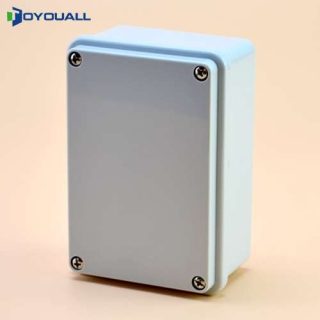
120 X 80 Waterproof Adaptor Box – Kenya
KSh1,310.00Add to cart?120 X 80 Waterproof Adaptor Box?
The 120mm x 80mm Waterproof Adaptor Box is a robust and versatile enclosure designed to protect electrical connections and adaptors from harsh environmental conditions. Constructed from high-quality ABS plastic, this adaptor box provides durable protection with an IP65 or IP67 rating, ensuring it is both dust-tight and water-resistant. This makes it ideal for use in outdoor or industrial settings where exposure to moisture and dust is a concern.
The box features a removable or hinged cover with a rubber or silicone gasket to create a watertight seal, effectively preventing water and dust ingress. It is equipped with multiple cable entry points to accommodate various wiring needs, and it can be securely mounted to walls or surfaces using its locking tabs or screws. The cover and gasket ensure that the internal components remain protected while allowing easy access when needed.
Designed to withstand a temperature range of -20?C to +60?C, the adaptor box remains functional and reliable across different environmental conditions. Its UV resistance, flame-retardant properties, and resistance to chemicals and corrosion add to its durability and suitability for challenging environments.
Overall, the 120mm x 80mm Waterproof Adaptor Box is an excellent choice for managing and safeguarding electrical connections, offering a combination of protection, accessibility, and durability for both indoor and outdoor applications.
Additional Information ?
Color Grey
Item Dimensions 120 X 80
Material PVC
Warranty 1 Year
Additional Features IP65
Application ?Outdoor -

A4 Printing Papers – Kenya
KSh1,000.00Add to cartA4 photocopy paper Smooth paper surface makes sharp printing and copying | Two-sided usage gives the paper sheet high opacity | Bright Appearance gives high print contrast to the printing .
A4 Photocopy Paper has Sharp cutting edges prolongs performance of copying machine | A4 Photocopy Paper has Anti-curl quality reduces paper jams in the copier | A4 AONE Photocopy Low dust content minimizes copier running cost .
A4 AONE Photocopy Paper has 500 sheets of paper guarantee in Each Pack
-
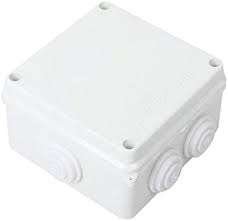
100 X 100 Waterproof Adaptor Box – Kenya
KSh1,250.00Add to cart100 X 100 Waterproof Adaptor Box?
The 100 x 100 Waterproof Adaptor Box is designed to provide robust protection for electrical adapters and connectors, making it ideal for use in outdoor or challenging environments. With dimensions of 100mm x 100mm x 60mm, this compact box is constructed from high-quality plastic or polycarbonate, ensuring durability and resistance to impact.
Featuring an IP65 protection rating, the adaptor box is both dust-tight and resistant to water ingress, safeguarding your electrical components from moisture and debris. The box is equipped with a secure screw-down or latch closure, which ensures a tight seal against environmental elements.
The internal layout is designed to accommodate adapters and connectors comfortably, with space for cable entries through grommets or knockouts. It also includes optional ventilation slots for heat dissipation, helping to maintain optimal operating temperatures.
Suitable for a wide range of applications, the 100 x 100 Waterproof Adaptor Box is a reliable solution for protecting electrical connections in outdoor, industrial, or harsh conditions. Its weatherproof and UV-resistant design ensures long-lasting performance and safety for your electrical components.
Additional Information ?
Color Grey
Item Dimensions H 100 mm x W 100 mm x D 50mm
Material PVC
Warranty 1 Year
Additional Features IP65
Application ?Outdoor -
 Add to cart
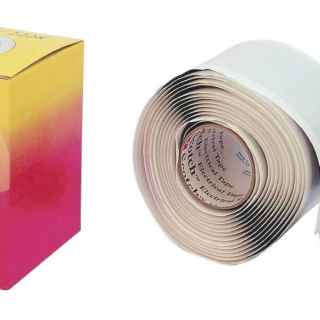
Almagamating 3M Double Sided WaterProof Tape
3M Double Sided WaterProof Tape from the leading tape dealer in Nairobi Kenya, buy online 3M Double Sided WaterProof Tape and have it delivered.
