Logitech G413 Mechanical Keyboard – Kenya
KSh14,500.00
Logitech G G413 in Kenya
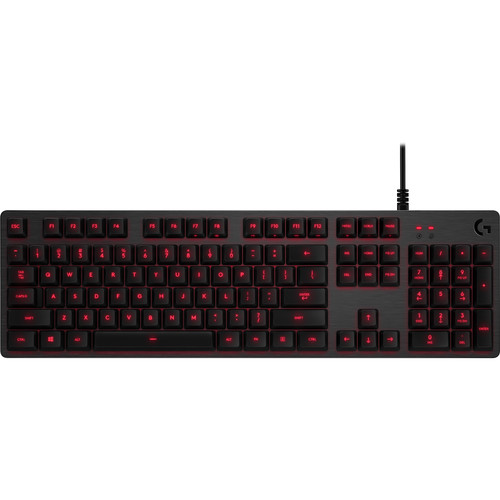
Logitech G413 Mechanical Keyboard Price in Kenya is Ksh 14,500. The G413 Mechanical Backlit Gaming Keyboard from Logitech is built with a durable aluminum top cover and gaming-friendly features to help you dominate the battlefield. It utilizes Logitechs Romer-G switches, which provide you with a balance of speed and precision, and has red LED backlighting so you can game in the dark. Moreover, built-in function keys grant you easy access to multimedia controls, lighting options, and more. Thanks to Logitechs downloadable gaming software, you can customize and program functions and macros on the F1 to F12 keys to execute complicated commands with a single click.
Logitech Romer-G Switches
The Logitech Romer-G switches have an actuation force of 45 g, an actuation distance of 0.06**, and a total travel distance of 0.12**. Moreover, they are rated to last up to 70 million clicks to provide you with durable, fast, and responsive gaming experience.
Logitech G413 Mechanical Keyboard Price in Kenya
Precision Key Lighting
Romer-G switches are also built with LED lighting in mind. The keys are always visible and offer precise and clean lighting through the keycaps without being too distracting.
Aircraft-Grade Aluminum Alloy
The top case of the keyboard is built with an aluminum-magnesium alloy for a tough and stylish finish.
USB Pass-Through
Located at the top of the keyboard is a USB pass-through port, which you can use to conveniently plug in your other USB peripherals. Be sure to plug in both USB cables for USB pass-through functionality.
Full Function Keys
Use the FN key to access multimedia controls, gaming mode, lighting options, and more.
Gaming Keycaps
Included are 12 additional keycaps and a keycap puller so you can swap out the keys for a different style.
Advanced Features
Game Mode Disable the Windows key to prevent accidents during crucial moments.
26-Key Rollover Press multiple keys at the same time and have them all accurately register.
Anti-Ghosting Reliable control when multiple commands are give simultaneously.
Programmable Macros
Download the optional Logitech Gaming Software to gain access to this keyboards full set of features including customizable macros.
Related products
-
Logitech G PRO Wireless Gaming Mouse – Kenya
KSh17,999.00Add to cartLogitech G PRO Wireless Gaming Mouse in Kenya
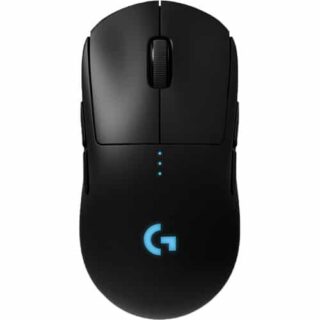
Logitech G PRO Wireless Gaming Mouse Price in Nairobi,Kenya is Ksh 17,999
DESIGNED WITH PROS, ENGINEERED TO WIN
PRO Wireless was designed to be the ultimate gaming mouse for esports professionals. Over a 2 year period, Logitech G collaborated with more than 50 professional players to find the perfect shape, weight and feel combined with our LIGHTSPEED wireless and HERO 25k sensor technologies. The result is a gaming mouse with unrivaled performance and precision, giving you the tools and confidence needed to win.
OUR MOST ACCURATE GAMING SENSOR
As esports professionals strive for ever greater speed and accuracy, so too does Logitech G. With the invention of HERO 25K, the next-gen gaming sensor, the world now has a new leader. For PRO Wireless, HERO 25K has been optimized to track insane flicks at speeds over 400 IPS without spinning out. HERO 25K delivers peak performance at any sensitivity with zero smoothing, acceleration, or filtering from 100 to 25,600 DPI. HERO 25K also consumes 10x less power than predecessors, like PMW3366, enabling a lighter battery and longer battery life. Pros require the best, and thats HERO 25K.
LIGHTSPEED WIRELESS
For pros, cutting the cord is vital. Cord drag produces friction and distraction that is unacceptable in professional esports. This innovative, end-to-end wireless technology overcomes the limitations of latency, connectivity and power to provide consistent, lag-free, 1 ms report rate connectionwithout a wire.
ULTRA LIGHTWEIGHT
The latest endoskeleton design from Logitech G achieves an unreal 80-gram weight. The incredibly thin outer shell, as thin as 1 mm, uses an innovative ladder-chassis design for tournament-ready strength and structural support.
The advanced LiPo battery is incredibly long-lasting and lightweight for no-hassles, worry-free wireless gaming. Charge before a tournament and you can forget all about the battery while you compete.4-8 PROGRAMMABLE BUTTONS
Removable left and right side buttons make PRO Wireless truly ambidextrous, and let pros decide how many side buttons they wantfrom zero to four. The DPI button1Logitech G HUB software is required to reprogram DPI button and will be available starting 9/3/2018 is located on the underside of the mouse to eliminate unintentional DPI shifts in-game. Logitech G PRO Wireless Gaming Mouse can be used out-of-the-box with preset button settings or can be fully configured to your custom preferences using Logitech G HUB.
LIGHTSYNC RGB
PRO Wireless comes complete with ~16.8M color customization2Advanced features require Logitech G HUB, available for download at logitechG.com/downloads thats perfect for representing your team colors, personalizing your setup, or synchronizing with other G products. LIGHTSYNC also features game-driven lighting effects that respond to in-game action, audio visualization, screen color sampling and more. Program it all with G HUB.
ONBOARD MEMORY
With an onboard memory, you can use G HUB to save your preferences directly to the mouse for fast and easy use on tournament systems. Your mouse settings remain consistent from home to stage. Skip installing custom software or reconfiguring your settings. Get straight to the game.
MECHANICAL BUTTON TENSIONING SYSTEM
PRO Wireless is equipped with the latest primary button engineering. Using a metal spring to tension separated left and right button keyplates, the travel distance and actuation force (force required to click) have been reduced and refined. The result is an incredibly accurate, consistent and tight feel for every click.
ENDURING PERFORMANCE
Built on over 35 years of Logitech expertise in engineering, building, testing mice, PRO Wireless is designed to withstand pro esports players during training and tournaments. The surface of PRO is coated for durability and grip while the feet are tested to perform for over 250 km of use.
PLAY TO WIN
PRO Series gear is purpose-built for professional gaming. The most advanced technology and highest performance specsdesigned in partnership with professional players worldwidedeliver the precision, speed, and endurance required to win. Everything pros need. Nothing they dont.Other Computer Accessories available in Stock
-
 Read more
Logitech MX Master 3s in Kenya
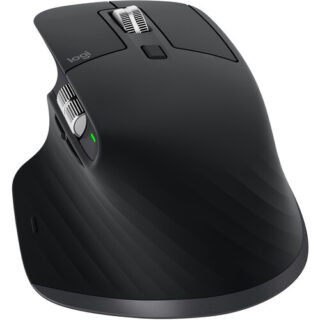
Logitech MX Master 3s price in Kenya is Ksh 15,000. Stay comfortable and productive with the black Logitech MX Master 3S Wireless Mouse by your side. Updated with an 8000 dpi Darkfield optical sensor, this versatile mouse is designed to provide precise tracking on almost any surface, including glass. At the same time, its Quiet Click buttons provide a satisfying feel while producing 90% less noise than the original MX Master, and the MagSpeed scroll wheel provides fast yet precise scrolling at up to 1000 lines per second. The ergonomic design fits most right hands and includes a convenient thumb rest area where you can quickly access buttons and a side scroll function. Enhance your workflow by using the Logi Options+ software for Windows and macOS to customize the MX Master 3S buttons with different functions. Buy Logitech MX Master 3S at the best price in Kenya from Adishnetservices.
Logitech MX Master 3S specs and price
Connection Wireless (2.4 GHz or Bluetooth Low Energy)
Sensor 8K DPI sensor
DPI 200 8,000 DPI (in 50 DPI increments)
Buttons 7
Special features MagSpeed scroll wheel with SmartShift, thumbwheel, Logitech Flow
Shape Right-handed
Battery Rechargeable (500 mAh) lithium-polymer battery
Battery life Up to 70 days on a full battery charge
Size 124.9 x 84.3 x 51 mm (H x W x D)
Weight 141 g
Colors Black, Graphite, Light Gray
Scope of delivery MX Master 3S mouseUSB-A receiver
USB-C charging cable
Instruction manual
Price in Kenya Ksh 15,400
About the Logitech MX Master 3s Wireless MouseIntroducing Quiet Clicks create, make and do with the same click feel, but less noise. Quiet Clicks deliver satisfying, soft tactile feedback with 90% less click noise Compared to MX Master, MX Master 3S has 90% less Sound Power Level left and right-click, measured at 1m. Add that to a remarkably quiet MagSpeed electromagnetic scroll wheel for a high-performance experience with zero distraction. The MX Master 3s comes in color Black, Graphite, and Light Gray
8K dpi any-surface tracking
MX Master 3S is outfitted with our most accurate sensor ever, with next-gen precision and responsiveness. The 8,000 DPI optical sensor tracks virtually anywhere even on glass mm minimum glass thickness. You can adjust your tracking sensitivity in Logi Options+ Requires Logi Options+ software, available for Windows and macOS, and set the right level for your workflow and monitor resolution.
Scroll 1,000 lines per second
MagSpeed Electromagnetic scrolling is precise enough to stop on a pixel and quick enough to scroll 1,000 lines per second. Oh, and its nearly silent. The wheels machined steel gives it a premium tactility and enough weight to offer dynamic inertia you feel but dont hear.
Upgrade your workflow
Work between devices and operating systems, customize individual buttons, set app-specific customizations, optimize nearly every action of your workflow, and set tracking speed in Logi Options+ Requires Logi Options+ software, available for Windows and macOS.
Countless customizations
MX Master 3S is fully customizable in virtually every app you use. Youll work faster with predefined customizations optimized for your favorite apps such as Adobe Photoshop, Adobe Premiere Pro, Final Cut Pro, Google Chrome, Safari, Zoom, Microsoft Teams, Word, Excel, PowerPoint, and Edge.
Work seamlessly
Logi Options+ lets you flow between computers by simply moving your cursor to the edge of the screen. Your MX keyboard follows your MX Master 3S and lets your workstream flow between Windows and macOS Requires Logi Options+ software, available for Windows and macOS. Effortlessly transfer text, images, and files between computers just copy on one and paste to the other.
Charge quickly, connect instantly
MX Master 3S stays powered for up to 70 days on a full charge and gets three hours of use from a one-minute quick charge. Battery life may vary based on user and computing conditions. Use the included USB-C charging cable to top up the power.
MX Master 3S is compatible with all major operating systems19Device basic functions will be supported without software for operating systems other than Windows and macOS right out of the box such as Windows, macOS, Chrome OS, or Linux®. Your mouse instantly pairs with up to three devices via Bluetooth Low Energy or the included Logi Bolt USB Receiver Not compatible with Logitech Unifying technology.
Hand sculpted all-day comfort.
Work comfortably with an ergonomic silhouette crafted to support your palm and fingers. Textured surfaces provide a confident grip for total control. The unique tilt angle of MX Master 3S positions your arm in a more natural posture for better comfort.
Optimally placed thumb controls are positioned for quick, intuitive access and fast navigation. The side scroll wheel follows the natural movement of the thumb for fluid and intuitive horizontal navigation.
Made with recycled plastic
The plastic parts in MX Master 3S include certified post-consumer recycled plastic 27% for Graphite and 22% for Pale Grey to give a second life to end-of-life plastic from old consumer electronics and help reduce our carbon footprint.*Excludes plastic in printed wiring assembly (PWA), receiver, wire, FFC cable, and packaging.
Responsible packaging
The paper packaging of MX Master 3S comes from FSC®-certified forests and other controlled sources. By choosing this product, you are supporting responsible management of the worlds forests.
Certified carbon neutral
Rest easy knowing that the carbon footprint of your MX Master 3S has been reduced to zero. Thats because beyond designing for sustainability, we also offset our residual impact by supporting forestry, renewables, and climate-impacted communities that reduce carbon.
In the Box
Mouse
Logi Bolt USB receiver
USB-C charging cable (USB-A to USB-C)
User documentationVisit the official website to learn more.
-

Logitech C920s HD Pro – Kenya
KSh12,500.00Add to cartLogitech C920s HD Pro Price in Kenya
The Logitech C920s HD Pro Price in Kenya is Ksh 12,500. Chat, stream, and record with the C920s HD Pro Webcam from Logitech. This webcam supports up to 1080p video at 30 fps and features HD auto-focus and automatic light correction for clear details whether youre in dimly- or brightly-lit environments. Thanks to its dual microphones, your voice will sound natural and clear. Also, an included privacy cover keeps your privacy protected. This webcam is compatible with Windows systems, but can also work in USB Video Device Class (UVC) mode with supported video-calling clients on macOS, Xbox one, Chrome OS, and Android.
HD Auto-Focus & Light Correction
HD Auto-Focus ensures your capture is detailed while the light correction features enables you to be seen in dimly- or brightly-lit environments.
Logitech Capture Software
Using the Logitech Capture software, you can record high-quality video, customize recording, adjust camera settings, and more with its intuitive interface.
Chat in Full Stereo
Two built-in microphones on the left and right side ensure you can be clearly heard from every angle.
Maintain Your Privacy
This webcam comes with a privacy cover, which you can flip up or down whenever necessary.
Logitech C920s HD Pro Webcam specs and price in Kenya
Price in Kenya Ksh. 13000SENSOR
Resolution and Frame Rate 1080p at up to 30 fps
720p at up to 30 fps
Sensor Type CMOS Sensor
Sensor Resolution 2 MP
Field of View 78°GENERAL
Microphone Yes
OS Compatibility Windows 7 or Later
macOS 10.10 or Later
Chrome OS
Android 5.0 or Later
Low-Light Correction Yes
Power Source Bus Powered
Focus Type AutoHost Connection
USB Type-A USB 2.0PHYSICAL
Privacy Shutter
yes
Attachment Method Clip, Tripod
Housing Material Plastic
Cable Length 5** / 1.52 m -
Microsoft Surface Slim Pen 2 – Kenya
KSh15,999.00Add to cartMicrosoft Slim Pen 2 in Kenya
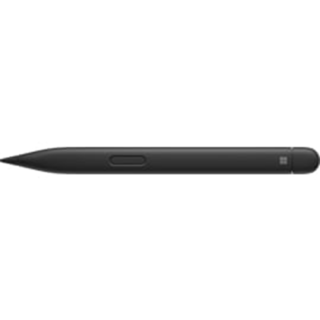
Microsoft Surface Slim Pen 2 Price in Kenya is Ksh 16,000. Draw, sketch, and take handwritten notes with the natural feel of pen and paper with the Surface Slim Pen 2 from Microsoft. Designed to work with the Surface Laptop Studio, Surface Pro, Surface Duo, and other Microsoft Pen Protocol (MPP) compatible devices, this wireless digital pen features a sharp pen tip and an improved design that delivers pinpoint accuracy and exceptional shading with 4096 levels of pressure sensitivity and digital ink that flows as soon as the tip touches the screen. With its integrated haptic motor, you get the feel of putting pen to paper when working from a digital screen using apps such as Microsoft Teams and Microsoft Whiteboard. The Slim Pen 2 also has a side button and a top button with eraser functionality that help to enhance your workflow. Additionally, its 15-hour battery can be recharged wirelessly, and the pen is designed to be stored securely onto a separately purchased Surface Pro Signature Keyboard or Surface Laptop Studio. The Surface Slim Pen 2 pairs with your device using Bluetooth 5.0 technology. Buy Microsoft Surface Slim Pen 2 at the best price in Kenya at Adishnetservices.
Designed for Comfort
The slim carpenter-inspired style is designed to fit almost all hands for easy hold and control.
Perfect Shading
The sharp pen tip supports a 77° tilt for exceptionally precise shading.
Zero Force Inking
Digital ink flows out as soon as the pen touches the screen.
A Natural Feel
The integrated haptic motor delivers tactile signals as you write and draw, letting you know when youve completed gestures like circling text to select and crossing things out to delete in applications such as Microsoft Word and Excel. You can customize the strength of the tactile feedback to fit your preferences.
Easy Erasing
Enjoy smooth writing and drawing experiences by using the built-in eraser to quickly get rid of unwanted lines and text as you would with a traditional pencil.
Compatibility
Surface Laptop Studio
Surface Pro 3 to Surface Pro 8
Surface Pro X
Surface Duo, Surface Duo 2
Surface Go, Go 2, Surface Go 3
Surface Hub 2S
Surface Laptop 1 to 4
Surface Studio 1, 2
Surface Book 1 to 3
Surface Slim Pen 2 Tips
Non-Surface devices that support Microsoft Pen Protocol (MPP) -
Microsoft Arc Touch Mouse Laser Wireless – Kenya
KSh10,500.00Add to cartMicrosoft Arc Touch Mouse Laser Wireless Price in Kenya
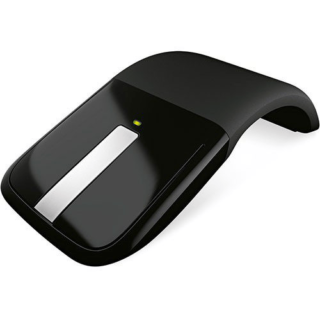
Microsoft Arc Touch Mouse Laser Wireless Price in Kenya is Ksh 10,500. The Microsoft Arc Touch Mouse Laser Wireless in gray is a flexible mouse with a 2.4GHz wireless USB nano transciever that snaps into the bottom of the mouse. It offers a 30-foot wireless range and battery life of up to six months. Buy Microsoft Arc Touch Mouse Laser Wireless at best price in Kenya at Adishnetservices.
This unique mouse curves to turn on, and flattens to turn off without the use of a button. A green light shows the battery is working and powers off to conserve battery life. It accommodates both left and right handed users. Its flexible design allows for optimum comfort and performance, while it also flattens to make portable use easy.
Easy to Use
2.4 GHz wireless USB Nano Transceiver connects wirelessly
Up to 30 feet (9 m) of wireless range
BlueTrack technology works on difficult surfaces
Green light flashes to show the battery is working, turns off to save battery life
Access common tasks, including product information, registration, and settings
Up to 6 months of battery life
Flexible Design
Curve to turn on, flatten to turn off
Works for left or right-handed control
Curved design flattens for portable use
Operating System Compatibility
Windows 7, Windows Vista, Windows XP (excluding Windows XP 64-bit)