Logitech M185 Wireless Mouse (Swift Gray) – Kenya
KSh1,500.00
Logitech M185 Wireless Mouse (Swift Gray) in Kenya
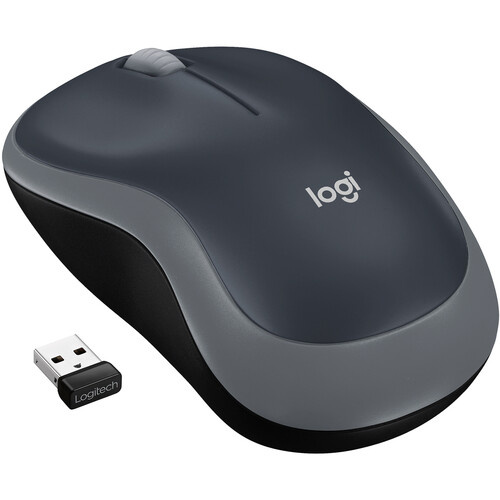
Logitech M185 Wireless Mouse (Swift Gray) Price in Nairobi,Kenya is Ksh 1,499. The swift gray Logitechs M185 Wireless Mouse is an affordable, straightforward, comfortable mouse for use with your laptop or desktop computer. This mouse is designed to work with either your right or left-hand and features right and left-click buttons as well as a scroll wheel.
The mouse also comes with a USB nano receiver that fits into a USB port on your computer. That receiver emits a wireless signal on the 2.4GHz band and connects with the mouse, so that you can work without wires. Plus, the receiver is plug-and-play, so it will work on virtually all computers without the need to install software or drivers. The mouse comes with a pre-installed AA battery and can work for as long as 12 months.
Plug-and-Forget Nano Receiver
The included USB receiver is so small and unobtrusive that you can plug it into a USB port and forget about it. Plus, you can say good-bye to worries about lost receivers.
1-Year Battery Life
You can go for a year without battery hassles. The On/Off switch and smart sleep mode help conserve power. Please note that battery life may vary based on user and computing conditions.
Advanced 2.4GHz Wireless Connectivity
You get the reliability of a cord with wireless convenience and freedom-fast data transmission and virtually no delays or dropouts.
Plug-and-Play Simplicity
No software, no hassles simply plug in the tiny nano receiver and start using your mouse right away.
Comfy, Contoured Shape
The contoured design feels good in either hand and offers more comfort than a touchpad.
Related products
-

Apple Mac mini with M4 Chip – Kenya
KSh94,999.00Add to cartApple Mac mini with M4 Chip in Kenya
Apple Mac mini with M4 Chip Price in Kenya is KShs 165,000. At just five by five inches, the Apple Mac mini is less than half the size of the previous Mac mini. The compact Mac mini has a small footprint in your workspace and its lightweight design makes it easy to move, mount, and rack. Now housing the powerful M4 10-Core chip, the Mac mini delivers up to 1.8x faster CPU performance and 2.2x faster GPU performance over the M1 model. Add 16GB of unified RAM, 1TB of storage, Wi-Fi 6E, Gigabit LAN, and Thunderbolt 4, and the Mac mini is a tiny powerhouse. The Mac mini also features Apple Intelligence, the personal intelligence system that transforms the way you express yourself, all while protecting your privacy. As Apple**s first carbon neutral Mac, the Mac mini has seen over 80 percent reduction in greenhouse gas emissions across its materials, manufacturing, transportation, and customer use.Buy Apple Mac mini with M4 Chip at Adishnetservices Kenya
This Mac comes preloaded with macOS. Updates can be downloaded for free via the Mac App Store. Please check Apple**s website for upgrade eligibility. Also, please note that a keyboard and mouse are not included.
Supercharged by M4
The M4 chip brings a performance boost to Mac mini. Featuring a faster 10-Core CPU, the Mac mini is up to 1.8x faster than Mac mini with M1. Users will feel this performance across everyday activities like multitasking between their favorite apps and browsing webpages in Safari. And with a powerful GPU, featuring Apple**s advanced graphics architecture, Mac mini with M4 handles more intense workloads, like photo editing and gaming, up to 2.2x faster than the Mac mini with M1. The M4 also brings hardware-accelerated ray tracing to the Mac mini for the first time. The Mac mini comes standard with 16GB of faster unified memory. The Neural Engine in the M4 is now over 3x faster than on Mac mini with M1, making it a solid option for AI, and accelerating the pace at which users can get things done.
Looks Small. Lives Large.
Measuring in at just five by five inches, the Mac mini saves a lot of space on your desk. I ts smaller design reduces aluminum use in the enclosure by 85 percent compared to the previous generation. Weighing just 1.5 pounds, the Mac mini is easy to move, rack, or mount just about anywhere.
Built to Chill
A smaller design requires an improved thermal architecture to keep temperatures low. Within the Mac mini, air is guided to different levels of the system, and all of it flows through the foot. Combined with Apple silicon**s power efficiency, the Mac mini can breeze through intensive workloads at fast speeds without overheating.
A New Era with Apple Intelligence on the MacApple Intelligence harnesses the power of Apple Silicon and the Neural Engine to unlock new ways for users to work, communicate, and express themselves on Mac. It is available in U.S. English with macOS Sequoia 15.1. With systemwide Writing Tools, users can refine their words by rewriting, proofreading, and summarizing text nearly everywhere they write. With the newly redesigned Siri, users can move fluidly between spoken and typed requests to accelerate tasks throughout their day, and Siri can answer thousands of questions about Mac and other Apple products. New Apple Intelligence features will be available in December, with additional capabilities rolling out in the coming months. Image Playground gives users a new way to create fun original images, and Genmoji allows them to create custom emoji in seconds. Siri will become even more capable, with the ability to take actions across the system and draw on a user**s personal context to deliver intelligence that is tailored to them. In December, ChatGPT will be integrated into Siri and Writing Tools, allowing users to access its expertise without needing to jump between tools.
Apple Intelligence does all this while protecting users** privacy at every step. At its core, is on-device processing, and for more complex tasks, Private Cloud Compute gives users access to Apple**s even larger, server-based models and offers groundbreaking protections for personal information. In addition, users can access ChatGPT for free without creating an account, and privacy protections are built in-their IP addresses are obscured and OpenAI won**t store requests. For those who choose to connect their account, OpenAI**s data-use policies apply.
Writing Tools
Apple Intelligence can proofread your text and rewrite different versions until the tone and wording are just right, and summarize selected text with a click.
Image Playground
Create fun, original images based on a , a concept, or even a person from your Photos library.
Natural Language Search in Photos
Search for photos and videos simply by describing what you**re looking for.
PortsThe back of the Mac mini features three Thunderbolt 4 ports, delivering 40 Gb/s of data throughput. There is also an HDMI port and a Gigabit Ethernet RJ45 LAN jack. At the front, there are two 10 Gb/s USB-C 3.2 Gen 2 ports and a 3.5mm headphone jack.
The Mac mini can simultaneously support up to three displays, two 6K 60 Hz displays over Thunderbolt 4 and a 4K 60 Hz display over HDMI. For higher resolutions, the Mac mini can support two displays, one 5K 60 Hz display over Thunderbolt and an 8K 60 Hz or 4K 240 Hz display over Thunderbolt or HDMI.
macOS ** Let Your Apps Fly
The Mac mini comes loaded with built-in apps, privacy and security, and amazing features for work and play. And macOS brings more speed and responsiveness to all your go-to apps-from Microsoft Word, Excel, and Outlook to Slack and Adobe Photoshop.
Mac + iPhone: The One-Two Punch
Use your Mac mini and iPhone together in perfect harmony. Make and answer calls and text messages from your iPhone directly on your Mac. Don**t have a webcam** You can use your iPhone instead. Left your iPhone in another room** You can access it wirelessly with the iPhone Mirroring app in the Dock.
Plug and Slay
The Mac mini is designed to pair perfectly with the Apple Studio Display, Magic Keyboard, and Magic Mouse (all sold separately). However, the Mac mini is also ready to work with third-party displays and accessories you already own. You can mix, match, and make the Mac mini truly yours.
The First Carbon Neutral MacThis Mac mini is Apple**s first carbon neutral Mac, marking a significant milestone toward Apple 2030, the company**s goal to be carbon neutral across the entire carbon footprint by the end of this decade.
The Mac mini is made with over 50 percent recycled content overall, including 100 percent recycled aluminum in the enclosure, 100 percent recycled gold plating in all Apple-designed printed circuit boards, and 100 percent recycled rare earth elements in all magnets. Apple also used renewable energy to manufacture the Mac mini. Apple also invested in clean energy projects and prioritized lower-carbon modes of shipping, like ocean freight, to further reduce emissions from transportation. Together, these actions have reduced the carbon footprint of the Mac mini by over 80 percent. For the small amount of remaining emissions, Apple applies high-quality carbon credits from nature-based projects, like those generated by its innovative Restore Fund.
In another first for the Mac mini, the packaging is now entirely fiber-based, bringing Apple closer to its goal to remove plastic from its packaging by 2025.
-
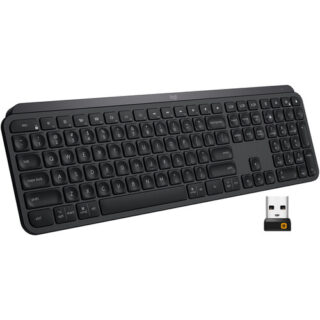
Logitech MX Keys Wireless Keyboard – Kenya
KSh16,500.00Add to cartLogitech MX Keys Wireless Keyboard Price in Kenya
Logitech MX Keys Wireless Keyboard Price in Kenya is Ksh 16,500.Get working with the Logitech MX Keys Wireless Keyboard for a comfortable typing experience. Featuring 2.4 GHz and Bluetooth wireless connectivity as well as compatibility with multiple platforms and devices, the MX Keys offers users a seamless way to work across systems. By downloading the Logitech Options software and using the Logitech Flow feature, users can navigate, copy/paste text, images, and files between three Windows and Mac computers simultaneously. Moreover, it features Smart Illumination, which automatically turns on the backlight when youre near and can also adjust its brightness depending on your surroundings. On a normal use basis, the MX Keys can last up to 10 days; however, with backlight off, its rated to last up to 5 months. Please note that actual battery life will depend on usage.
Smart Illumination
Smart Illumination enables this keyboards backlight to automatically turn on once your hands are near. It can also automatically adjust brightness to fit your ambient lighting conditions.
Perfect Stroke Keys
Perfect Stroke keys are indented and have improved stability for an ergonomic, responsive, and silent typing experience.
Logitech Flow
Logitech Flow enables users to work across multiple Windows and Mac systems using the same set of Flow-enabled peripherals. This can help to reduce distractions and streamline users workflow. Please note that this requires the Logitech Options software.
Compatibility
Users can pair this keyboard with up to three devices via Bluetooth LE or its included Unifying USB receiver. By adjusting settings in the Logitech Options software, users can easily switch between devices with the tap of a button.
Battery
The built-in battery is rated for up to 10 days of use or up to 5 months with backlighting off. When power is low, plug in the included USB Type-C cable to your system to recharge it.
System Requirements
Internet connection for software download
Logitech Options software on macOS and Windows
USB port or Bluetooth Low Energy technology enabled device with keyboard support
USB Receiver: Windows 7 and above, macOS 10.11 and above, Linux, Android 6 or later
Bluetooth: Windows 8 and above, macOS 10.12 and above, Linux, iOS 9 or later, Android 6 or later -
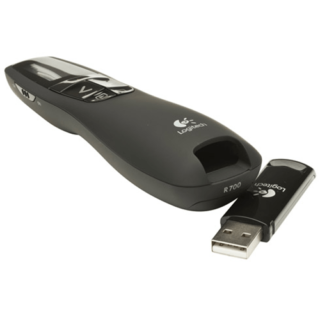
Logitech R700 Professional Laser Pointer – Kenya
KSh8,500.00Add to cartLogitech R700 Professional Laser Pointer in Kenya
Logitech R700 Professional Laser Pointer price in Kenya is 9000 Shillings. The Logitech Professional presenter R700 helps you navigate through slideshows and highlight your points using a brilliant red laser pointer. With a wireless range of up to 30 m, you can control your presentations, no matter where you are standing.
Youll enjoy the freedom to move around the room and mingle with your audience for greater impact. A reception-level indicator ensures you dont wander too far. Navigate through your presentation with confidence with the intuitive slideshow controls.
Theres no software to install. Just plug the receiver into a USB port to begin. And when the show is over, you can store the receiver in the presenter. A brilliant red laser pointer helps you get their attention and keep it. Keep track of time, battery, and wireless reception with a glance or with silent, vibrating alerts. You remain focused on your presentation, not the clock.
Logitech R700 Professional Laser Pointer price and specs in Kenya
Price in Kenya Ksh. 9000
Display LCD Display with Timer and Indicators
Range Up to 100-foot (30-meter) range
Presenter mode Yes
Laser Pointer Built-In red Laser Pointer
Wireless 2.4GHz RF Wireless Technology
Plug-and-Play Technology Yes
Intuitive slideshow controls Yes
Color Black
User experience Comfortable -
 Add to cart
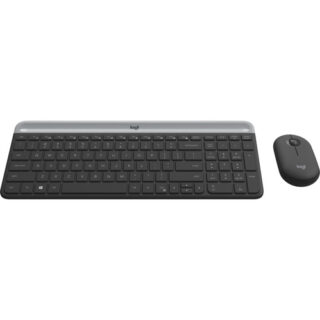
Logitech MK470 Slim Wireless Keyboard and Mouse Combo in Kenya
Logitech MK470 Slim Wireless Keyboard and Mouse Combo Price in Nairobi,Kenya is 8,000. The Logitech MK470 Slim Wireless Keyboard and Mouse Combo features a slim and minimalistic design, fit for space-conscious setups. The keyboard, complete with a numberpad, is built with scissor-switch keys, which offer a similar typing experience to that of a laptop. Its also quiet, so you can work without distractions. On the other hand, the ambidextrous wireless mouse also has a low-profile design and functions quietly. Both devices are wireless and connect to your system via the included USB receiver. The keyboard utilizes two AAA batteries and is rated for 36 months of use, whereas the mouse needs just one AA battery that can last for up to 18 months of use.
-

Logitech C920s HD Pro – Kenya
KSh12,500.00Add to cartLogitech C920s HD Pro Price in Kenya
The Logitech C920s HD Pro Price in Kenya is Ksh 12,500. Chat, stream, and record with the C920s HD Pro Webcam from Logitech. This webcam supports up to 1080p video at 30 fps and features HD auto-focus and automatic light correction for clear details whether youre in dimly- or brightly-lit environments. Thanks to its dual microphones, your voice will sound natural and clear. Also, an included privacy cover keeps your privacy protected. This webcam is compatible with Windows systems, but can also work in USB Video Device Class (UVC) mode with supported video-calling clients on macOS, Xbox one, Chrome OS, and Android.
HD Auto-Focus & Light Correction
HD Auto-Focus ensures your capture is detailed while the light correction features enables you to be seen in dimly- or brightly-lit environments.
Logitech Capture Software
Using the Logitech Capture software, you can record high-quality video, customize recording, adjust camera settings, and more with its intuitive interface.
Chat in Full Stereo
Two built-in microphones on the left and right side ensure you can be clearly heard from every angle.
Maintain Your Privacy
This webcam comes with a privacy cover, which you can flip up or down whenever necessary.
Logitech C920s HD Pro Webcam specs and price in Kenya
Price in Kenya Ksh. 13000SENSOR
Resolution and Frame Rate 1080p at up to 30 fps
720p at up to 30 fps
Sensor Type CMOS Sensor
Sensor Resolution 2 MP
Field of View 78°GENERAL
Microphone Yes
OS Compatibility Windows 7 or Later
macOS 10.10 or Later
Chrome OS
Android 5.0 or Later
Low-Light Correction Yes
Power Source Bus Powered
Focus Type AutoHost Connection
USB Type-A USB 2.0PHYSICAL
Privacy Shutter
yes
Attachment Method Clip, Tripod
Housing Material Plastic
Cable Length 5** / 1.52 m