
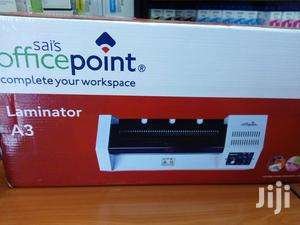
Office point A3/A4 laminator
KSh9,000.00
Description
Office point A3/A4 laminator
Office point A3/A4 laminator from the leading office point dealer in Nairobi kenya, buy online Office point A3/A4 laminator and have it delivered at your doorstep. Quick pre-heating Simple operation(Power on, temperature control) Stable control temperature system Perfect laminating effect Uniform rising temperature Can laminate from A5 and A4 Size of document.
A3 big size laminator with handle
Throat Width:330MM
Size:A3
Heater: Hot tube
Roller:4pcs
Roller diameter:25mm
Driving Motor: AC geared motor
Power: 220V/50HZ,620W
Laminating Speed:600mm/min
With Safety Handle:Yes
Operating Temperature:Up to 180ºC
Dimensions(W×L×H):500*200*110MM
Weight:7.5KGS
Related products
-
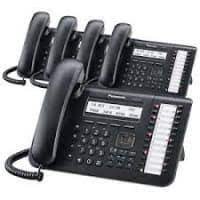
NS500 PBX, IP Panasonic System,+ 20 IP Phones package
KSh430,000.00Add to cartDescription
NS500 PBX IP Panasonic System+ 20 IP Phones package Mtech NetworksNS500 PBX IP Panasonic System+ 20 IP Phones package, with this package office movement will be reduced as there will be inter office communication by use of this phone, the package include, one KNS 500 IP PABX, one S-DSP Voip card KX-NS5110, 10 IP licenses for Hard Phones-KX-NSM510, one DSS Console- KX-DT543, IP Phone-KX-HDV130, 16 PORT POE SWITCH,
Description Unit QTY
KNS 500 IP PABX pcs 1
S-DSP Voip card KX-NS5110 pcs 1
20 IP licenses for Hard Phones-KX-NSM520 pcs 1
DSS Console- KX-NT543 pcs 1
Huawei Gateway GSM b932 1
IP Phone-KX-HDV130 pcs 19
24 PORT POE SWITCH pcs 1
configuration pcs 1 -
 Add to cart
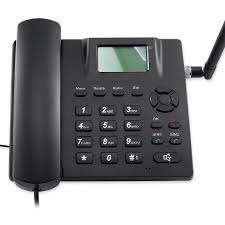
Dual Simcard Landline Desktop Phone for Home & Offices Mtech
Fixed Terminal desk phone with sim card slots. Ease to use in your office or at home Desk Phones works with networks in Kenya and anywhere. Safaricom, Airtel, Telkom, YU Desktop phone can be kept anywhere in your house, office, village and other remote locations with poor signals Rechargeable Li-ion battery that lasts very long up to 48 hours after a power cut
-
 Add to cart
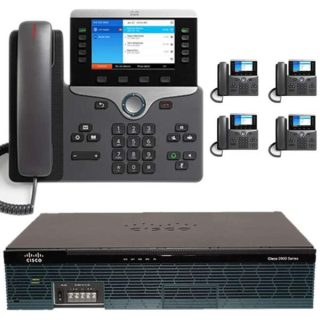
Advantages / Benefits of Cisco IP PBX Office Telephone Mtech
Cisco Small business PBX phone systems today are increasingly more sophisticated. Here’s a quick comparison of a conventional small business PBX system and a Unified Communications system that combines an Internet Protocol (IP) PBX and other features.
Cisco IP PBX can do everything a traditional small business PBX can do and more. It performs the switching and connecting of Voice over IP as well as landline calls.
A conventional PBX requires two networks, one for data and another for voice. An IP PBX system runs on an IP data network, which saves costs and minimizes network management.
Advantages of Cisco IP PBX System
Easier to install & configure than a proprietary phone system
An IP PBX runs as software on a computer and can leverage the advanced processing power of the computer and user interface as well as features. Anyone proficient in networking and computers can install and maintain an IP PBX. By contrast a proprietary phone system often requires an installer trained on that particular system!
Easier to manage because of web/GUI based configuration interface
An IP PBX can be managed via a web-based configuration interface or a GUI, allowing you to easily maintain and fine tune your phone system. Proprietary phone systems have difficult-to-use interfaces which are often designed to be used only by phone technicians.
Significant cost savings using VoIP providers
With an IP PBX you can easily use a voip provider for long distance and international calls. The monthly savings are significant. If you have branch offices, you can easily connect phone systems between branches and make free phone calls.
Eliminate phone wiring
An IP Telephone system allows you to connect hardware IP phones directly to a standard computer network port (which it can share with the adjacent computer). Software phones can be installed directly on the PC. You can now eliminate the phone wiring and make adding or moving of extensions much easier. In new offices you can completely eliminate the need for wiring extra ports to be used by the office phone system!
Eliminate vendor lock in
IP PBXs are based on the open SIP standard. You can mix and match any SIP hardware or software phone with any SIP-based IP PBX, PSTN Gateway or VOIP provider. In contrast, a proprietary phone system often requires proprietary phones to use advanced features, and proprietary extension modules to add features.
Scalable/ Expandle
Proprietary systems are easy to outgrow. Adding more phone lines or extensions often requires expensive hardware modules. In some cases you need an entirely new phone system. Not so with an IP PBX. A standard computer can easily handle a large number of phone lines and extensions – just add more phones to your network to expand!
Better customer service & productivity
With an IP PBX you can deliver better customer service and better productivity. Since the system is now computer-based, you can integrate phone functions with business applications. For example, bring up the customer record of the caller automatically when you receive his/her call, dramatically improving customer service and cutting costs by reducing time spent on each caller. Outbound calls can be placed directly from Outlook, removing the need for the user to type in the phone number.
8. Twice the phone system features for half the price
Since an IP PBX is software-based, it is easier for developers to add and improve feature sets. Most VoIP phone systems come with a rich feature set, including auto attendant, voice mail, ring groups, and advanced reporting. Unified Communications features are included, to support presence, video and audio conferences and free calls via the data network. These options are often very expensive in proprietary systems.
9. Allow hot desking & roaming
Hot desking, the process of being able to easily move offices/desks based on the task at hand, has become very popular. Unfortunately traditional PBXs require extensions to be re-patched to the new location. With an IP PBX the user simply takes his phone to his new desk – No patching required!
Users can roam too – if an employee has to work from home, he/she can simply fire up their SIP software phone and are able to answer calls to their extension, just as they would in the office. Calls can be diverted anywhere in the world because of the SIP protocol characteristics!
10. Better phone usability: SIP phones are easier to use!
Employees often struggle using advanced phone features. Setting up a conference, or transferring a call on an old PBX requires detailed instructions.
Not so with an IP PBX – all features are easily performed from a user friendly GUI. In addition, users get a better overview of the status of other extensions, of inbound calls, call queues, and presence via the clients. Proprietary systems often require expensive “system” phones to get an idea what is going on on your phone system and even then, status information is cryptic at best.
-
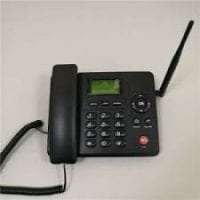
Ets Wireless 6588 GSM desktop phone – Kenya
KSh5,000.00Add to cartEts Wireless 6588 GSM desktop phone Mtech Kenya
The ETS Wireless 6588 GSM Desktop Phone is a versatile and efficient communication tool designed for users who need reliable GSM network connectivity in a desktop setting. Featuring a standard SIM card slot, this phone operates over the GSM network, making it an ideal choice for locations where traditional landline service is not available or desired.
The device boasts a 2.4-inch color LCD display, which provides clear visibility of call information, contact details, and menu options. It includes a numeric keypad along with 10 programmable speed dial keys and various function keys, ensuring quick and easy access to essential features and frequent contacts.
For optimal call quality, the ETS Wireless 6588 is equipped with noise cancellation and echo reduction technology. It offers full-duplex speakerphone functionality for hands-free conversations and includes a 3.5mm headset jack for private calls.
The phone supports key call management features such as call forwarding, call transfer, call hold, conference calling, call waiting, and caller ID. It is powered by an AC adapter and features a rechargeable internal battery (typically around 1500mAh), which provides backup power to keep the device operational during power outages.
Connectivity is straightforward with a single Ethernet port for LAN connection, enabling network integration. Security is maintained with basic GSM encryption for calls, and the device can be updated via USB or Over-The-Air (OTA) for firmware enhancements.
With dimensions of approximately 6.5? x 5.5? x 2.5? and a weight of around 1.3 lbs, the ETS Wireless 6588 is compact and designed to fit comfortably on a desk. It comes with a desktop stand and may offer optional wall mounting. Available in classic black or gray, it seamlessly blends into various office or home environments.
Reviews
There are no reviews yet.