
Logitech C920s HD Pro – Kenya
KSh12,500.00
Logitech C920s HD Pro Price in Kenya
The Logitech C920s HD Pro Price in Kenya is Ksh 12,500. Chat, stream, and record with the C920s HD Pro Webcam from Logitech. This webcam supports up to 1080p video at 30 fps and features HD auto-focus and automatic light correction for clear details whether youre in dimly- or brightly-lit environments. Thanks to its dual microphones, your voice will sound natural and clear. Also, an included privacy cover keeps your privacy protected. This webcam is compatible with Windows systems, but can also work in USB Video Device Class (UVC) mode with supported video-calling clients on macOS, Xbox one, Chrome OS, and Android.
HD Auto-Focus & Light Correction
HD Auto-Focus ensures your capture is detailed while the light correction features enables you to be seen in dimly- or brightly-lit environments.
Logitech Capture Software
Using the Logitech Capture software, you can record high-quality video, customize recording, adjust camera settings, and more with its intuitive interface.
Chat in Full Stereo
Two built-in microphones on the left and right side ensure you can be clearly heard from every angle.
Maintain Your Privacy
This webcam comes with a privacy cover, which you can flip up or down whenever necessary.
Logitech C920s HD Pro Webcam specs and price in Kenya
Price in Kenya Ksh. 13000
SENSOR
Resolution and Frame Rate 1080p at up to 30 fps
720p at up to 30 fps
Sensor Type CMOS Sensor
Sensor Resolution 2 MP
Field of View 78°
GENERAL
Microphone Yes
OS Compatibility Windows 7 or Later
macOS 10.10 or Later
Chrome OS
Android 5.0 or Later
Low-Light Correction Yes
Power Source Bus Powered
Focus Type Auto
Host Connection
USB Type-A USB 2.0
PHYSICAL
Privacy Shutter
yes
Attachment Method Clip, Tripod
Housing Material Plastic
Cable Length 5? / 1.52 m
Related products
-
Logitech MeetUp Video Conference Camera – Kenya
KSh96,000.00Add to cartLogitech MeetUp Video Conference Camera in Kenya
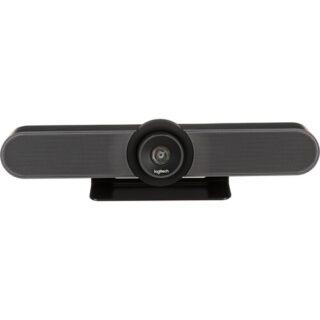
Logitech MeetUp Video Conference Camera Price in Kenya is Ksh 96,000.Add the MeetUp All-In-One 4K ConferenceCam from Logitech to your small conference room to capture audio and video of everyone in the room. The compact design keeps wiring to a minimum and can be easily mounted on a table or on the wall.
The camera features a 120° lens with a 5x zoom which captures a wide field of view, keeping all subjects in focus without a fisheye effect. The camera captures up to 1080p video over USB 2.0, and up to 4K UHD video with a separately available USB 3.0/3.1 Gen 1 cable at 30 fps. Its pan, tilt, zoom, volume, mute, and answer/hang-up functions can be controlled by the included RF remote control or by the ConferenceCam Soft Remote app for Android and iOS over Bluetooth. You can also connect your smartphone via Bluetooth to use the MeetUp speaker for rich, clear sound.
The ConferenceCams audio features include three built-in microphones that have a range of 8?. If you have a larger room to cover, an optional Expansion Mic for MeetUp can be added to extend your audio capture range to 14?. Microphone features include a low-distortion algorithm, background noise reduction, and echo cancellation. The built-in speaker provides clear audio and peak-limiting to prevent clipping.
The MeetUp connects to a macOS or Windows computer via plug-and-play USB, and supports numerous conferencing applications such as Skype for Business, Microsoft Cortana, Cisco Jabber, and WebEx. It also integrates with Logitech Collaboration Program (LCP) members which include BlueJeans, Broadsoft, LifeSize Cloud, Vidyo, and Zoom.
You can mount your MeetUp on a table or wall with the included wall mount, or an optional TV mount can be purchased to mount above or below a wall-mounted flat-panel TV with standard VESA mounts. A built-in Kensington security slot allows you to lock down your MeetUp when not in use. The unit also comes with a 16? USB cable and power adapter.
System Requirements
Windows 7, Windows 8.1, or Windows 10.
macOS 10.10 or higher.
Chrome OS Version 29.0.1547.70 and higher.
USB 2.0 port (USB 3.0/3.1 Gen 1 required for 4K video).
Camera Optics
MeetUp features camera optics that capture a wide field of view without distorting faces and furniture with a fisheye effect. Faces look natural, whiteboard writing remains legible, and straight lines stay straight.
5x Zoom Lens
Zoom in on whiteboards and objects so remote participants can see what you see. Thanks to its advanced 4K image sensor, video remains sharp and clear, even when you zoom in on the details.
Camera Operation
The camera features three presets and motorized pan/tilt operation.
Built-In Microphone, Optional Expansion Mic
MeetUps built-in beamforming mics are optimized for up to 8?. To extend that range up to 14?, add an optional Expansion Mic. Whether people are seated at a table, sitting against the wall, or walking around the room, the Expansion Mic for MeetUp means everyone will be heard.
Bluetooth Speakerphone
If youre already connected on your smartphone or dialing into an audio conference, pair MeetUp with your smartphone or tablet to enjoy outstanding audio clarity, volume, and range that handheld devices cant match.
RF Remote Control
With a multi-directional remote control, you can easily operate camera controls, adjust volume, and mute/unmute from anywhere in the room. Featuring a low-profile design, durable materials, and a non-slip base, the MeetUp Remote Control feels as good on the tabletop as it does in your hand.
Smartphone Remote Control
The ConferenceCam Soft Remote app for Android and iOS (available on Google Play and iTunes) replicates every function of the physical MeetUp remote on your smartphone or tablet.
Wall Mount or Optional TV Mount
The MeetUp includes a mounting kit with the hardware you need to mount the unit on a wall or mount onto a table. The optional Logitech TV Mount for MeetUp lets you mount the MeetUp ConferenceCam either above or below a flat-panel monitor, and attaches to the industry-standard VESA mounting points available on most TVs and monitors.
Kensington Security Slot
Secure the MeetUp when not in the conference room with a Kensington-compatible security slot.
Software Compatibility
MeetUp works with most any video conferencing application or meetings service.
Skype for Business certified.
Microsoft Cortana certified.
Cisco Jabber and WebEx compatible.
Enhanced integration with Logitech Collaboration Program (LCP) members, including BlueJeans, Broadsoft, LifeSize Cloud, Vidyo, and Zoom. -

Logitech R700 Professional Laser Pointer – Kenya
KSh8,500.00Add to cartLogitech R700 Professional Laser Pointer in Kenya
Logitech R700 Professional Laser Pointer price in Kenya is 9000 Shillings. The Logitech Professional presenter R700 helps you navigate through slideshows and highlight your points using a brilliant red laser pointer. With a wireless range of up to 30 m, you can control your presentations, no matter where you are standing.
Youll enjoy the freedom to move around the room and mingle with your audience for greater impact. A reception-level indicator ensures you dont wander too far. Navigate through your presentation with confidence with the intuitive slideshow controls.
Theres no software to install. Just plug the receiver into a USB port to begin. And when the show is over, you can store the receiver in the presenter. A brilliant red laser pointer helps you get their attention and keep it. Keep track of time, battery, and wireless reception with a glance or with silent, vibrating alerts. You remain focused on your presentation, not the clock.
Logitech R700 Professional Laser Pointer price and specs in Kenya
Price in Kenya Ksh. 9000
Display LCD Display with Timer and Indicators
Range Up to 100-foot (30-meter) range
Presenter mode Yes
Laser Pointer Built-In red Laser Pointer
Wireless 2.4GHz RF Wireless Technology
Plug-and-Play Technology Yes
Intuitive slideshow controls Yes
Color Black
User experience Comfortable -
Samsung 75″ Flip Pro WM75B Interactive Display – Kenya
KSh410,000.00Add to cartSamsung 75? Flip Pro WM75B Interactive Display in Kenya
Samsung 75? Flip Pro WM75B Interactive Display Price in Kenya is Kshs.410,000.Buy Samsung 75? Flip Pro WM75B Interactive Display at Adishnetservices Kenya.
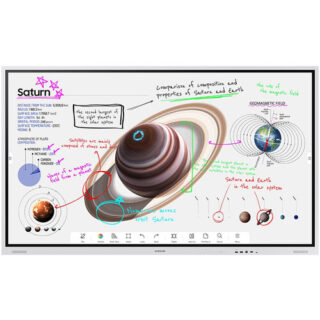
The future of classroom instruction is here with the?WM75B Flip Pro 75? 4K Interactive Touchscreen LED Display?from?Samsung. The messy blackboard is replaced with this touchscreen display, which provides 4K visuals for more engaging lessons and interactive features that increases student engagement. With up to 20-person multi-touch, students can still walk up to write on the ?board,? or they can share their mobile screen from their seat with software like Apple?s AirPlay 2. The screen can accommodate the display of up to 4 screens at once. Additional features, such as video calling and pushed content, allows the Flip Pro to move beyond the classroom and interact with the school itself and those outside its walls.
Real-World Writing & Drawing
More than a simple display, the Flip Pro lets teachers and students write and draw on it as you would a traditional blackboard. However, with the Flip Pro, you can also annotate 4K visuals for stunning and immersive educational content. Why settle for chalk circles when you can interact with professional renditions of the solar system. The screen provides 2048 points of pressure with a low 26 ms of latency for a natural experience, and you can choose between pen or brush modes. Modes you can adjust with the quick tool and palette.
Quick Tool & Palette
The integrated quick tool and palette gives you the option of choosing different tip sizes, thicknesses, and colors. You can even add additional note layers and easily erase content with the swipe of a finger or hand.
Workspace Secured by Knox
Integrated Samsung Knox security software makes it possible to safely access remote PCs, network drives, and other third-party applications directly from the Flip Pro. Applications like Office 365, VMWare, or Boxlight MimioConnect. MimioConnect is included with the Flip Pro and provides a catalog of versatile learning content, including real-time data and analytics.
MagicINFO Remote Management
Content, alerts, and warnings can conveniently be pushed to each Flip Pro in a school or on campus to notify teachers and students of important information.
Front Control Panel
A front control panel makes it easy to manage the Flip Pro?s settings and plug in optional devices, such as a laptop. You get two USB Type-A inputs (one USB 3.0), and once each of the following: USB Type-B, USB Type-C, and HDMI. The USB Type-C port is a 3-in-1 port that allows for a simplified single cable connection to a laptop for screen mirroring, touch control, and up to 65W of charging.
Safe to Use
Samsung equipped the Flip Pro with an antimicrobial coating and shatterproof film for improved safety. The coating inhibits microbial growth, while the film keeps the screen intact if it were to accidentally break.
Additional Features
Up to 50 simultaneous device connections via SmartView+
Video call compatible with WebRTC (Real Time Communication API)
Google Duo built-in
OPT (Open Pluggable Specification) slot for third-party apps, tools & SIS (School Information Systems) integration
Ethernet network connection -
Microsoft Surface Pro Signature Keyboard – Kenya
KSh37,499.00Add to cartMicrosoft Surface Pro Signature Keyboard Price in Kenya
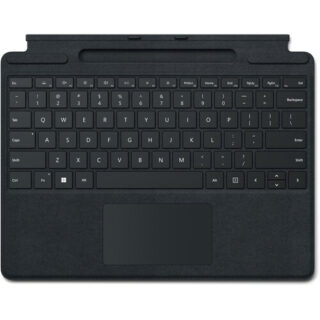
Microsoft Surface Pro Signature Keyboard Price in Kenya is Ksh 37,499. Enjoy a smooth and elegant typing experience while using your Surface Pro 8, Surface Pro 9, or Surface Pro X with the Microsoft Surface Pro Signature Keyboard. Made with luxurious Alcantara material, this stylish black mechanical keyboard cover attaches magnetically to your Surface Pro device to provide a smooth typing experience in almost any situation, whether youre working from your lap or at a desk. It also helps to optimize your workflow with a large glass touchpad along with Windows shortcut, media control, right click, and brightness adjustment buttons. The integrated fingerprint reader allows you to quickly log into Windows without having to enter a password. Additionally, its convenient tray securely stores and recharges your Surface Slim Pen 2, keeping it ready and close by when you need it. Once youre done, simply close the cover to protect your screen while traveling.
Microsoft Surface Pro Signature Keyboard Price in Kenya
Switch Type Mechanical
Key Rollover None
Dedicated Multimedia Keys Yes
Dedicated Macro Keys None
Windows Lock Key No -
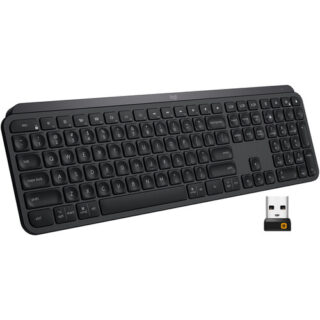
Logitech MX Keys Wireless Keyboard – Kenya
KSh16,500.00Add to cartLogitech MX Keys Wireless Keyboard Price in Kenya
Logitech MX Keys Wireless Keyboard Price in Kenya is Ksh 16,500.Get working with the Logitech MX Keys Wireless Keyboard for a comfortable typing experience. Featuring 2.4 GHz and Bluetooth wireless connectivity as well as compatibility with multiple platforms and devices, the MX Keys offers users a seamless way to work across systems. By downloading the Logitech Options software and using the Logitech Flow feature, users can navigate, copy/paste text, images, and files between three Windows and Mac computers simultaneously. Moreover, it features Smart Illumination, which automatically turns on the backlight when youre near and can also adjust its brightness depending on your surroundings. On a normal use basis, the MX Keys can last up to 10 days; however, with backlight off, its rated to last up to 5 months. Please note that actual battery life will depend on usage.
Smart Illumination
Smart Illumination enables this keyboards backlight to automatically turn on once your hands are near. It can also automatically adjust brightness to fit your ambient lighting conditions.
Perfect Stroke Keys
Perfect Stroke keys are indented and have improved stability for an ergonomic, responsive, and silent typing experience.
Logitech Flow
Logitech Flow enables users to work across multiple Windows and Mac systems using the same set of Flow-enabled peripherals. This can help to reduce distractions and streamline users workflow. Please note that this requires the Logitech Options software.
Compatibility
Users can pair this keyboard with up to three devices via Bluetooth LE or its included Unifying USB receiver. By adjusting settings in the Logitech Options software, users can easily switch between devices with the tap of a button.
Battery
The built-in battery is rated for up to 10 days of use or up to 5 months with backlighting off. When power is low, plug in the included USB Type-C cable to your system to recharge it.
System Requirements
Internet connection for software download
Logitech Options software on macOS and Windows
USB port or Bluetooth Low Energy technology enabled device with keyboard support
USB Receiver: Windows 7 and above, macOS 10.11 and above, Linux, Android 6 or later
Bluetooth: Windows 8 and above, macOS 10.12 and above, Linux, iOS 9 or later, Android 6 or later